
Multi-Touch Attribution Reporting: 6 Reports to Build
The six multi-touch attribution reports worth building, how to read each one, and how to share them so clients and execs act on them.
Table of contents
- Why you need your own multi-touch reports
- The 6 multi-touch attribution reports worth building
- 1. Channel credit under two models
- 2. Conversion paths
- 3. Time and touches to convert
- 4. Pipeline and revenue by first touch
- 5. Credited vs platform-claimed
- 6. A one-page summary
- How to share attribution reports so they get used
- Step 1: Give each audience one report
- Step 2: Share a live link
- Step 3: Export for the board deck
- Step 4: Post a weekly digest
- 5 rules for presenting attribution data
- 1. Lead with the decision
- 2. Keep one default model
- 3. Show both credited and claimed
- 4. Keep Unattributed visible
- 5. Back big calls with a test
- Mistakes that make attribution reports useless
Getting multi-touch attribution data is the easy part now. Getting anyone to act on it is harder.
A Gartner survey of marketing analytics users found analytics shaped only 53% of marketing decisions. A third of respondents said decision makers cherry-pick the data that fits the answer they already wanted.
That's a reporting problem more than a data problem. In this guide, I'll cover the six reports that hold up in a budget meeting, how to read each one, and how to share them so they get used.
Why you need your own multi-touch reports
Google Analytics and Google Ads used to offer first click, linear, time decay and position-based models. Google retired all four in 2023, leaving data-driven and last click.
Data-driven attribution is a black box, and it only sees Google's side of the journey. Last click gives everything to the final step.
So if you want to put two transparent models next to each other, or follow a lead past the form fill into pipeline and revenue, the report has to come from your own first-party data. If you're still deciding which models to use, start with our guide to multi-channel attribution models. If tracking isn't in place yet, implementing multi-touch attribution comes first.
The 6 multi-touch attribution reports worth building
Every report below can be built in SourceLoop, a first-party marketing attribution and measurement tool. It records every visit to your site, ties it to the lead, deal and payment it led to, and works out credit when the report runs. Switching models never needs re-processing.
Each section names the report, what it answers, how to read it, and where it lives in the app.
1. Channel credit under two models
What it answers: which channels start journeys and which ones close them.
Open Reports > Traffic and Revenue. Pick your default model in the model picker, then add a second one. Each channel shows its credited conversions and revenue under both, side by side. The Traffic and Revenue guide lists every column.

How to read it:
- Both models agree on a channel: act with confidence, up or down.
- First touch is much higher: the channel opens journeys. Cutting it shrinks next quarter's pipeline, even if this month looks fine.
- Last touch is much higher: the channel closes. Branded search, email and retargeting usually land here.
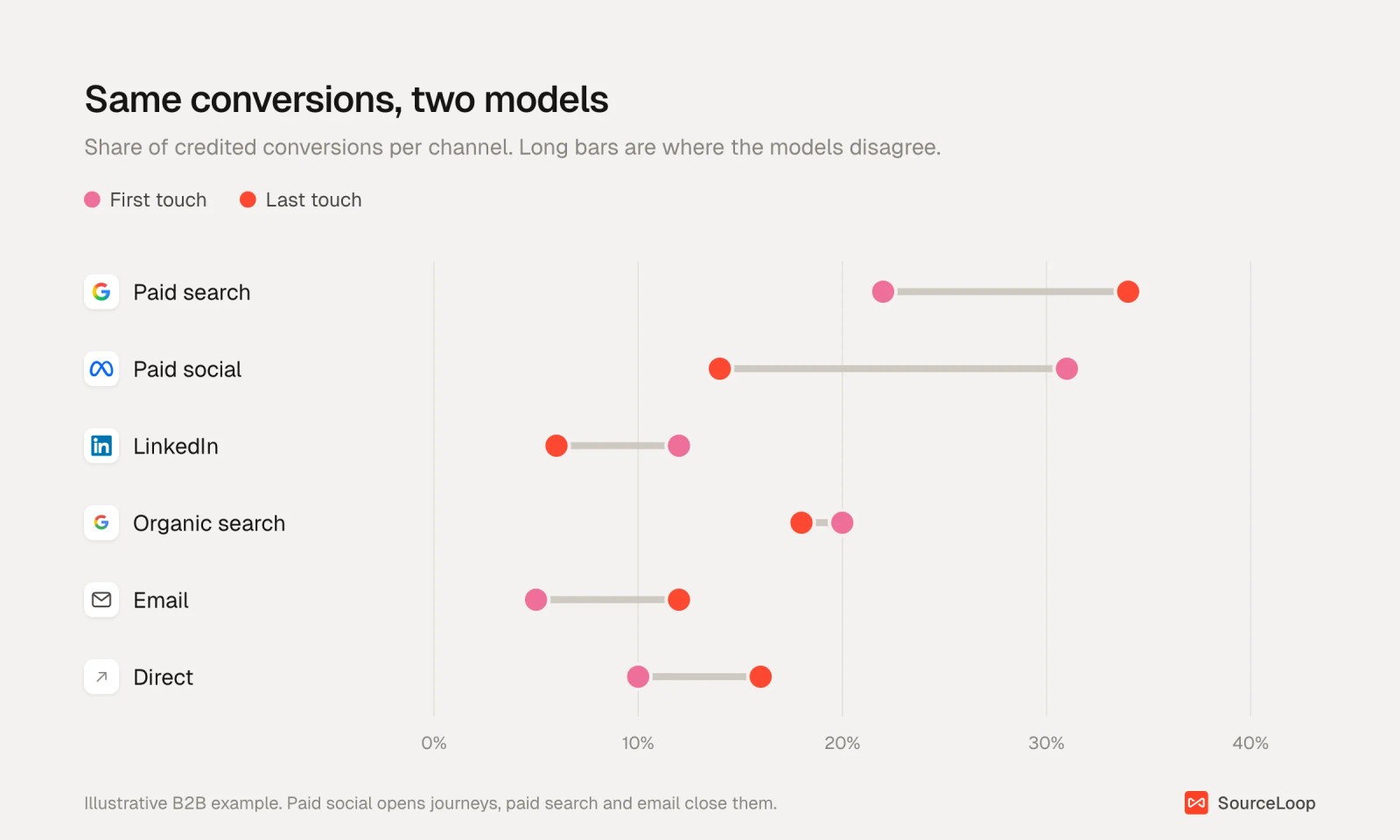
A good default pairing for B2B is U-shaped compared against first touch. For short ecommerce journeys, last non-direct is usually enough. The B2B attribution models guide goes deeper on picking a pair.
2. Conversion paths
What it answers: the actual sequences of channels people took before converting.
Open Reports > Paths. You'll see every journey, such as Paid Social > Organic Search > Email > Direct, with its visitors, conversions, conversion rate and revenue.
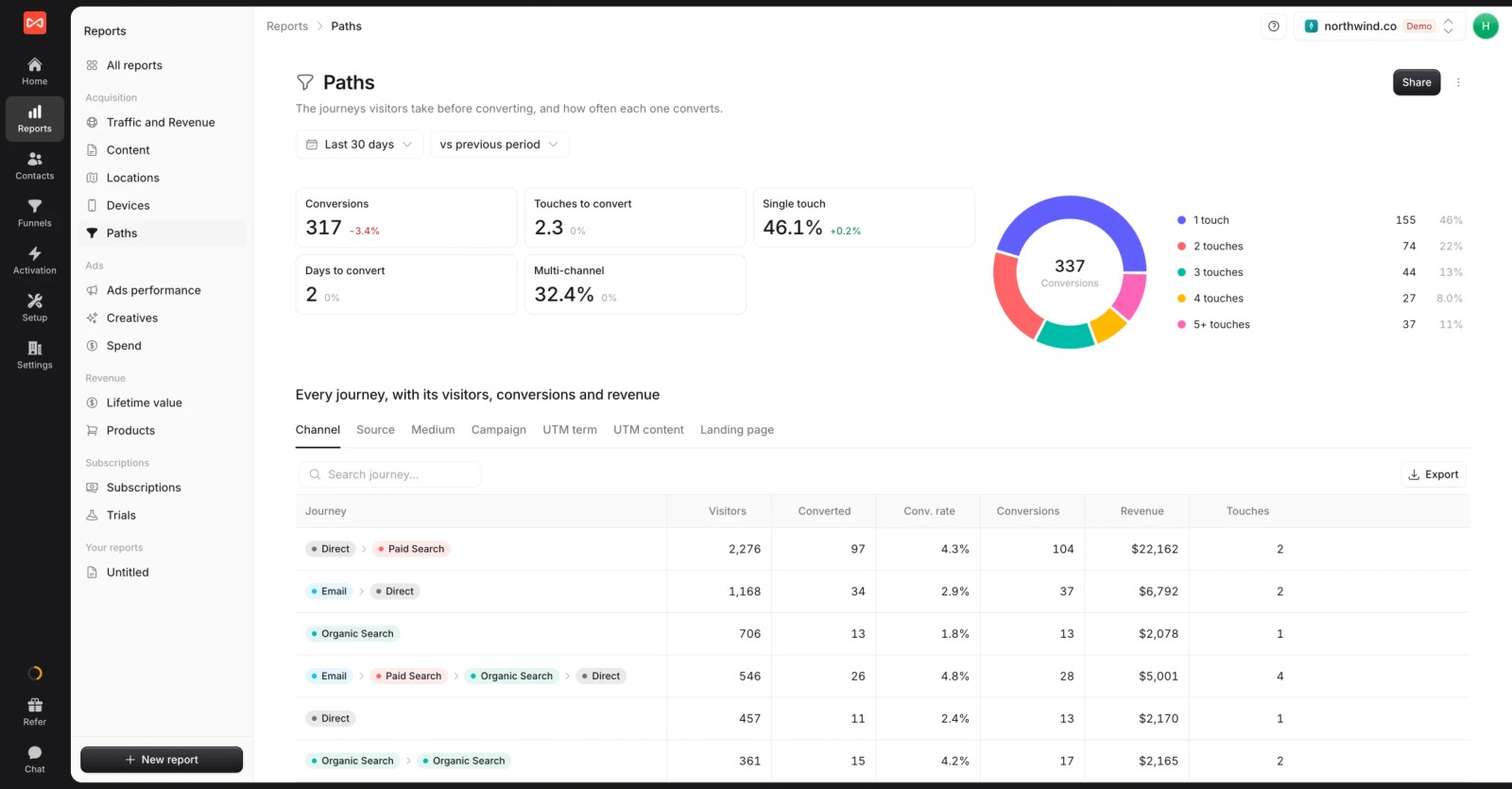
Look at the Single touch figure first. If most conversions take one visit, the models will mostly agree and you can stop debating them.
If a third or more are multi-channel, the model you report on changes the answer, and report 1 matters a lot. The Paths report guide explains each figure.
3. Time and touches to convert
What it answers: how far back your attribution needs to look.
The same Paths report shows average touches to convert and days to convert. Use them to set your lookback window under Settings > Preferences.
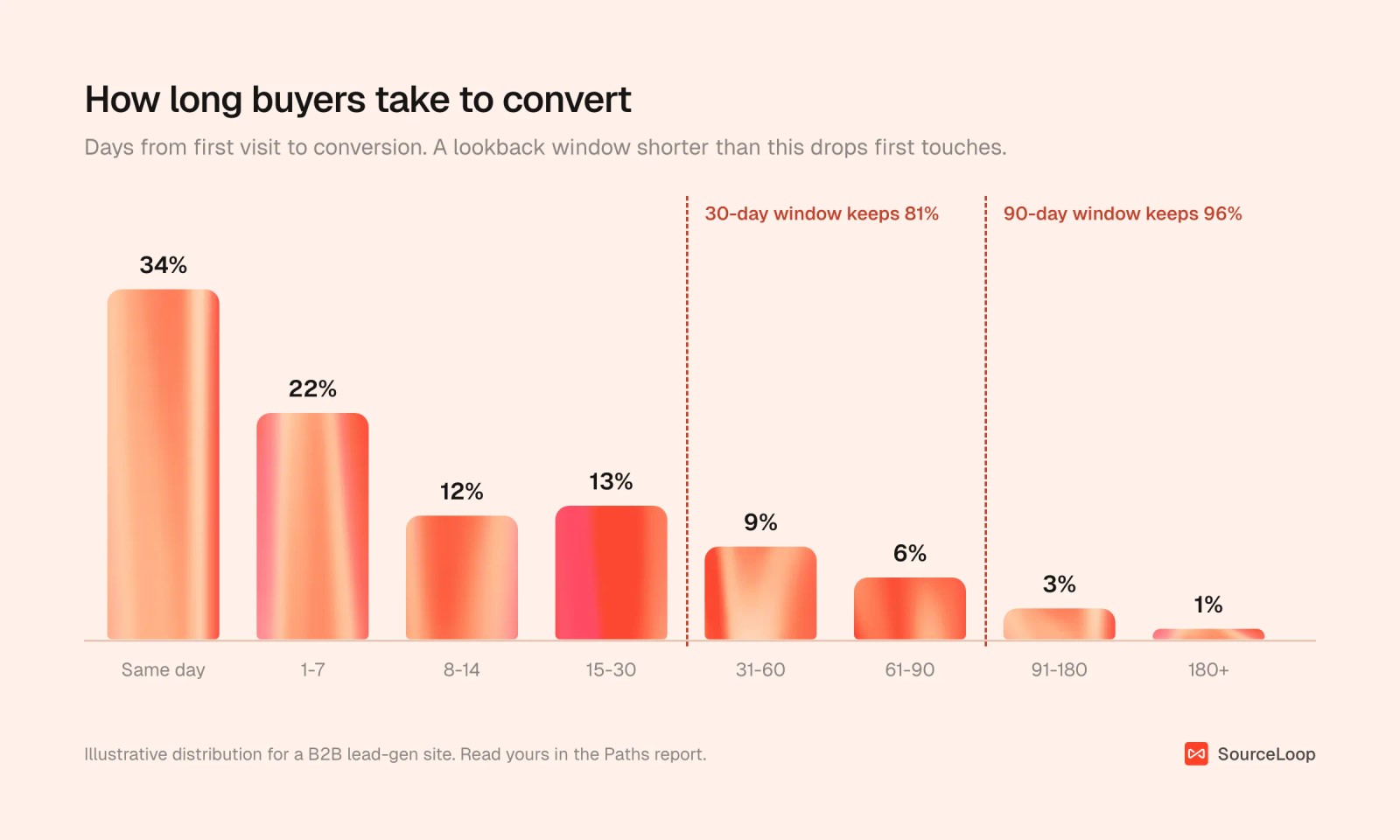
If a fifth of your buyers take more than 30 days, a 30-day window quietly hands their credit to whatever came later. Ninety days fits most lead generation. Stage and revenue reports in SourceLoop always look back a full year, so long deals keep their first touch.
4. Pipeline and revenue by first touch
What it answers: which channels create opportunities and revenue, not just leads.
Use the outcome picker on any report to switch from all conversions to contacts by CRM stage, deals by status, subscriptions or revenue. This works once HubSpot, Salesforce or Pipedrive is connected under Setup > CRM.
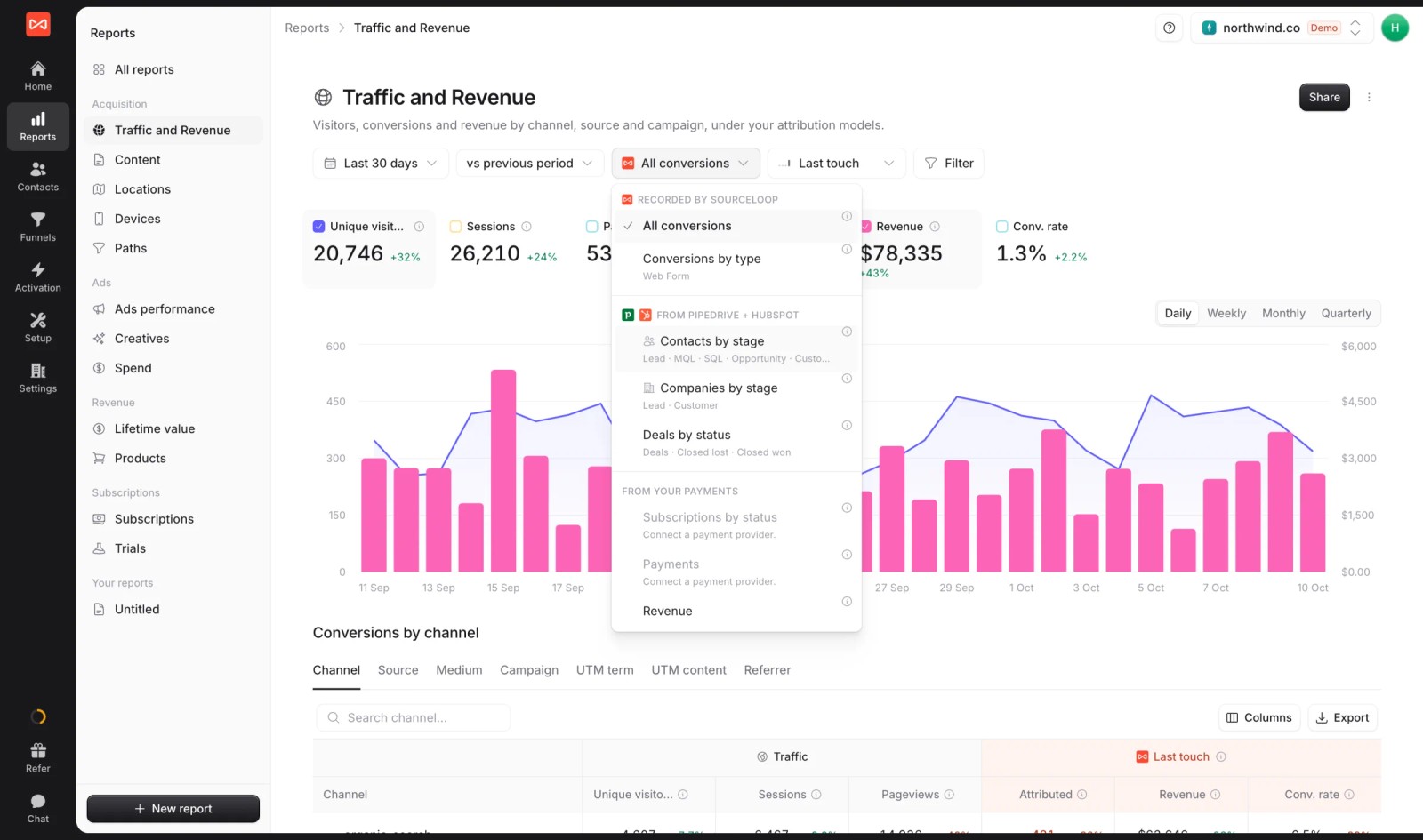
This is usually the report that changes budgets, and it's the core of revenue attribution. Here's a typical pattern:
| First-touch channel | Leads | Cost per lead | Opportunities | Cost per opportunity |
|---|---|---|---|---|
| Meta | 410 | $18 | 12 | $615 |
| Google Ads | 220 | $41 | 26 | $347 |
| 85 | $96 | 15 | $544 | |
| Organic search | 160 | n/a | 21 | n/a |
On cost per lead, Meta wins easily. On cost per opportunity it comes last of the three paid channels. For B2B, turn on Credit visits from: Everyone at their company so a colleague's first visit counts as part of the buyer's journey. Closed-loop attribution covers how to wire the CRM side.
5. Credited vs platform-claimed
What it answers: how much of what each ad platform reports holds up in your own data.
Reports > Ads performance puts spend and platform-reported conversions next to the conversions SourceLoop credits to the same campaigns. Reports > Creatives does the same per ad, with credited ROAS beside platform ROAS.
A platform claiming two or three times what your data shows is common, and it's the best place to start a holdout test. We walk through that test in our guide to advertising effectiveness measurement.
6. A one-page summary
What it answers: what happened this month and what you're changing, for people who won't open five reports.
Build it as a custom report in Reports. Add a short text block with your recommendation, then a few widgets: good leads, pipeline created, revenue, and report 1 as a small table.
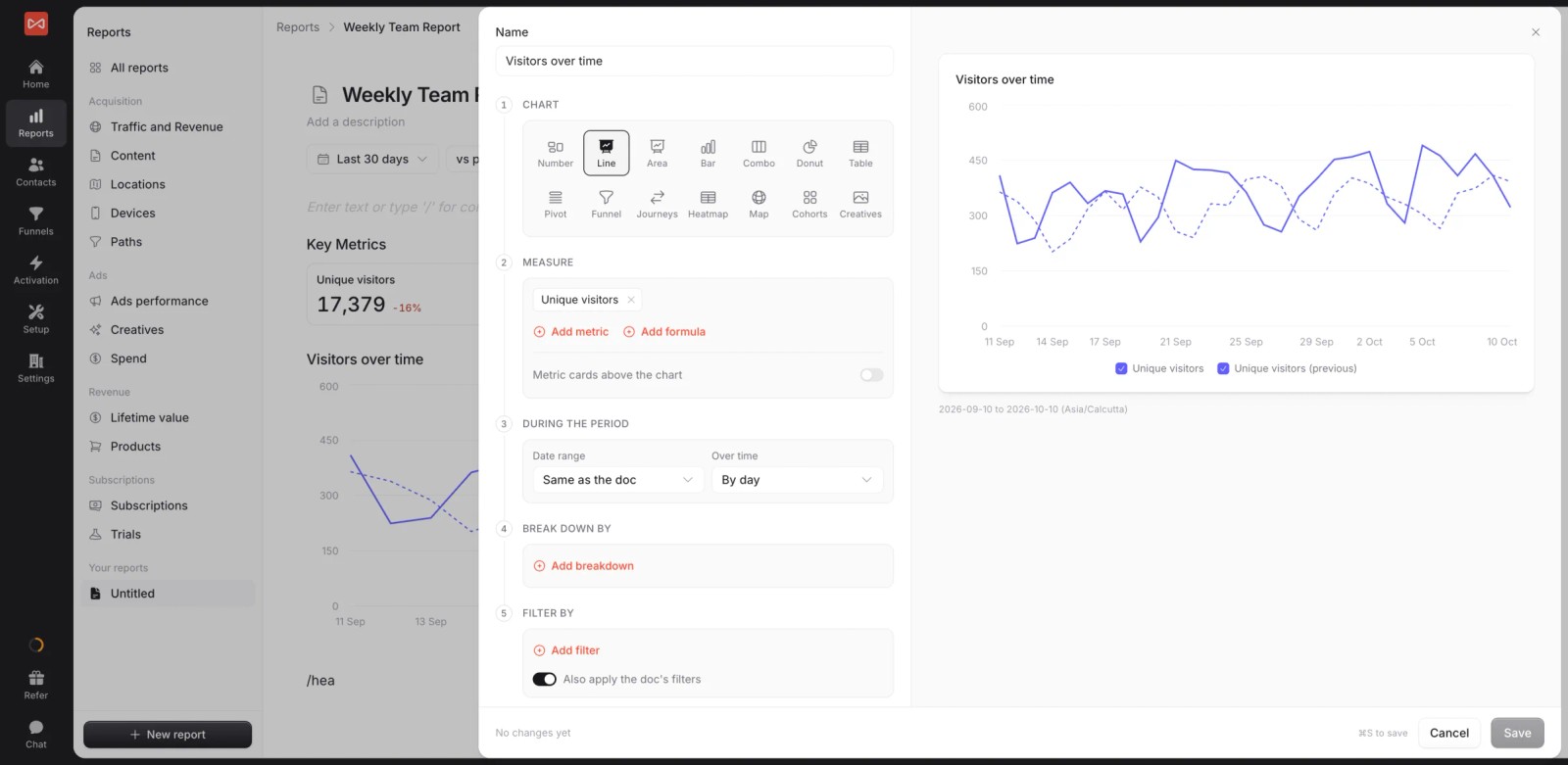
Numbers can sit inside sentences too, so "Paid search created $64,200 of pipeline" stays current every time someone opens it. The custom report guide shows every widget type.
How to share attribution reports so they get used
A report nobody opens doesn't change anything. These four steps cover the people who need to see your numbers.
Step 1: Give each audience one report
| Audience | What they need | Reports | How often |
|---|---|---|---|
| CEO, CFO or board | Pipeline, revenue, what's changing | One-page summary (6) | Monthly |
| Head of marketing | Where the next dollar goes | Two models (1), pipeline by first touch (4) | Weekly |
| Channel owners | What's working inside their channel | Credited vs claimed (5), paths (2) | Weekly |
| Agency clients | Proof of results in their own terms | Summary (6) plus pipeline (4) | Monthly, live link |
Step 2: Share a live link
Use Share on any report to create a public link. You choose the date range, whether viewers can change filters and comparisons, and you can add a password and an expiry date.
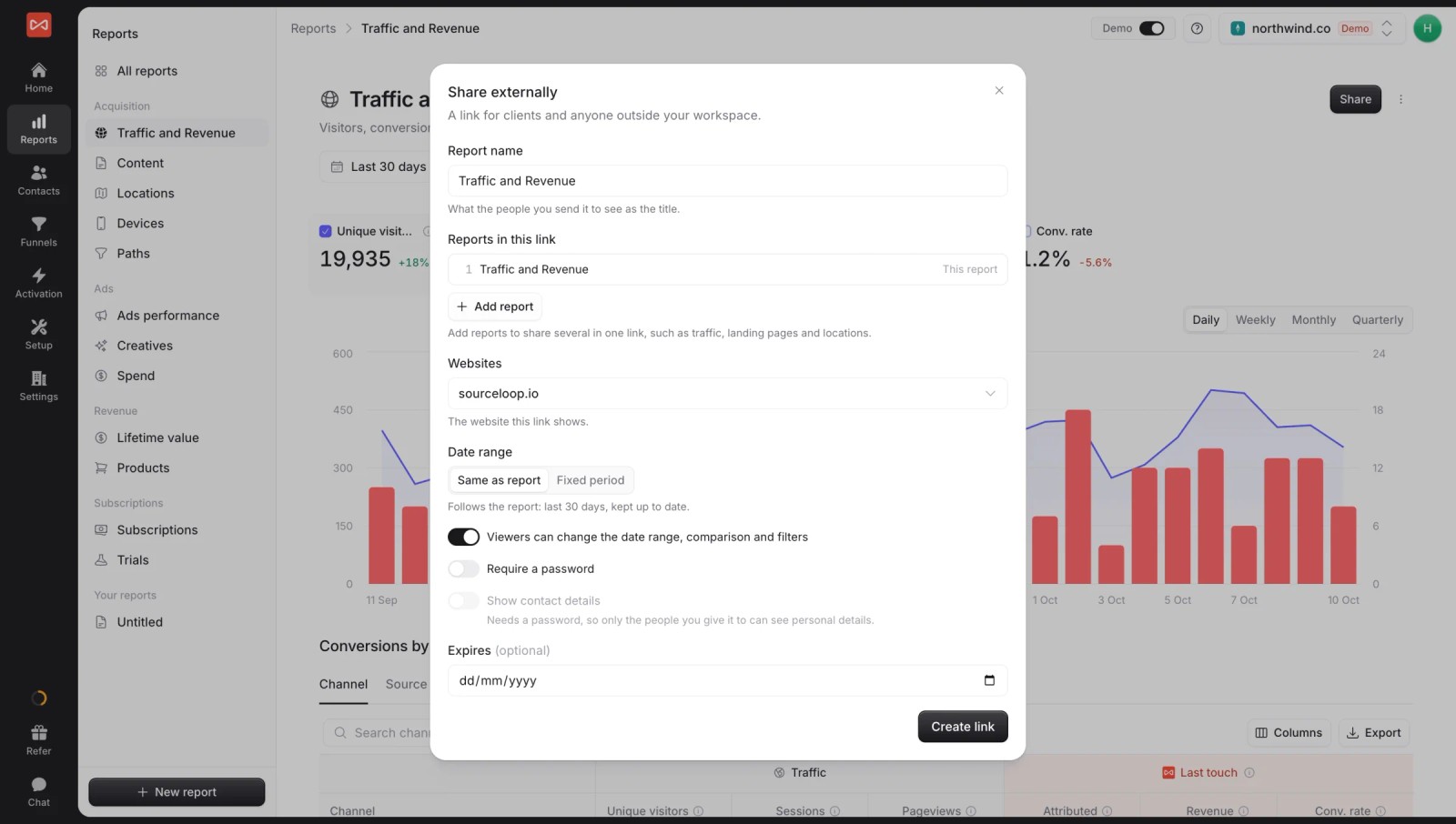
Agencies can put their own logo and colours on shared reports, and on the Agency plan the link can run on the client's own domain, so client reporting looks like part of your service.
Step 3: Export for the board deck
Some meetings still run on slides. Export turns any report into a PDF or a PowerPoint deck, with a cover page and table of contents if you want them. The export guide covers the layout options.
Step 4: Post a weekly digest
Most people will never open a dashboard. A scheduled alert can post the week's numbers to a Slack channel or an inbox every Monday morning.
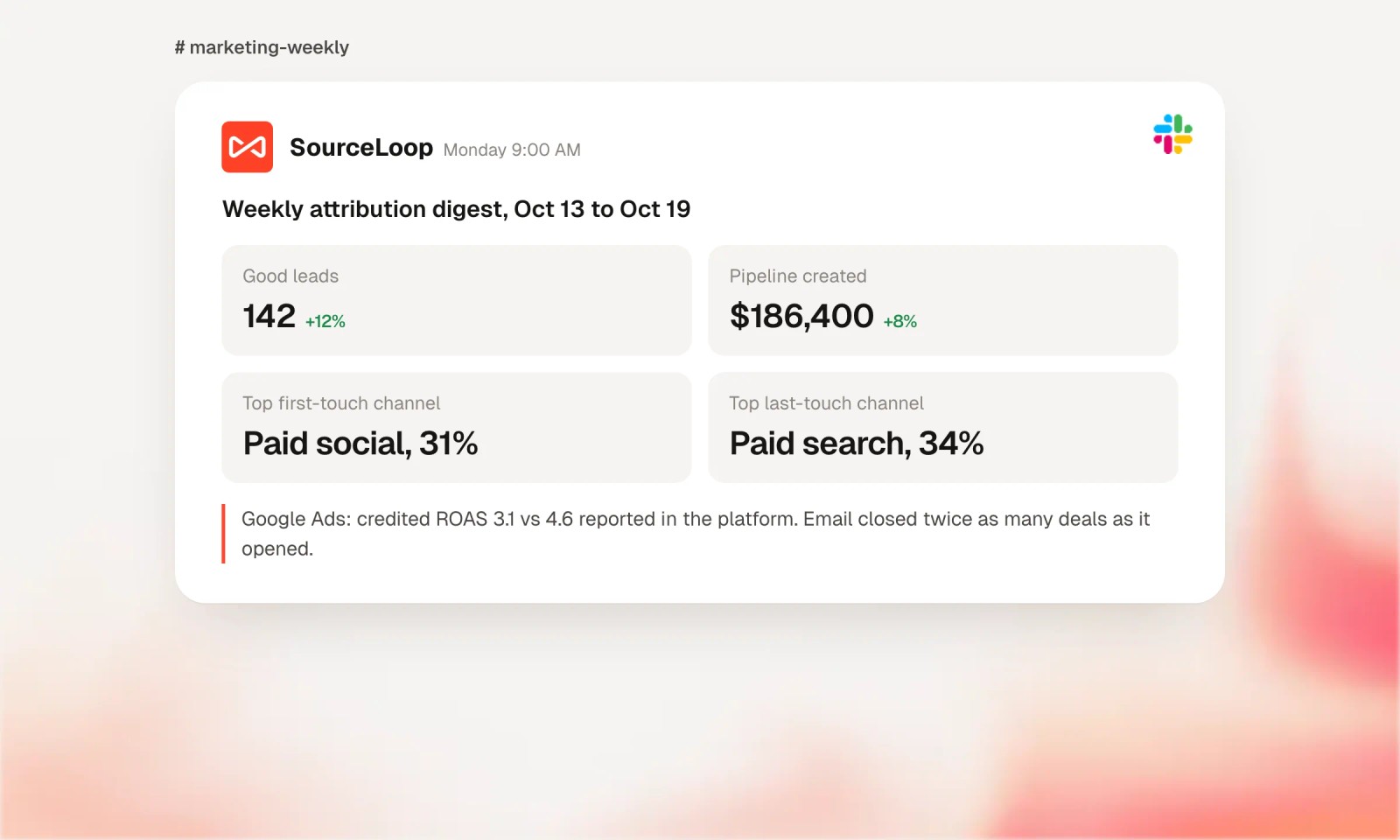
Setup takes a few minutes in Slack and email alerts.
5 rules for presenting attribution data
A report only matters if someone acts on it. These five rules make that more likely.
1. Lead with the decision
Open with what you're changing and why. Put the charts after.
2. Keep one default model
Trends only mean something under the same model. Pick one, show a second for context, and don't switch the default from month to month.
3. Show both credited and claimed
Put platform-reported numbers beside your own. Execs will see the platform dashboards anyway, so explain the gap before someone else asks.
4. Keep Unattributed visible
Imports and offline deals with no tracked visit should stay Unattributed. Folding them into Direct makes the report look tidier and hides how much you can't see.
5. Back big calls with a test
Attribution shows which channels appear in winning journeys. Proving a channel caused the win takes a holdout test.
Run one before any big budget move, and present the result as a range.
There's a reason this matters. In Nielsen's 2024 survey, 84% of marketers said they were confident in their ROI measurement, but only 38% measured digital and traditional channels together. Confidence is easy to overstate in a slide.
Mistakes that make attribution reports useless
- Reporting leads only. The cheapest leads are rarely the best customers. Report pipeline or revenue as soon as your CRM is connected.
- Switching models to win an argument. It's the cherry-picking Gartner found, and everyone in the room notices.
- A window shorter than your cycle. Check days to convert before you trust first-touch numbers.
- Counting pageviews as touches. A five-page visit isn't five touches. SourceLoop counts visits, so long sessions don't tilt the credit.
- Too many reports. If nobody can say which report answers which question, cut some.
Frequently asked questions
-
What is a multi-touch attribution report?
A report that splits credit for conversions, pipeline or revenue across the marketing touchpoints a buyer had before converting. A good one shows credit by channel under at least two models, plus the paths buyers actually took.
-
Which attribution model should I report on?
Pick one default and keep it. U-shaped suits most B2B lead generation, and last non-direct suits short ecommerce journeys. Show first touch as a second model so you can see which channels start journeys.
-
Can I do multi-touch attribution reporting in GA4?
Only partly. Google retired the first click, linear, time decay and position-based models in 2023, so GA4 offers data-driven and last click. It also can't follow a lead into your CRM, so pipeline and revenue by channel need another tool. We compared the options in the best multi-touch attribution tools.
-
How often should I review attribution reports?
Weekly for channel owners and the head of marketing, monthly for executives and clients. Change budgets on trends over several weeks, not on one week's swing.
-
How do I share attribution reports with clients?
Share a live, password-protected link so the client always sees current numbers, and export to PDF or PowerPoint for meetings. White-labeled links on the client's own domain help agencies keep the report in their brand.




 Paid Social


