
Closed-Loop Attribution: Connect Ad Clicks to Revenue
Closed-loop attribution follows each ad click to the deal it became, then sends the result back to Google and Meta. Here's how to set it up.
Table of contents
- What closed-loop attribution is
- 3 reasons the loop stays open
- 1. The click ID never reaches the CRM
- 2. CRM stages don't mean anything to the ad platforms
- 3. Results go back too late
- Why it's worth closing
- How to set up closed-loop attribution with SourceLoop
- Step 1: Capture the source on every lead
- Step 2: Connect your CRM and map the fields
- Step 3: Bring stages and deals back in
- Step 4: Report on pipeline and revenue by channel
- Step 5: Send qualified outcomes back to the ad platforms
- Step 6: Check that it's working
- Where closed loops usually break
Your ads manager says a campaign drove 200 leads. Your sales team says it drove two customers.
Both can be true. The problem is that the two numbers live in different systems, and nothing connects them.
Closed-loop attribution is that connection. It follows each ad click into your CRM, waits to see whether the lead became a deal, and then reports the result in both directions: to your reports, and back to the ad platform that paid for the click. In this guide, I'll show you where the loop usually breaks and how to close it, step by step.
What closed-loop attribution is
An open loop stops at the lead. You know which ad produced a form fill, and that's where the trail ends.
A closed loop keeps going. The lead's source stays attached as it moves through your CRM, so you can see revenue by campaign. Then the outcome goes back to Google Ads or Meta, so their bidding learns which clicks turn into customers.
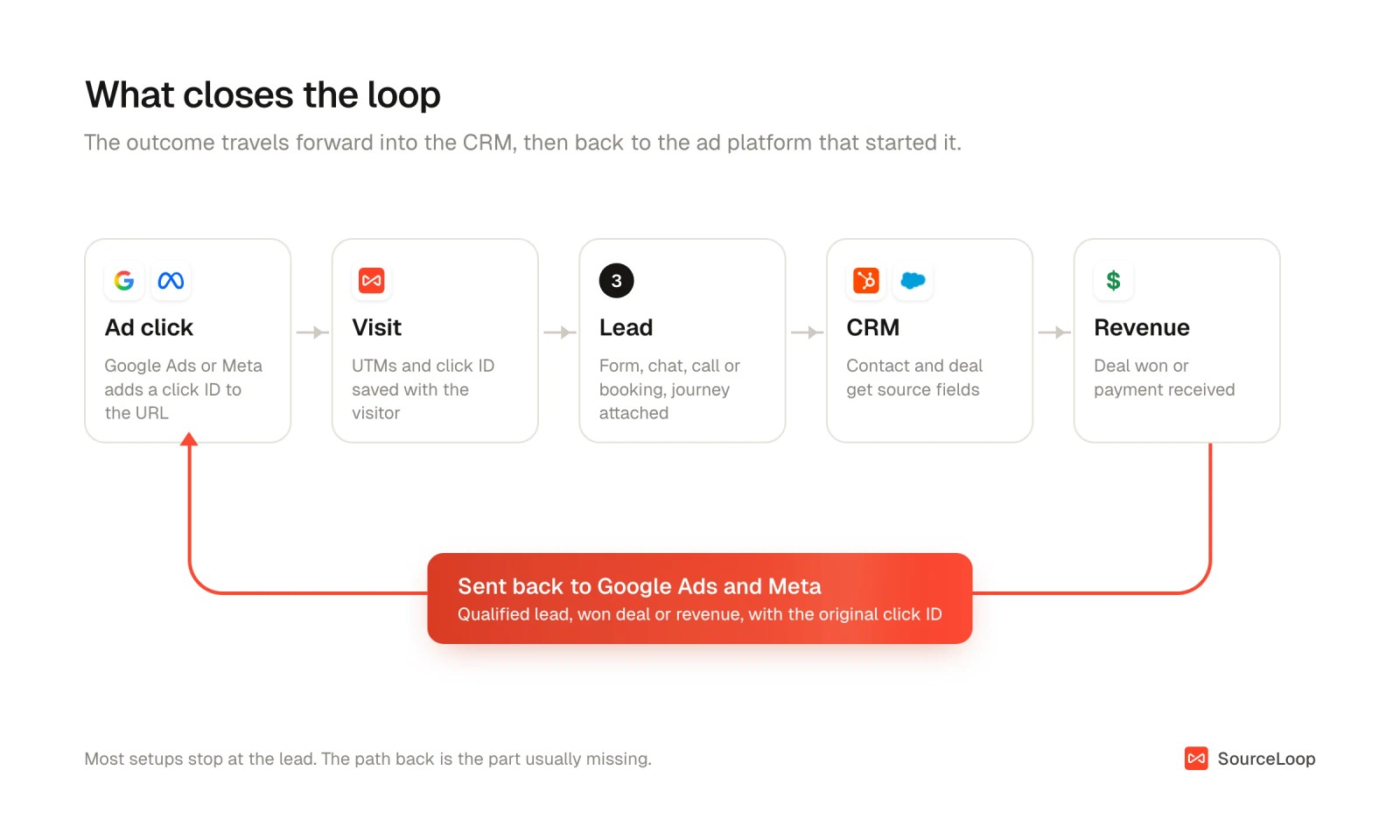
Closing the loop isn't the same thing as picking an attribution model. Models decide how to split credit across touchpoints, and we cover them in our guide to attribution models. The loop is the plumbing that gets the touchpoints and the revenue into the same place.
3 reasons the loop stays open
Most teams already have the data to close the loop. It breaks in one of three places.
1. The click ID never reaches the CRM
When someone clicks an ad, Google adds a gclid and Meta adds an fbclid to the landing page URL. If your form doesn't capture it, the CRM contact arrives with no idea where it came from.
It gets worse with multi-page visits, chat widgets, phone calls and booking tools, which usually drop the parameter entirely. Sales reps creating contacts by hand don't help either.
We walk through the fix for specific CRMs in how to track Google Ads leads in HubSpot and in Salesforce.
2. CRM stages don't mean anything to the ad platforms
Your CRM knows a lead became an SQL, then an opportunity, then a closed-won deal. Google and Meta only know what you send them.
Without a mapping from your stages to conversion actions, the platforms keep optimizing for the cheapest form fill. That's how campaigns end up buying lots of low-quality leads.
3. Results go back too late
Each platform only accepts offline results for a limited time after the click or lead.
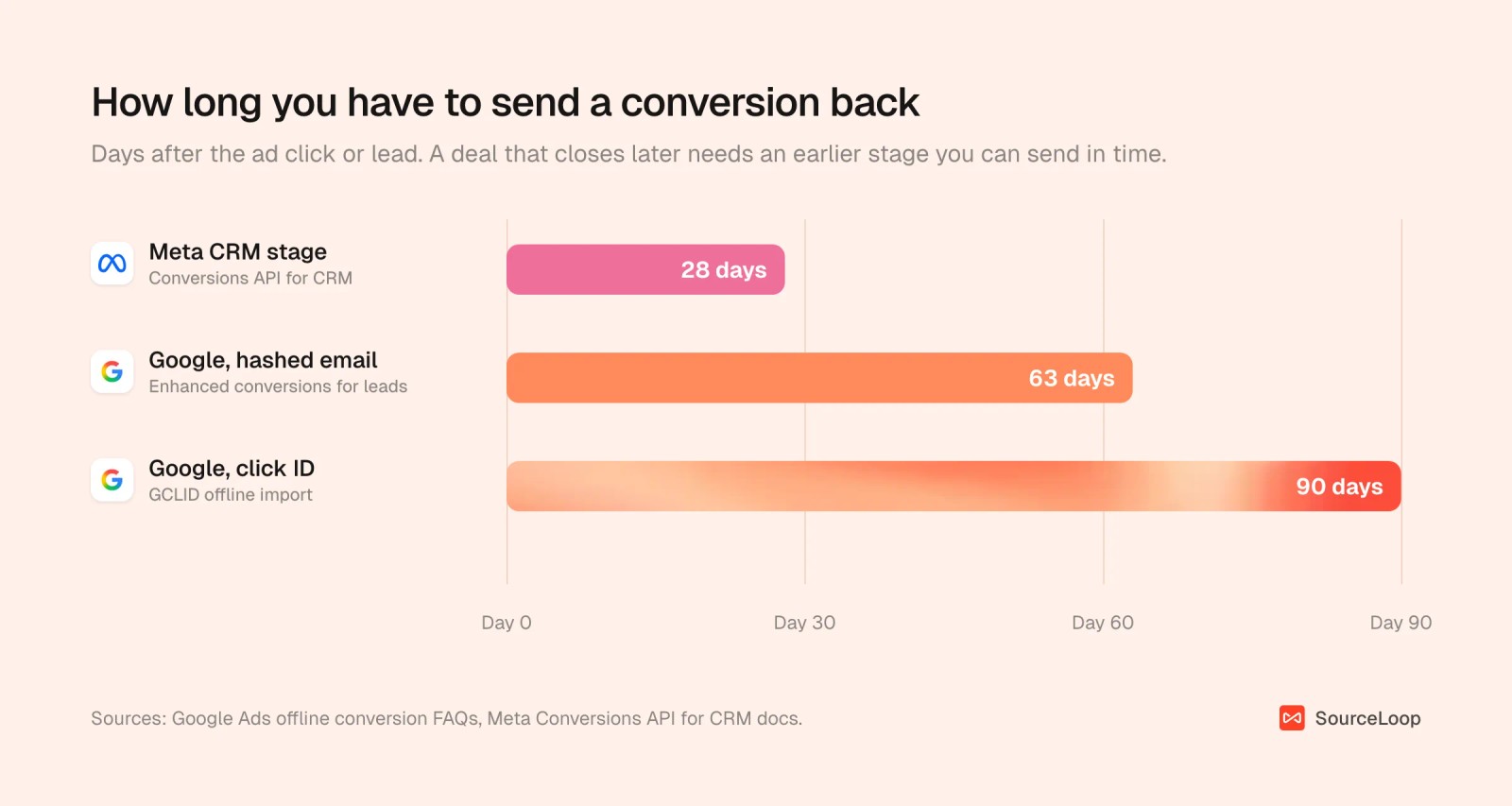
Google keeps a click ID for only 90 days, and uploads matched on hashed email have a shorter 63-day limit. Meta's CRM integration works best when the lead stage you optimize for happens within 28 days of the lead.
So for long sales cycles, you need an earlier signal as well as the final one.
Why it's worth closing
Cost per lead and cost per customer often rank your channels in opposite order.
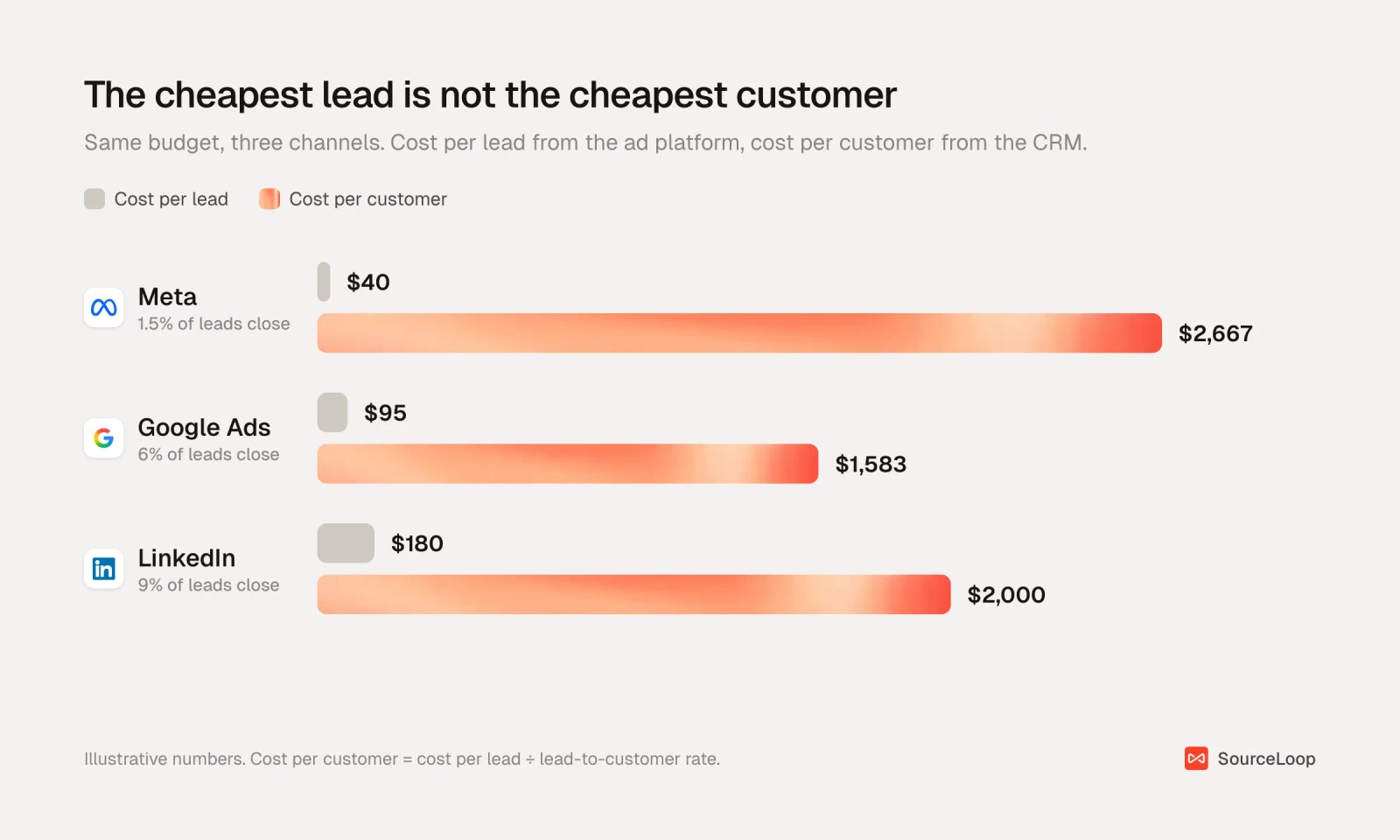
In this example, Meta's $40 leads look like a bargain until you see that only 1.5% of them close. LinkedIn's $180 leads cost less per customer. You can only see that if CRM outcomes are tied back to the original click.
There's also a bidding payoff. Meta says advertisers who connected their CRM and optimized for quality leads saw an average 15% lower cost per quality lead.
Ad platforms optimize toward whatever you call a conversion. If you never tell them which leads became customers, they can't find you more of them.
How to set up closed-loop attribution with SourceLoop
The steps below use SourceLoop, a marketing attribution and revenue measurement tool that handles each part of the loop. It records the source of every visit, keeps it attached to the lead, syncs it both ways with your CRM, and sends qualified outcomes back to Google Ads, Meta and ChatGPT Ads.
You can build the same loop with hidden form fields, a CRM workflow and a scheduled upload script. It works until a form changes, a chat lead slips through, or the upload job quietly fails.
Step 1: Capture the source on every lead
Install the SourceLoop script on your site. It stores the UTMs and click IDs (gclid, gbraid, wbraid, fbclid and others) from every visit and attaches them to the visitor.
When that visitor converts, the lead carries their whole journey. That works for forms, chats, calls and booked meetings, with no hidden fields to maintain.

Visitors who come back on another device are joined up by identity stitching, so the first ad click isn't lost when someone converts on their laptop a week later.
Step 2: Connect your CRM and map the fields
Under Setup > CRM, connect HubSpot, Salesforce or Pipedrive. Jobber is there for field service businesses too.
On the Fields tab, map SourceLoop's attribution fields to CRM properties. You can let SourceLoop create the properties for you.
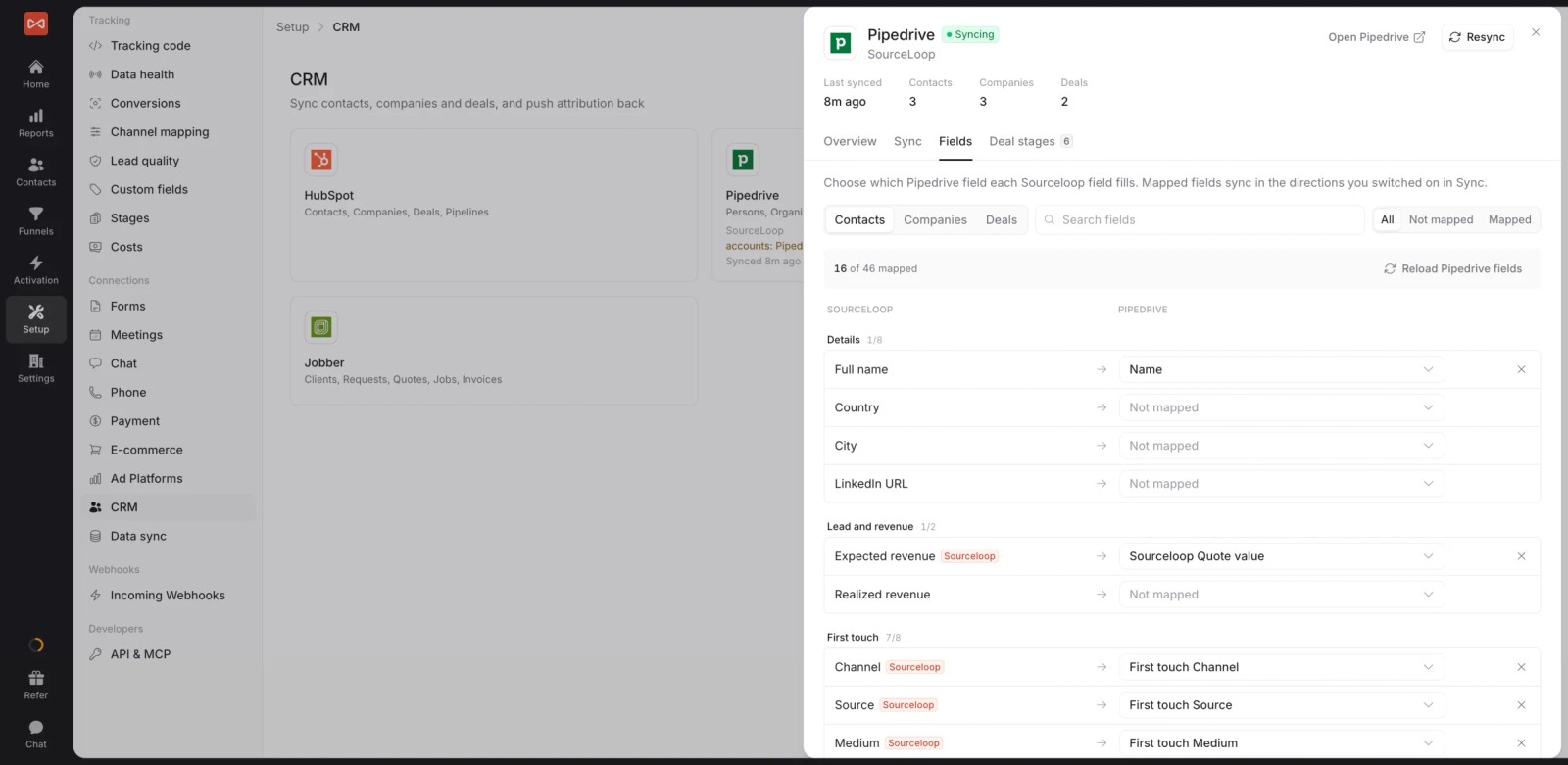
Here's what gets written where:
| CRM record | What SourceLoop writes |
|---|---|
| Contact | First-touch and latest-touch channel, source, medium, campaign, term, content and landing page, plus lead score, quality and value |
| Deal or opportunity | First-touch and latest-touch channel, source and campaign, visits before the deal, and a link to the full journey |
SourceLoop creates the deal fields for you in HubSpot and Pipedrive. In Salesforce, you create the Opportunity fields once and map them.
Sales sees where each lead came from without leaving the CRM. If you only need this part, see how to send lead source to your CRM.
Step 3: Bring stages and deals back in
The Sync tab controls both directions. Outbound sends new leads to the CRM, either all of them or only good leads. Inbound brings contacts, stages, deals and revenue back into SourceLoop.
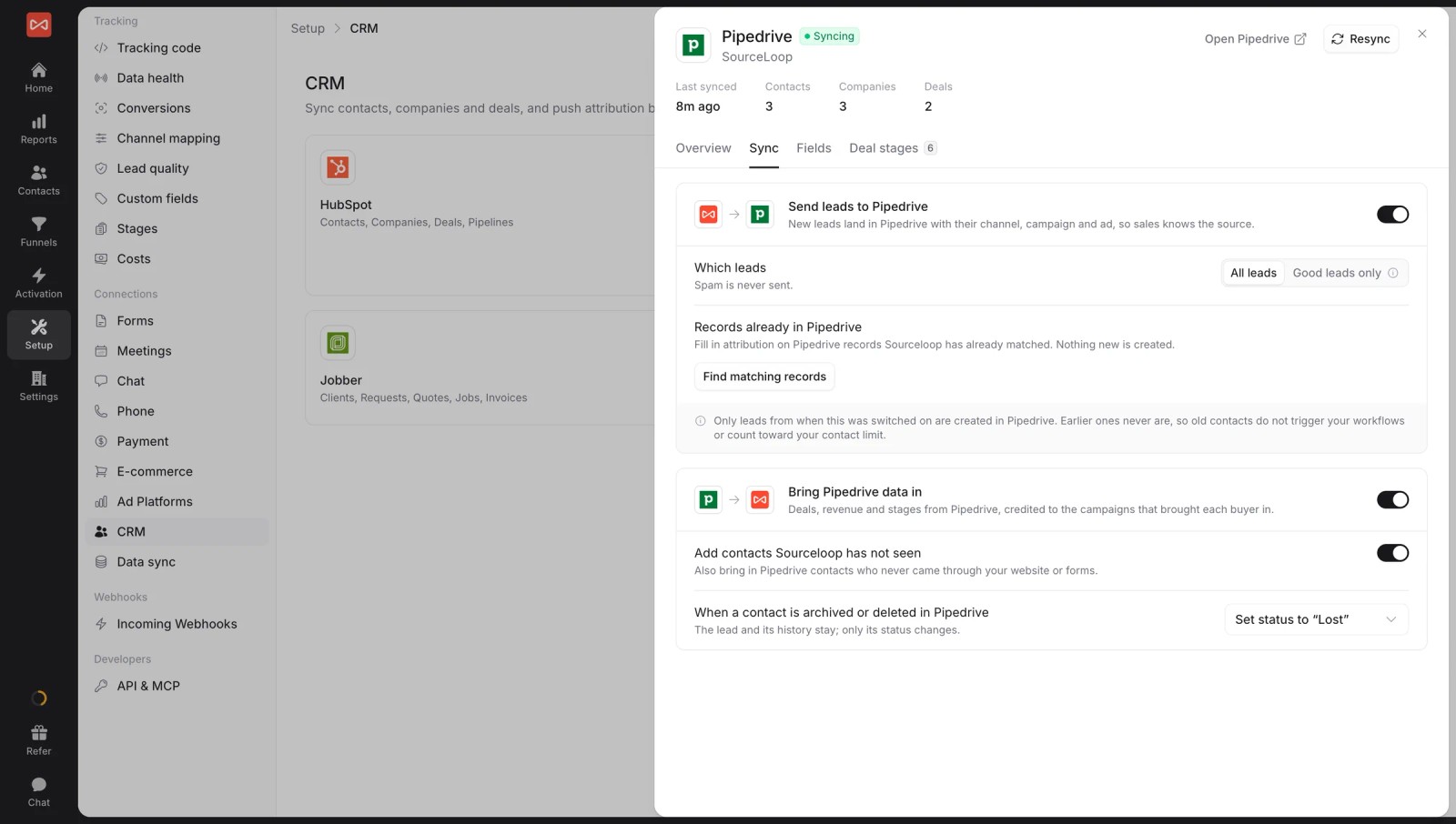
On the Deal stages tab, mark each stage as Open, Won or Lost. Then map your lifecycle stages or lead statuses so SourceLoop knows what an SQL or opportunity means in your CRM. The HubSpot lifecycle mapping guide shows how.
Step 4: Report on pipeline and revenue by channel
Now every report can count outcomes from the CRM, not just form fills. Open Reports > Traffic and Revenue and switch the outcome to contacts by stage, deals by status or revenue.
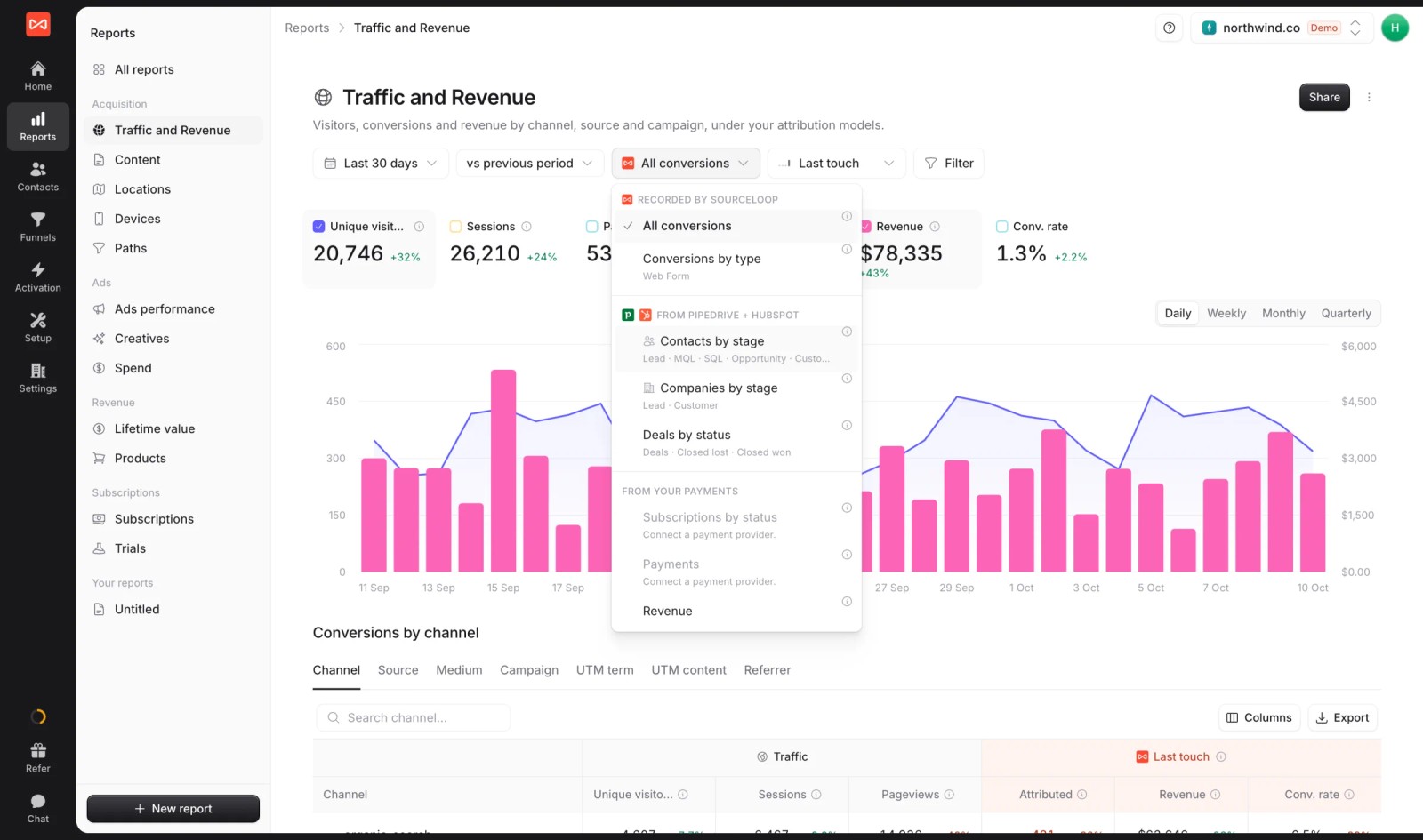
This is where the cheap-leads-versus-real-customers gap shows up. For the reporting side in depth, read our guides on revenue attribution and multi-touch attribution reporting.
Step 5: Send qualified outcomes back to the ad platforms
Go to Activation > Conversion sync and create a sync for Google Ads, Meta or ChatGPT Ads. Each sync has four choices:
- When: a good lead, a new lead, a CRM stage reached, a deal won, a trial, a new subscription or a payment.
- Only if: filters such as lead type, stage or a minimum value.
- Send as: the conversion action or event name in the ad platform.
- Value: the deal amount, a fixed value or none.

Each conversion goes out with its click ID plus hashed email and phone, so it still matches when the click ID is missing.
If a synced lead is later marked as spam, SourceLoop sends a retraction. If a deal's value changes, it sends the new value.
To stay inside the upload windows, run two syncs side by side:
| Outcome to send | Usually happens | Value | Why send it |
|---|---|---|---|
| Good lead or booked meeting | Minutes to days | Fixed estimate | Fast signal inside every window |
| Qualified stage (SQL, opportunity) | Days to weeks | Fixed estimate | Fits Meta's 28-day guidance for many B2B funnels |
| Deal won | Weeks to months | Deal amount | Teaches value-based bidding what a customer is worth |
| Payment or subscription | At purchase, then recurring | Amount paid | Best signal for SaaS and ecommerce |
The conversion sync guide covers setup for each platform, and the Google Ads offline conversions guide covers the conversion action side.
Step 6: Check that it's working
Run a test lead from Setup > Data health and follow it through. You should see it on the contact, in the CRM with its source fields filled, and in the sync log once it qualifies.
Then give the platforms a few weeks. Bidding strategies need time and volume to adjust to a new conversion goal, so judge the change on cost per customer, not on the first week.
Where closed loops usually break
- Only sending the won deal. On a long sales cycle it arrives after the click has expired. Send an earlier stage too.
- Sending every lead as a conversion. That teaches the platform to find more form fills. Filter on good leads with lead quality rules.
- Leaving the CRM's own source fields to guess. CRM "original source" fields often say Direct or Offline for paid leads. Write the tracked source to the record.
- Forgetting about chats and calls. If only forms carry the source, a whole slice of your pipeline looks unattributed.
- Never checking the sync log. Expired click IDs and permission errors fail quietly. Look at it weekly for the first month.
Frequently asked questions
-
What is closed-loop attribution?
Closed-loop attribution connects marketing touchpoints, like an ad click, to the sales outcome they led to, like a closed deal or revenue in your CRM. The loop is closed when that outcome is also sent back to the ad platform, so its bidding can learn from it.
-
What is the difference between closed-loop attribution and closed-loop reporting?
Closed-loop reporting usually means marketing and sales sharing one view of leads, pipeline and revenue by source. Closed-loop attribution includes that, plus sending the outcomes back to Google Ads, Meta and other platforms as offline conversions.
-
Do I need a CRM for closed-loop attribution?
You need somewhere the sales outcome is recorded. For most B2B and service businesses that's a CRM like HubSpot, Salesforce or Pipedrive. Ecommerce and SaaS teams can close the loop with payment data from Stripe, Paddle or Shopify instead.
-
How long does Google Ads accept offline conversions?
Up to 90 days after the click when you upload with the Google click ID, and up to 63 days for uploads matched on hashed customer data. If your deals take longer, also send an earlier stage, such as a qualified lead, that happens inside the window.
-
Does closed-loop attribution work with Meta Lead Ads?
Yes. Meta's Conversions API for CRM lets you send lead stages back for Instant Form leads and optimize for conversion leads. Meta recommends at least 200 leads a month, daily uploads, and a target stage that happens within 28 days of the lead.




 Paid Social


