
Multi-Channel Attribution Models: A Practical Guide for 2026
How each multi-channel attribution model splits credit, a worked example on one real journey, and how to pick and compare models without fooling yourself.
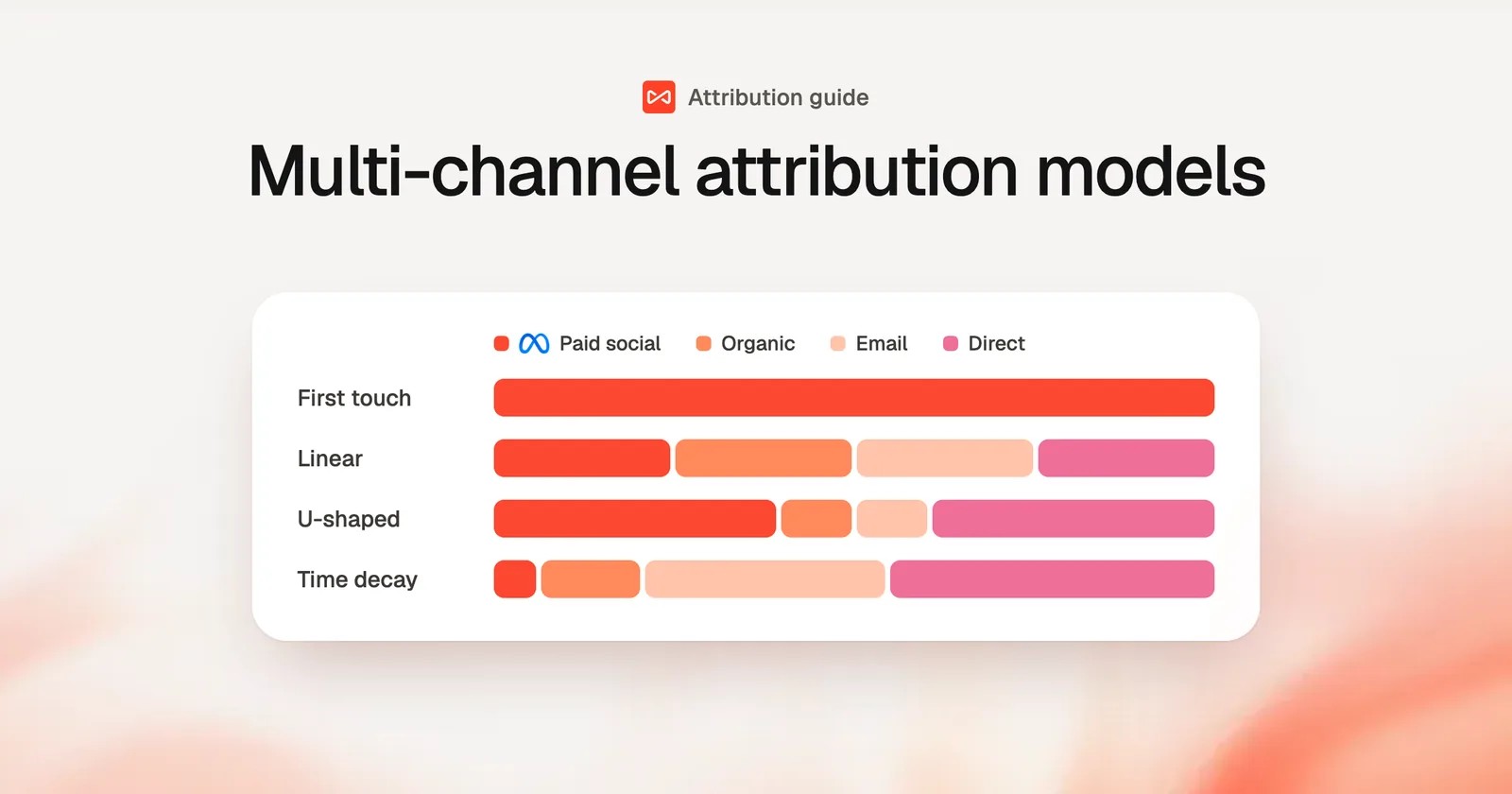
Table of contents
- What is multi-channel attribution?
- The seven models you'll actually use
- 1. First touch
- 2. Last touch
- 3. Last non-direct touch
- 4. First non-direct touch
- 5. Linear
- 6. U-shaped (position-based)
- 7. Time decay
- The models at a glance
- One journey, seven answers
- How to choose a model
- What about W-shaped and data-driven models?
- Get the inputs right before you pick a model
- How to compare models in SourceLoop
- Put two models side by side
- Measure more than leads
- See the journeys behind the numbers
- Tune the settings that shape the journey
- Mistakes that skew attribution
- Further reading
Most buyers don't convert on their first visit. They find you through a search, come back from a LinkedIn post, open a newsletter and finally type your URL in directly.
Four channels, one customer. Which one gets the credit?
That's the question multi-channel attribution answers. This guide covers how each common model splits credit, shows them side by side on a real journey, and explains how to choose one without fooling yourself.
What is multi-channel attribution?
Multi-channel attribution assigns credit for a conversion to the marketing channels that a person interacted with before converting. An attribution model is the rule that decides how that credit is split.
A single-touch model gives all the credit to one interaction. A multi-touch model shares it across several.
The point isn't the credit itself. It's knowing where your next dollar should go.
The seven models you'll actually use
1. First touch
100% of the credit goes to the first interaction.
It answers: *what introduces people to us?* It's useful for judging awareness channels such as paid social, podcasts and SEO content. It ignores everything that happened afterwards, including the retargeting and email that closed the deal.
2. Last touch
100% of the credit goes to the last interaction before conversion.
It answers: *what tipped them over?* It's simple and close to what ad platforms report by default. It overvalues branded search and Direct, which often just capture demand that other channels created.
3. Last non-direct touch
100% of the credit goes to the last interaction that wasn't Direct.
This is last touch with one fix. When someone types your URL to convert, it credits the channel that sent them before that. It's the most sensible single-touch default for most teams.
4. First non-direct touch
100% of the credit goes to the first interaction that wasn't Direct.
It's the first-touch version of the same fix. It's handy when lots of journeys start with a Direct visit you can't explain, such as a word-of-mouth referral.
5. Linear
Credit is split equally across every interaction.
Four touches get 25% each. It's fair and easy to explain. It's also blunt: a quick bounce from a display ad counts as much as the demo page visit before the sale.
6. U-shaped (position-based)
40% to the first touch, 40% to the last, 20% shared across the middle.
It rewards the channel that opened the journey and the one that closed it, while still giving the middle some credit. It suits B2B lead generation, where both discovery and the final push matter.
7. Time decay
Touches closer to the conversion get more credit.
Credit halves for every set period before the conversion. With a 7-day half-life, a visit a week before converting gets half the weight of one on the day. It fits short, promotion-driven cycles. It undervalues the channels that started long journeys.
The models at a glance
| Model | How credit is split | Best for | Blind spot |
|---|---|---|---|
| First touch | All to the first interaction | Judging awareness channels | Ignores what closed the deal |
| Last touch | All to the final interaction | Short, single-session purchases | Overvalues Direct and branded search |
| Last non-direct | All to the last non-Direct interaction | A sensible single-touch default | Still ignores the rest of the journey |
| First non-direct | All to the first non-Direct interaction | Discovery when many journeys start Direct | Ignores nurture and closing channels |
| Linear | Equal share to every interaction | A neutral multi-touch baseline | Treats every touch as equally important |
| U-shaped | 40% first, 40% last, 20% middle | B2B lead generation | Undervalues long nurture sequences |
| Time decay | More credit the closer to conversion | Short cycles and promotions | Undervalues the channels that start journeys |
One journey, seven answers
Here's a real-looking B2B journey that ends in a demo request:
- Day 1: clicks a Paid Social ad (20 days before converting)
- Day 9: finds a blog post through Organic Search (12 days before)
- Day 18: clicks a link in an Email newsletter (3 days before)
- Day 21: types the URL in Direct and books a demo
Here's how each model splits the credit for that one demo:
| Model | Paid Social | Organic Search | Direct | |
|---|---|---|---|---|
| First touch | 100% | 0% | 0% | 0% |
| Last touch | 0% | 0% | 0% | 100% |
| Last non-direct | 0% | 0% | 100% | 0% |
| First non-direct | 100% | 0% | 0% | 0% |
| Linear | 25% | 25% | 25% | 25% |
| U-shaped | 40% | 10% | 10% | 40% |
| Time decay (7-day half-life) | 6.3% | 13.9% | 34.0% | 45.8% |
Look at Paid Social. Depending on the model, it gets anywhere from 0% to 100% of the credit for the same demo.
That's why the model matters. It's also why picking one and never looking at another is risky.
How to choose a model
Start from your sales cycle and the decision you need to make:
- Ecommerce or self-serve, mostly same-day purchases: last non-direct. Most journeys are one or two touches, so the models barely disagree.
- B2B lead generation, a few weeks from first visit to lead: U-shaped, compared against first touch.
- Long enterprise cycles with several people involved: linear or U-shaped, measured on pipeline stages rather than leads.
- Promotions and launches: time decay, for the weeks when recent touches really do the work.
- Deciding where to grow awareness spend: first touch or first non-direct.
A good working setup is one default model plus one comparison model. When they agree on a channel, act with confidence. When they disagree, look closer before moving budget.
What about W-shaped and data-driven models?
You'll also come across two more:
- W-shaped adds a third anchor at the moment a visitor becomes a lead, splitting 30% each between first touch, lead creation and opportunity creation.
- Data-driven models, like the one in Google Ads, use machine learning to estimate each touch's contribution.
Data-driven models sound ideal, but they need a lot of conversions to be stable. They're also a black box, and Google's version only sees Google's side of the journey. Most teams get further with a few transparent models compared side by side.
Get the inputs right before you pick a model
A model can only split the journey it's given. Four things decide whether that journey is accurate.
- Count visits, not pageviews. If a five-page visit counts as five touches, every multi-touch model tilts toward whichever channel brings people who browse the most. A touch should be one visit.
- Set a lookback window that fits your cycle. The window decides how far back touches count. Ninety days suits most lead generation. Revenue and pipeline stages need longer, often a full year, or the first touch of a long deal falls outside the window.
- Handle Direct honestly. Direct often means "we don't know". Non-direct models fix this at the last step. Good channel rules fix it at the source, by sorting AI search, partner links and email clicks into their real channels.
- Stitch identities across devices. If the phone visit and the laptop conversion look like two people, the first touch disappears. A journey should follow the person once they're identified.
How to compare models in SourceLoop
SourceLoop stores every visit in the journey and works out credit when you run a report. Switching models doesn't need any re-processing, so you can compare them as often as you like.
Put two models side by side
Open Reports, then Traffic and Revenue. Use the model picker to choose your default, then add a second model. Each channel shows its credited conversions and revenue under both.
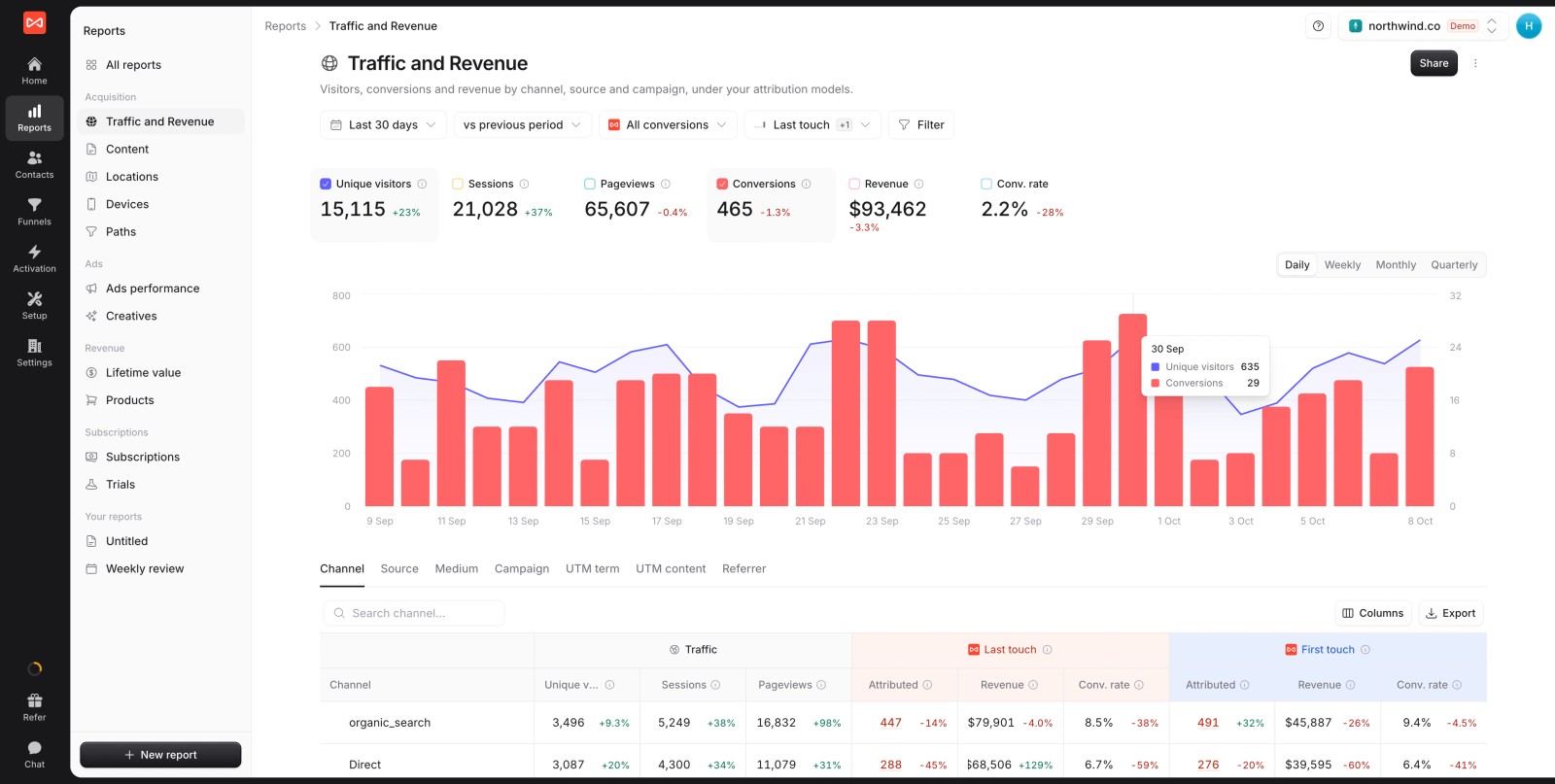
The picker offers first touch, last touch, last non-direct, first non-direct, linear, U-shaped and time decay.
Measure more than leads
The conversion picker lets you change what you're attributing. Leads are a start. Pipeline is better.
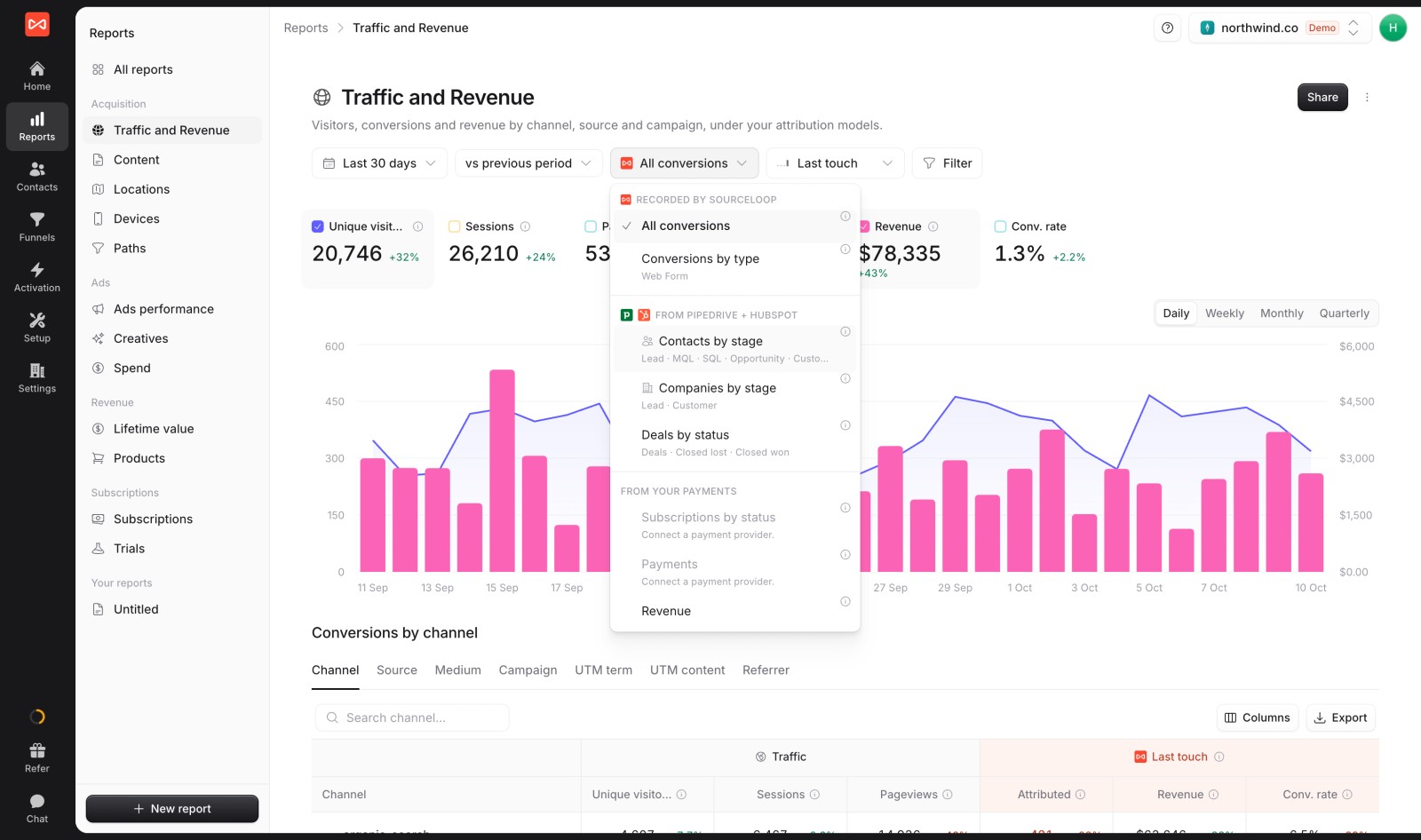
With HubSpot, Salesforce or Pipedrive connected, attribute contacts by stage, deals by status or revenue. A channel that brings plenty of leads but few SQLs looks very different here.
See the journeys behind the numbers
Open Reports, then Paths, to see the actual sequences of channels people took before converting, with how many touches and days each one needed.
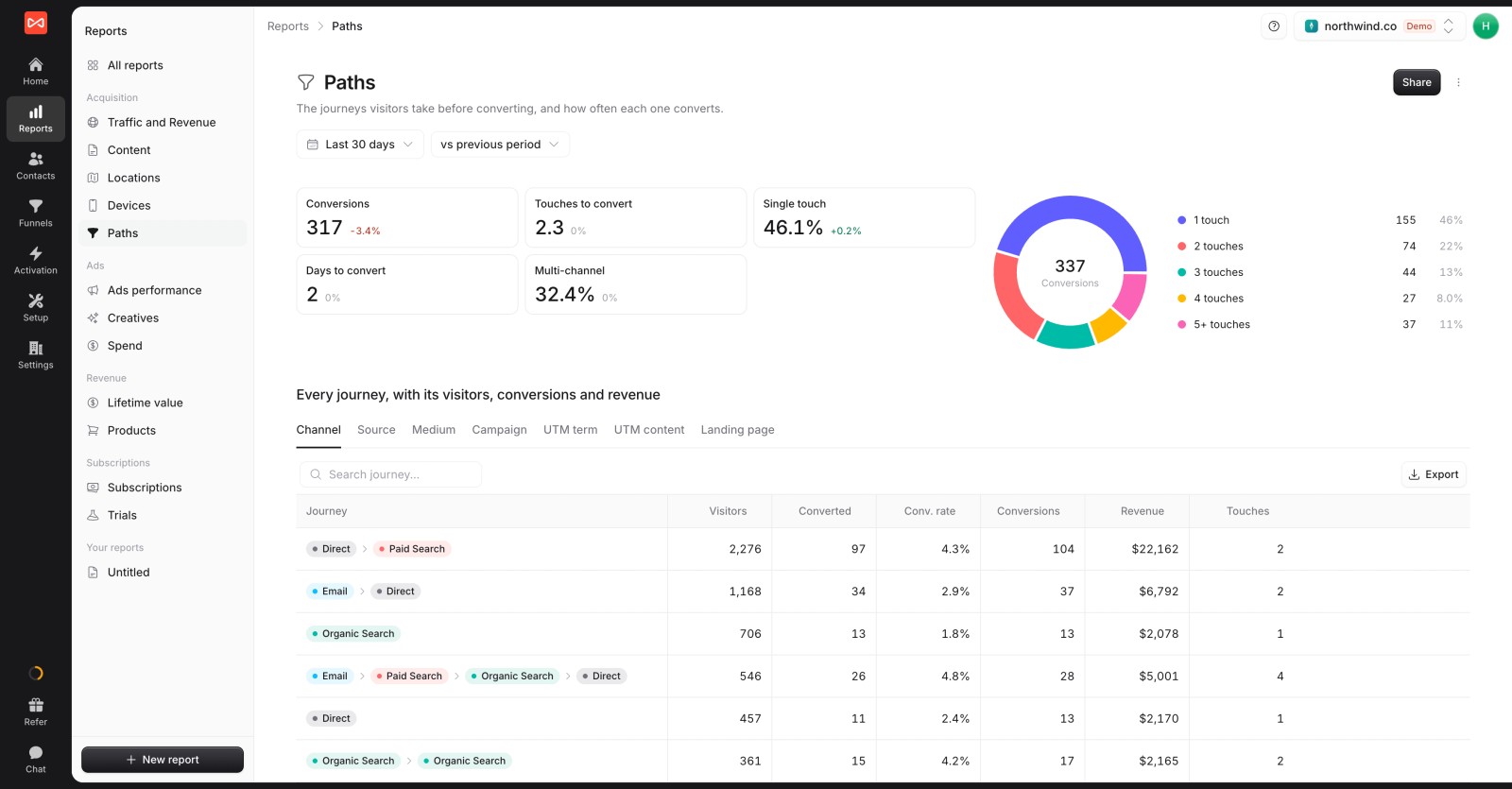
Check the Single touch and Multi-channel figures first. If most of your conversions take one touch, the models will mostly agree. If a third or more are multi-channel, the model you pick will change your budget.
Tune the settings that shape the journey
- Lookback window: set it under Settings, then Preferences. Lead reports use it. Stages and revenue always look back 365 days.
- Company journeys: for B2B, set Credit visits from to Everyone at their company. A colleague's first visit then counts as part of the buyer's journey.
- Channel rules: under Setup, then Channel mapping, decide how sources are sorted into channels. Past visits are re-sorted when you change a rule.
Mistakes that skew attribution
- Comparing ad platform numbers to your model's numbers. Each ad platform credits itself under its own rules. Their totals will add up to more than your actual conversions.
- Switching models every month. Trends only mean something under the same model. Pick a default and keep it.
- Attributing leads, not revenue. The cheapest leads are rarely the best customers.
- Ignoring Unattributed. Imports and offline deals with no tracked visit should stay Unattributed. Folding them into Direct hides the gap.
- Treating the model as the truth. Attribution shows correlation along a journey. For big budget decisions, back it up with a holdout or geo test.
Further reading
Frequently asked questions
-
What is the difference between multi-channel and multi-touch attribution?
They're closely related. Multi-touch attribution splits credit across several interactions. Multi-channel attribution looks at those interactions by channel, such as paid search, email or organic social. In practice, most people use the terms interchangeably.
-
Which attribution model is best?
There's no single best model. Last non-direct is a sensible default for short cycles, and U-shaped suits most B2B lead generation. Compare at least two models before moving budget.
-
What is a good lookback window for attribution?
Ninety days works for most lead generation. For pipeline stages and revenue, use up to a year, so long deals keep their first touch.
-
How does U-shaped attribution split credit?
It gives 40% to the first touch, 40% to the last touch and shares the remaining 20% across the touches in between. A journey with only two touches splits 50/50.
-
Why does Direct get so much credit in last-touch reports?
People often type your URL or use a bookmark for their final visit, after other channels did the persuading. Last non-direct attribution skips that final Direct visit and credits the channel before it.
-
Can I use different attribution models for different reports?
Yes. In SourceLoop, every report has its own model picker, and you can show several models side by side. Your conversion sync to ad platforms can also credit the first or last click.
-
Do I need multi-touch attribution if most customers convert on their first visit?
Not much. If your Paths report shows most conversions as single-touch, every model gives nearly the same answer. Multi-touch matters when journeys span several channels and weeks.




 Paid Social


