











Contact record
Contacts hub
Lead tracking software with the source on every contact
Every contact lands with its first touch, latest touch, and full journey already attached. Lead quality, saved views, companies and deals, and two-way sync with HubSpot, Salesforce, Pipedrive, and Jobber.
Free 7-day trial. No credit card required.
Used by 750+ marketing teams, agencies, and SaaS companies
Why lead tracking breaks
Five reasons your lead list cannot tell you what worked
Most teams track leads in a CRM, a spreadsheet, or both. Either way the one field that decides your budget, where the lead actually came from, is the field nobody can trust.
- 01
Leads arrive with no source
The form fires, the contact is created, and the source field says Direct, Referral, or nothing at all. Nobody can say which campaign paid for it.
Affects DirectReferralUnknown source - 02
The source dies in a spreadsheet
Someone hand-logs where each lead came from, which works until volume grows or that person is away, and then the column quietly stops being true.
Affects SpreadsheetsManual entry - 03
A full CRM is too heavy to start with
Salesforce and HubSpot are built for teams with an admin and a budget per seat. Early on that is a project, not a tool.
Affects SalesforceHubSpotPer-seat pricing - 04
Anonymous visits never become people
Someone reads five pages over two weeks, then fills a form. Most tools record a brand-new contact with none of that history attached.
Affects Anonymous visitsFirst touch - 05
Every lead looks the same in a list
Without a quality mark on the record, sales works the list top to bottom, spam included, and the best leads wait their turn.
Affects Lead scoringSpam
With SourceLoop
A lead record that already knows its source
Contacts created automatically from every form, call, chat, meeting, and payment, with the full journey and the revenue attached from the first visit.
- 01 Every contact created with its real source already attached
- 02 Created automatically, with no manual logging to keep up
- 03 Works before you have a CRM, and syncs into one when you do
- 04 Anonymous sessions stitch to the person the moment they identify
- 05 Every lead marked Good, Not a fit, or Spam, so the list sorts itself
Contacts stack
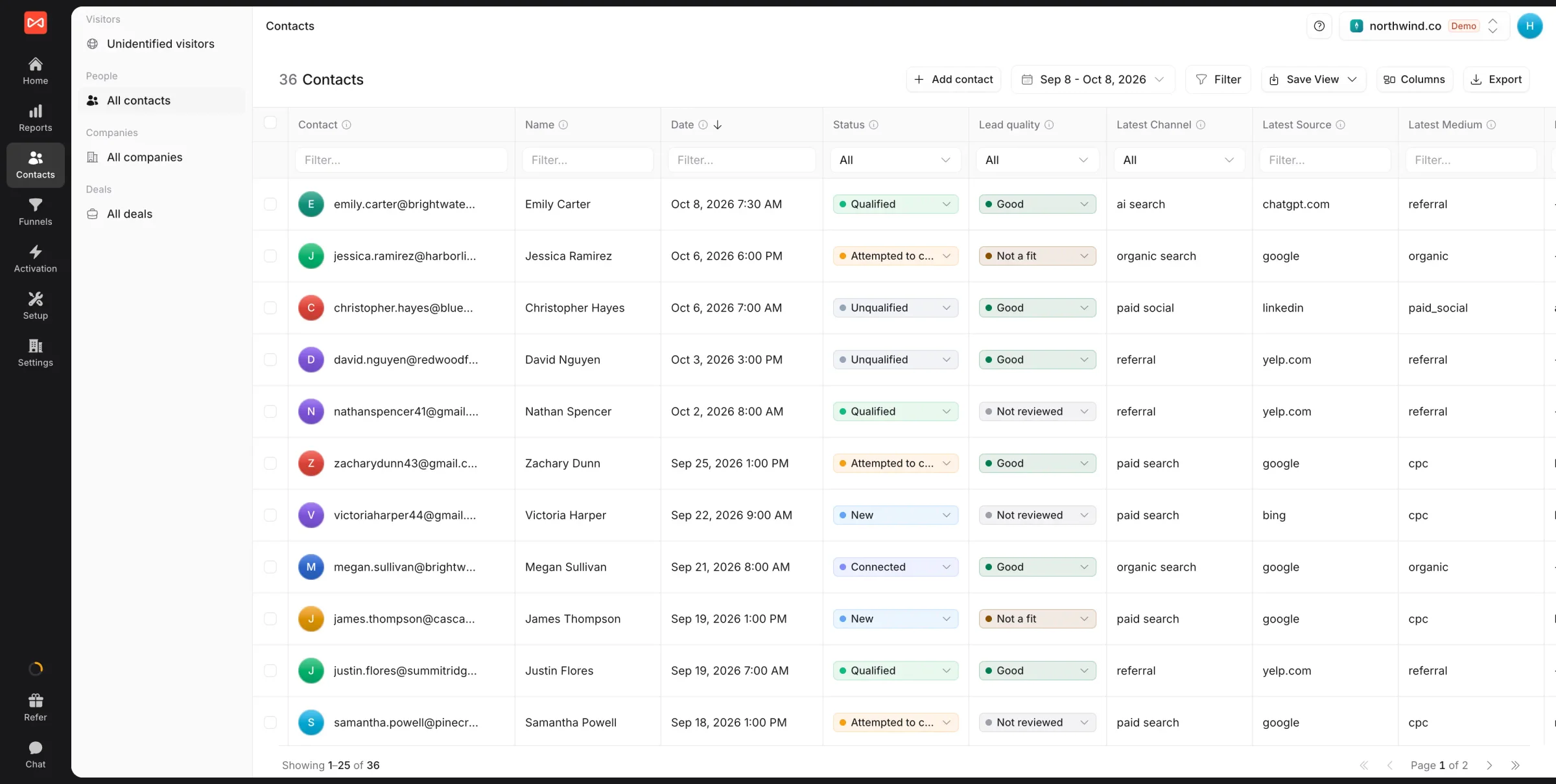
Contact records that answer where every lead came from
A built-in lightweight CRM with source, journey, lead quality, and revenue on every contact, synced two ways with HubSpot, Salesforce, Pipedrive, and Jobber.
Two-way CRM sync
HubSpot, Salesforce, Pipedrive, and Jobber.




Contacts by source
See which channels bring your best contacts.
Full journey
Every touch on the contact, first click to close.


Lead quality
Every lead marked Good or Spam, by your rules or AI.
A
Acme Co · Shivam K
shivam@acme.com
First touch  Google · CPC ·
search_ad
Google · CPC ·
search_ad
Google · CPC ·
search_ad Activity
Visited /pricing 2d ago
Started chat 1d ago
Booked demo 4h ago
Paid $99/mo just now
Lead score 92 / 100 Good lead
Contact detail
Source, journey, and quality on every record
Open any contact. See where they came from, every touch they took to get to a decision, whether they are a good lead, and the revenue they brought in. No more bouncing between Google Analytics, your CRM, and a spreadsheet.
- First-touch and last-touch on every record
- Marked Good, Not a fit, or Spam by your rules
Saved views
Any list of leads, two clicks away
Filter by source, campaign, stage, lead quality, or any custom field you add, like the service a lead asked for. Save the view so the whole team sees the same list, and update stage or status for many leads at once.
- Filter by source, quality, or your own fields
- Change stage and status in bulk
Saved views · 6
All contacts 1,284
 From Google Ads
412
From Google Ads
412 Good leads this month 288
Paying customers 94
Demo last 30d 47
Service: Roof repair 61
Companies · this quarter
First touch| Company | People | Came from | Won |
|---|---|---|---|
| Acme Co | 4 | Paid search | $24,000 |
| Northwind | 2 | Organic | $9,600 |
| Globex | 3 |  Paid social Paid social | Open |
Companies and deals
See the whole buying team, not just one form fill
People from the same company are grouped together, and deals come in from your CRM with their stage and amount. When one person clicks the ad and a colleague signs, the revenue still goes back to the ad.
- Every company with its people and journey
- Deals tied to the channel that started them
How it works
Three steps from snippet to a working contact database
No manual contact entry, no spreadsheet to keep up.
-
<script async src="https://t.sourceloop.ai/tracking-v3.js"></script>
01Install the snippet
Page views, conversions, chat, demos, and payments start flowing.
- A
shivam@acme.com
- Source Google / CPC
- Touches 7
- Status Paying
02Contacts created automatically
Every conversion creates or updates a contact with full attribution.
-
Two-way CRM sync
- Outbound Source, quality
- Inbound Stage, revenue
- Status Active
03Sync to your real CRM
HubSpot, Salesforce, Pipedrive, or Jobber. Fields are created for you.
FAQ
Contacts Hub, FAQ
Is this a full CRM replacement?
No, and that's the point. SourceLoop Contacts is a lightweight CRM built for marketing: every contact has its source, journey, lead quality, and revenue. It pairs with HubSpot, Salesforce, Pipedrive, or Jobber as the system of record for sales. For very small teams, Contacts on its own may be enough.
Do I need to manually create contacts?
No. Contacts are created the moment a visitor fills a form, opens a chat, books a meeting, calls, or pays. Each one arrives with its source, journey, and whatever the visitor submitted. You can still add a lead by hand or import offline leads from a spreadsheet.
Can I score leads based on behavior or source?
Yes. Lead quality rules give points for what matters to you, like a company email, a budget answer, the service asked for, or the source, and mark each lead Good, Not a fit, or Spam. Or let Ask AI read the lead's answers and decide. Your CRM's stage can update it later.
Can I build segments by source or campaign?
Yes. Filter contacts by source, campaign, stage, status, lead quality, or any custom field, and save the view for your whole team. Select many leads at once to change their stage or status.
What does two-way sync with HubSpot or Salesforce look like?
Out: each new lead is written into your CRM with its first and latest touch, lead score, and lead quality. In: deals, stages, and revenue come back, so your reports run to closed won. You turn each direction on separately.
Does it track companies and deals too?
Yes. People are grouped into companies by email domain, and deals come in from your CRM with their stage and amount. Each company and deal shows the journey of everyone on it, which matters when one person clicks the ad and another signs.
What is lead tracking software?
Lead tracking software records every inbound lead and what happened before and after it: which campaign brought them in, which pages they read, and whether they became a customer. SourceLoop creates the contact automatically from any form, call, chat, meeting, or payment, with the source already attached.
What is the best software for lead management on a small team?
A full CRM is usually more than a small team needs on day one, and a spreadsheet stops working the moment volume picks up. SourceLoop sits between the two: contacts, sources, lead quality, and saved views with nothing to configure, and a sync into HubSpot, Salesforce, Pipedrive, or Jobber once you outgrow it.
How do I build a lead tracker without a spreadsheet?
You do not build one. The tracker is the by-product of tracking your site: every conversion creates a contact record with its source, journey, and revenue already filled in, so there is no column for anyone to fill in and no chance of it drifting out of date.
How does an anonymous visitor become a named contact?
We hold the browsing history against an anonymous profile. When that person identifies themselves by filling a form, booking a meeting, or clicking an email link, the earlier sessions stitch onto the contact and the original first touch is credited, even if it was weeks before.
Can I send my best leads back to Google and Meta?
Yes. Conversion sync sends Good leads, won deals, and paying customers to Google Ads, Meta, and ChatGPT Ads, with their value, so each platform's bidding learns what a real customer looks like.
