
What Is Revenue Attribution? How to Tie Revenue to Channels
Revenue attribution links deals, subscriptions and payments to the marketing that started them. Here's what it is and how to set it up.
Table of contents
- What revenue attribution is
- 3 reasons lead counts give you the wrong answer
- 1. Cheap leads aren't cheap customers
- 2. Sales cycles outlast most attribution windows
- 3. Customers from different channels are worth different amounts
- The 4 kinds of revenue you can attribute
- 1. Won deals
- 2. One-time payments and orders
- 3. Subscriptions
- 4. Lifetime value
- How to set up revenue attribution with SourceLoop
- Step 1: Capture the source on every visit
- Step 2: Connect where the money lands
- Step 3: Switch the report's outcome to revenue
- Step 4: Choose a model and a journey scope
- Step 5: Put spend next to the revenue
- Step 6: Check lifetime value by channel
- Mistakes to avoid
Your ad dashboards count leads. Your CRM, Jobber or Stripe counts money. Most teams never join the two.
So budgets get set by cost per lead, and nobody finds out which channel's leads actually paid. For an insurance broker, a home services company or the agency running their ads, that's the number that matters.
Revenue attribution fixes that. In this guide, I'll cover what it is, why it changes the answer, the four kinds of revenue you can attribute, and how to set it up.
What revenue attribution is
Revenue attribution credits revenue to the marketing touchpoints that led to it. Every won deal, payment or subscription is traced back to the visits, ads and campaigns in that customer's journey.
It answers a different question from lead attribution:
| Lead attribution | Revenue attribution | |
|---|---|---|
| Question it answers | Which channels bring in leads? | Which channels bring in money? |
| Outcome counted | Form fills, calls, sign-ups | Won deals, payments, subscriptions, lifetime value |
| Data you need | Website tracking | Website tracking joined to the CRM and payment system |
| Lookback window | Weeks | Months, often a full year |
| Main metric | Cost per lead | Cost per customer, revenue per dollar spent |
You still use the usual attribution models: first touch, last touch, U-shaped and the rest. The difference is the outcome you hand them.
3 reasons lead counts give you the wrong answer
Cost per lead feels like a stand-in for revenue. Here's where it stops being one.
1. Cheap leads aren't cheap customers
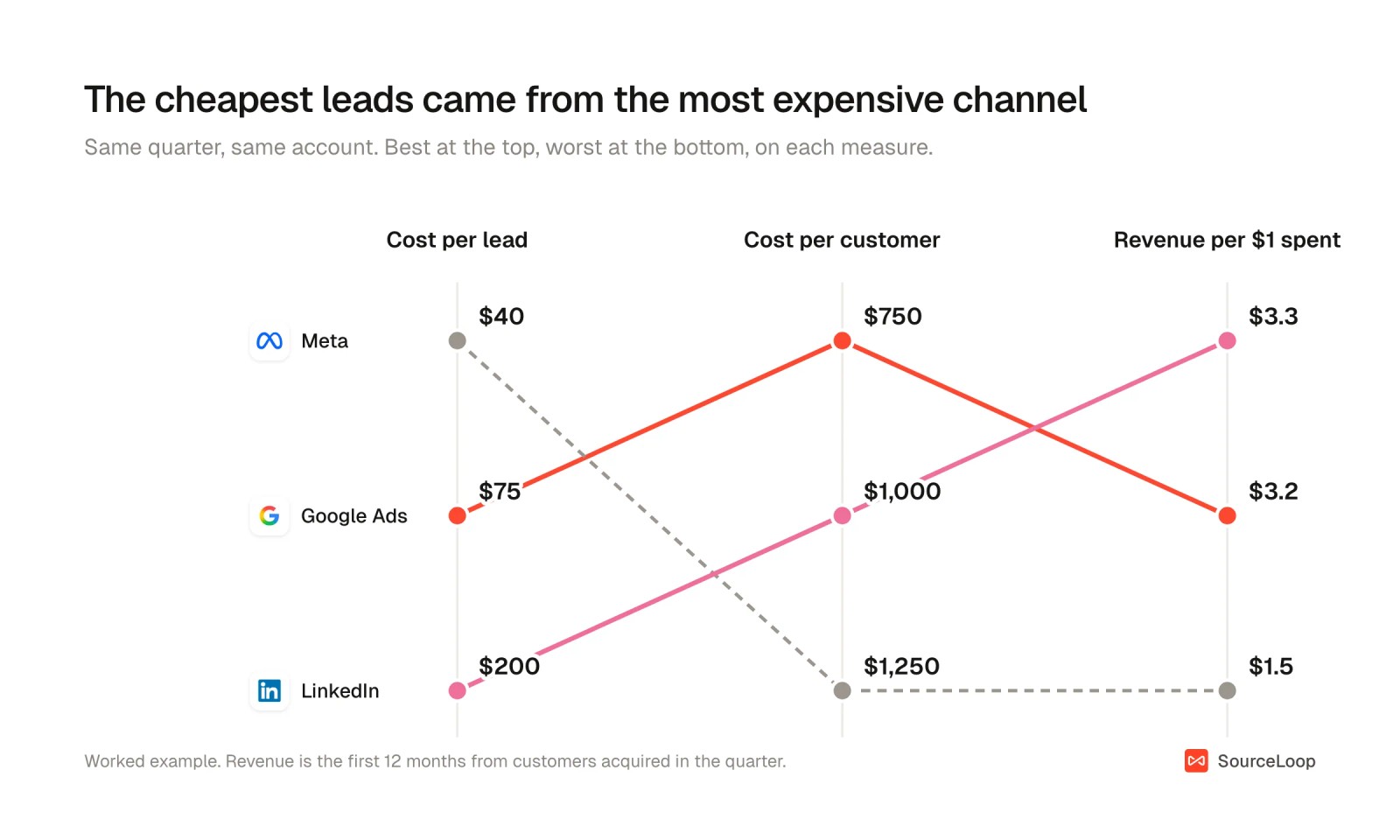
Here's one quarter from a commercial insurance brokerage spending on three platforms. A customer here is a signed policy. Ranked by cost per lead, Meta wins easily. Ranked by what each channel cost per paying customer, it comes last.
| Channel | Spend | Leads | Cost per lead | Customers | Cost per customer | 12-month revenue | Revenue per $1 |
|---|---|---|---|---|---|---|---|
| Google Ads | $30,000 | 400 | $75 | 40 | $750 | $96,000 | $3.20 |
| Meta | $20,000 | 500 | $40 | 16 | $1,250 | $30,400 | $1.52 |
| $25,000 | 125 | $200 | 25 | $1,000 | $82,500 | $3.30 |
A team optimizing for cost per lead would move money from LinkedIn to Meta. Revenue says do the opposite.
Patterns like this are why Meta lead quality comes up so often, and why cost per conversion only means something when the conversion is worth something.
2. Sales cycles outlast most attribution windows
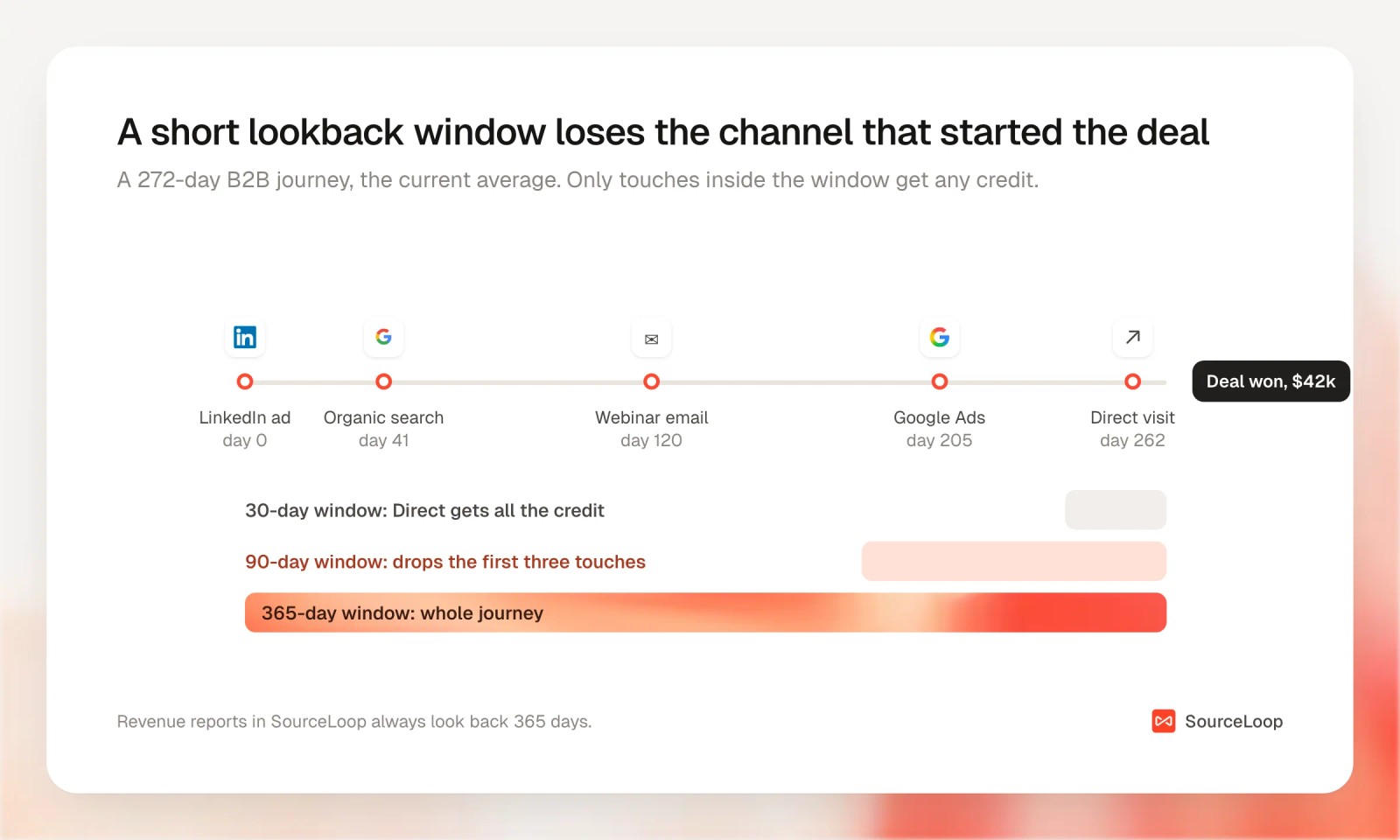
A policy quote, a roofing estimate or a software demo rarely closes the week the lead comes in. At the far end, Dreamdata's 2026 benchmark found the average B2B software journey now runs 272 days and 88 touchpoints from first marketing touch to closed revenue, with about 10 people involved on the buyer's side.
Most lead generation cycles are much shorter than that, but the problem is the same. A lookback shorter than your sales cycle can't see where the deal started. The channel that introduced the buyer drops out, and whatever came last takes the credit.
The same data shows how much the outcome matters. Measured against closed-won revenue, LinkedIn returned 121% on ad spend, Google Search 67% and Meta 51%.
3. Customers from different channels are worth different amounts
Two channels can produce the same number of first purchases and very different lifetime value.
A study of a German bank found referred customers were about 16% more valuable than similar customers acquired other ways, and the gap held over six years. Research on a web hosting firm found customers who arrived through word of mouth added roughly twice the long-term value of those brought in by paid marketing.
If you only count the first payment, you'll undervalue the channels that bring in customers who stay.
The 4 kinds of revenue you can attribute
Which ones apply depends on how you sell.
1. Won deals
For lead generation and service businesses, where a lead becomes revenue after a quote or a sales call: insurance policies, legal cases, home service jobs. Revenue is the deal amount when it's marked won in HubSpot, Salesforce or Pipedrive. You can also attribute earlier stages, such as quotes sent, to see pipeline before it closes.
2. One-time payments and orders
For services paid online, such as bookings, deposits and invoices, and anything sold at checkout. Revenue is each payment from Stripe or a similar system, minus refunds.
3. Subscriptions
For SaaS and memberships. Track new MRR, trials that convert and churn by acquisition channel. A channel that brings in annual plans looks very different from one that brings in monthly plans that cancel after two months.
4. Lifetime value
The cumulative revenue from every customer a channel acquired, measured over months. It's the slowest number to mature and the most honest one for setting how much you can pay to acquire a customer.
How to set up revenue attribution with SourceLoop
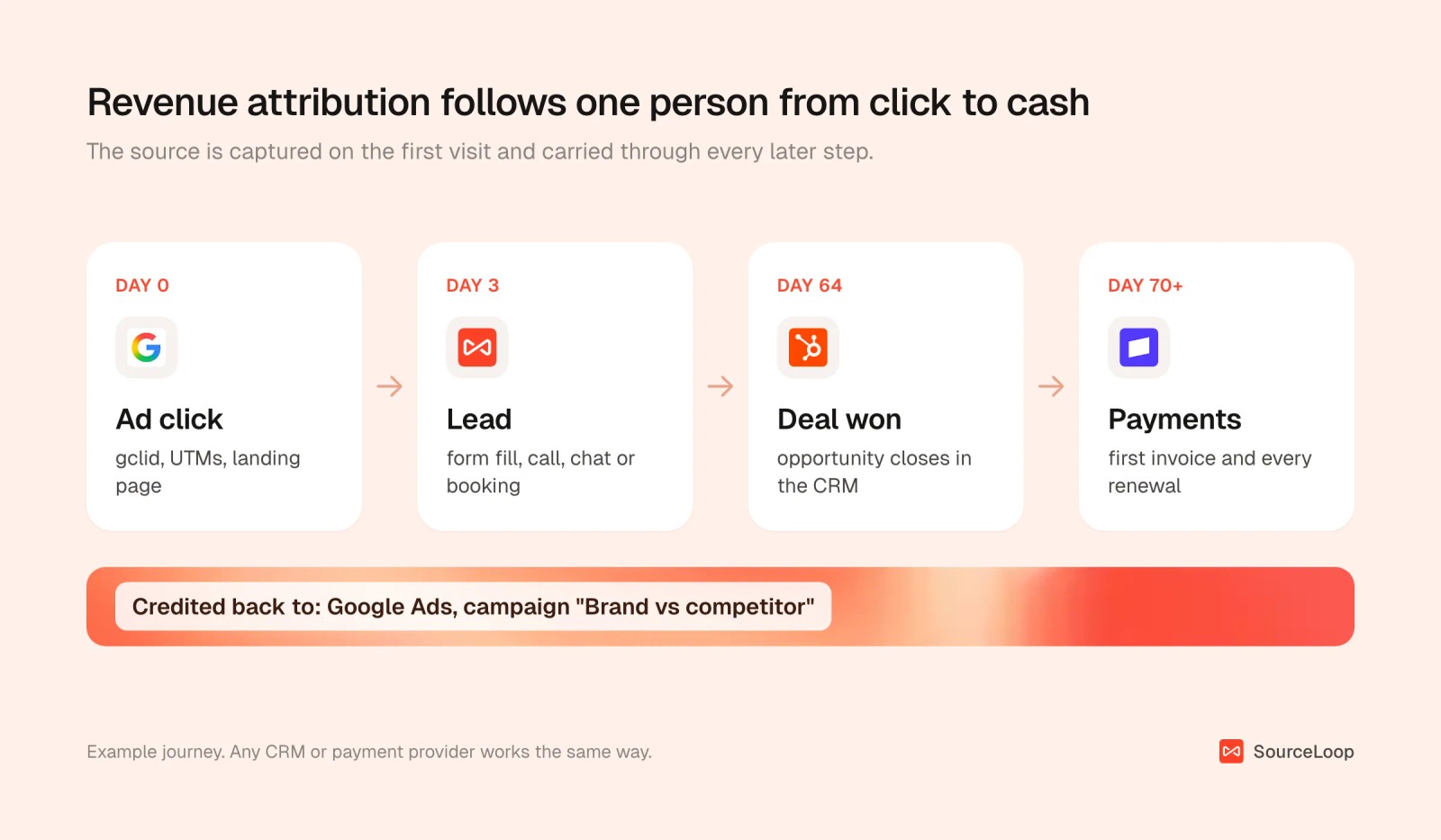
The steps below use SourceLoop, a marketing attribution and revenue measurement tool. It records the source of every visit, keeps it attached to the person when they convert, and follows them into your CRM and payment system. Revenue reports then credit each dollar back to the channels in that person's journey.
Step 1: Capture the source on every visit
Install the tracking script under Setup > Tracking code. From then on, each visit's UTMs, click IDs, referrer and landing page are stored, and they stay attached when the visitor fills in a form, starts a chat, calls or books a meeting.
Visits on different devices or sessions are stitched to the same person once they identify themselves. Open any contact and you can see the whole journey, with first touch and last touch side by side.

Step 2: Connect where the money lands
This is the step most setups skip.
- Lead generation and sales-led businesses: connect HubSpot, Salesforce or Pipedrive. Contacts, companies and deals sync both ways, and won deals become revenue.
- Home services: connect Jobber. Each client's quotes, jobs and invoices become one deal, with revenue booked per invoice against the channel that brought the client in.
- Payments: connect Stripe, Paddle, Polar, Lemon Squeezy or Dodo Payments under Setup > Payment, using a webhook and signing secret. Shopify connects through its app.
- Anything else: send orders through the tracking script or the API.
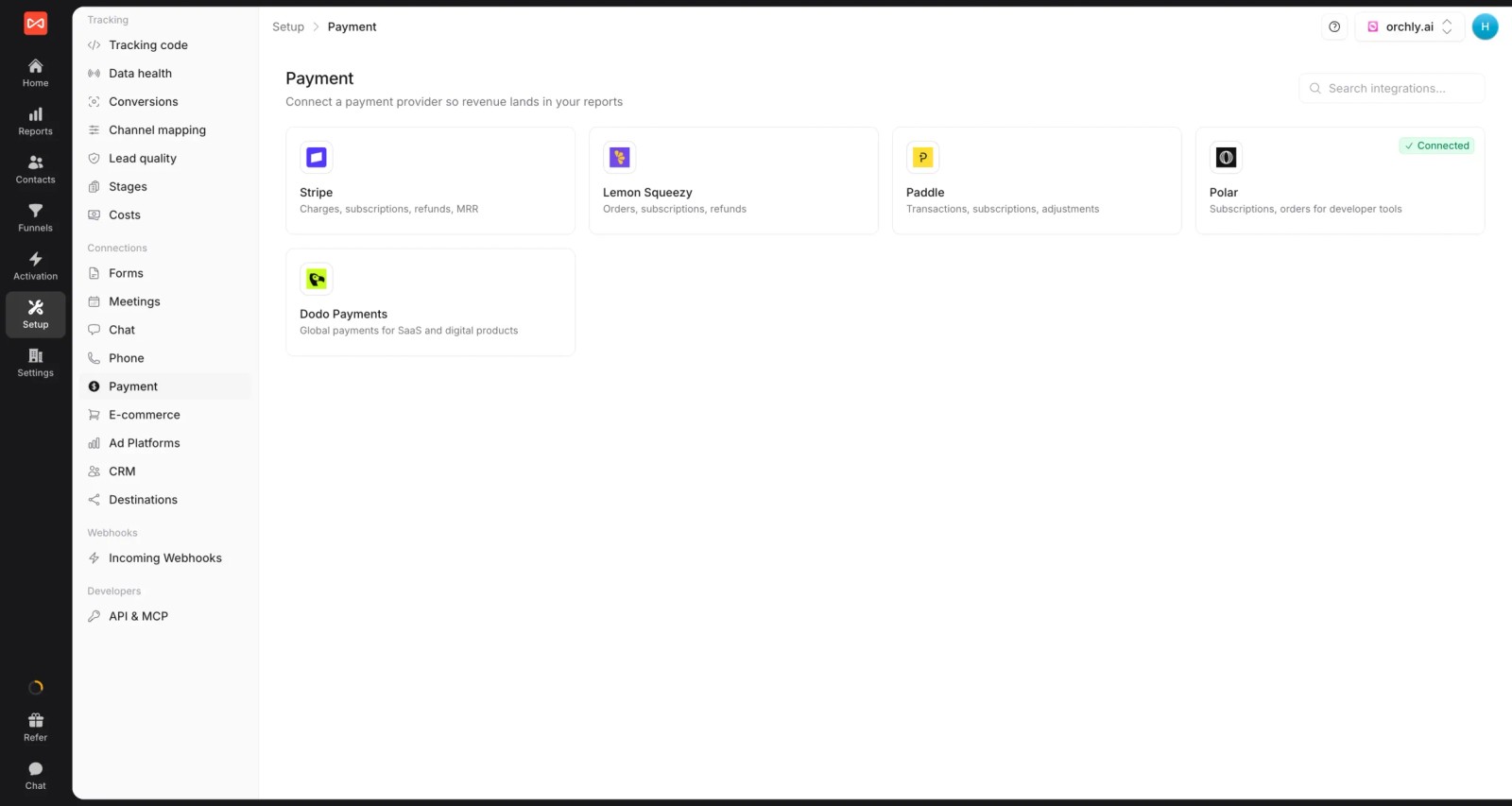
Money from customers who arrived before tracking started is labeled Unattributed. It never gets quietly folded into Direct, so revenue by channel always adds up to your real total. The Stripe lead source guide covers the payment side in detail.
Step 3: Switch the report's outcome to revenue
Open Reports > Traffic and Revenue and use the outcome picker. The same journey data can attribute all conversions, contacts by CRM stage, companies by stage, deals by status, subscriptions, payments or revenue.
Agencies get the same view per client. Each client has its own workspace, and the report can go to the client as a live link, so you're reporting the revenue your ads produced, not just leads.
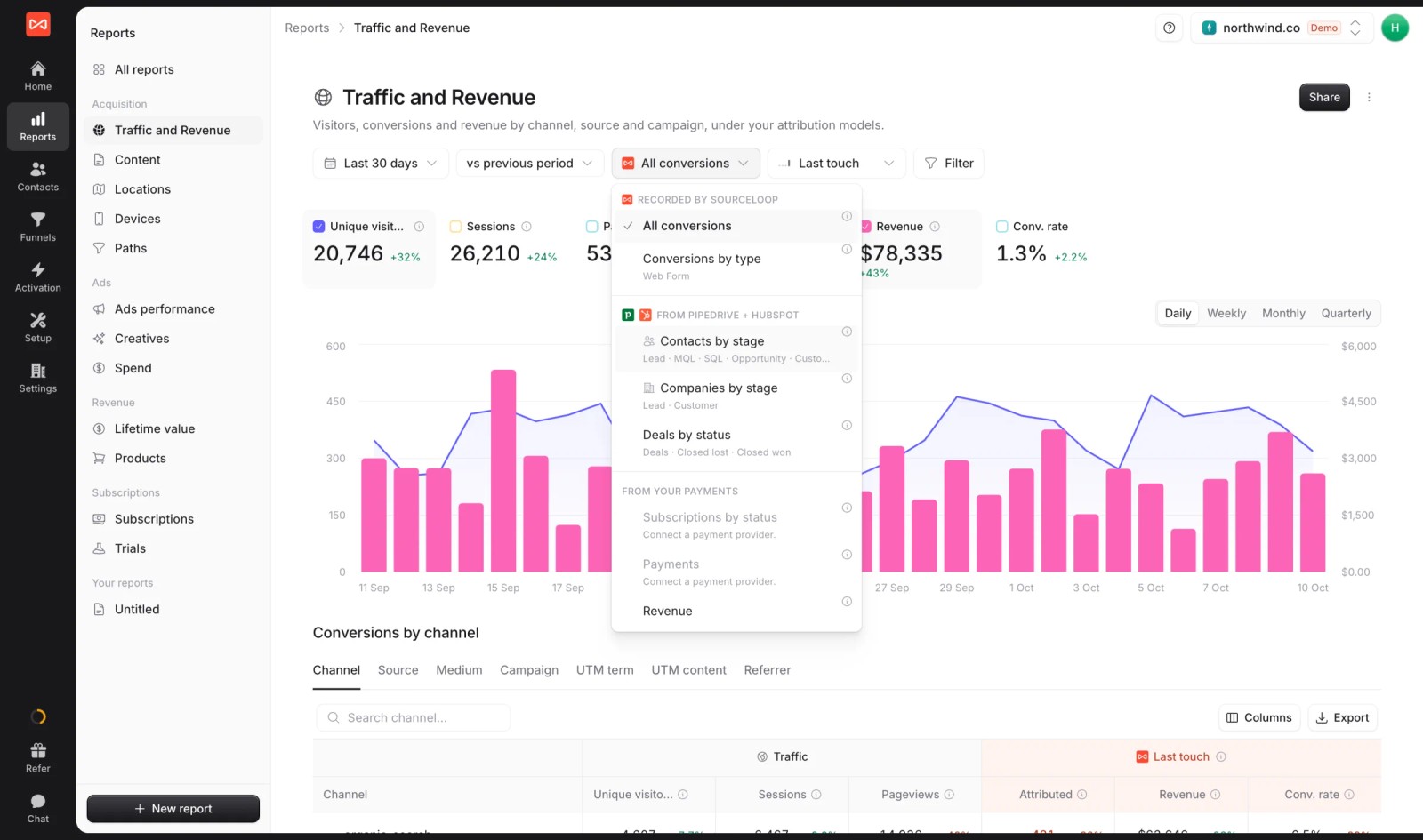
Revenue and stage reports always look back 365 days, whatever your lead lookback is set to. That keeps the first touch on long deals.
Step 4: Choose a model and a journey scope
Revenue attribution works with any model. As a starting point:
- First touch shows which channels start revenue.
- Last non-direct shows which channels close it.
- U-shaped splits credit between the two, and suits most businesses where a lead is followed by a quote or a sales call.
Put two side by side and look at where they disagree. Our guide to marketing attribution models goes through each one.
If you sell to companies, as a commercial insurer or a SaaS business does, set Credit visits from to Everyone at their company under Settings, Preferences. A deal then also credits the colleague who first found you on search, along with the person who signed, which matters when B2B buying groups involve several people.
Step 5: Put spend next to the revenue
Connect Google Ads, Meta and ChatGPT Ads so spend syncs daily, and add other costs (agencies, sponsorships, tools) under Setup > Costs. Now every channel has a cost per customer and a revenue per dollar to go with its cost per lead.
The Creatives report goes down to the ad: each creative shows credited ROAS beside the ROAS the platform reports for itself.
Run your numbers through the customer acquisition cost calculator if you want a quick sanity check.
Step 6: Check lifetime value by channel
Open Reports > Lifetime value. It groups paying customers by acquisition channel and by month of first payment, so you can see which channels bring in customers who keep paying.
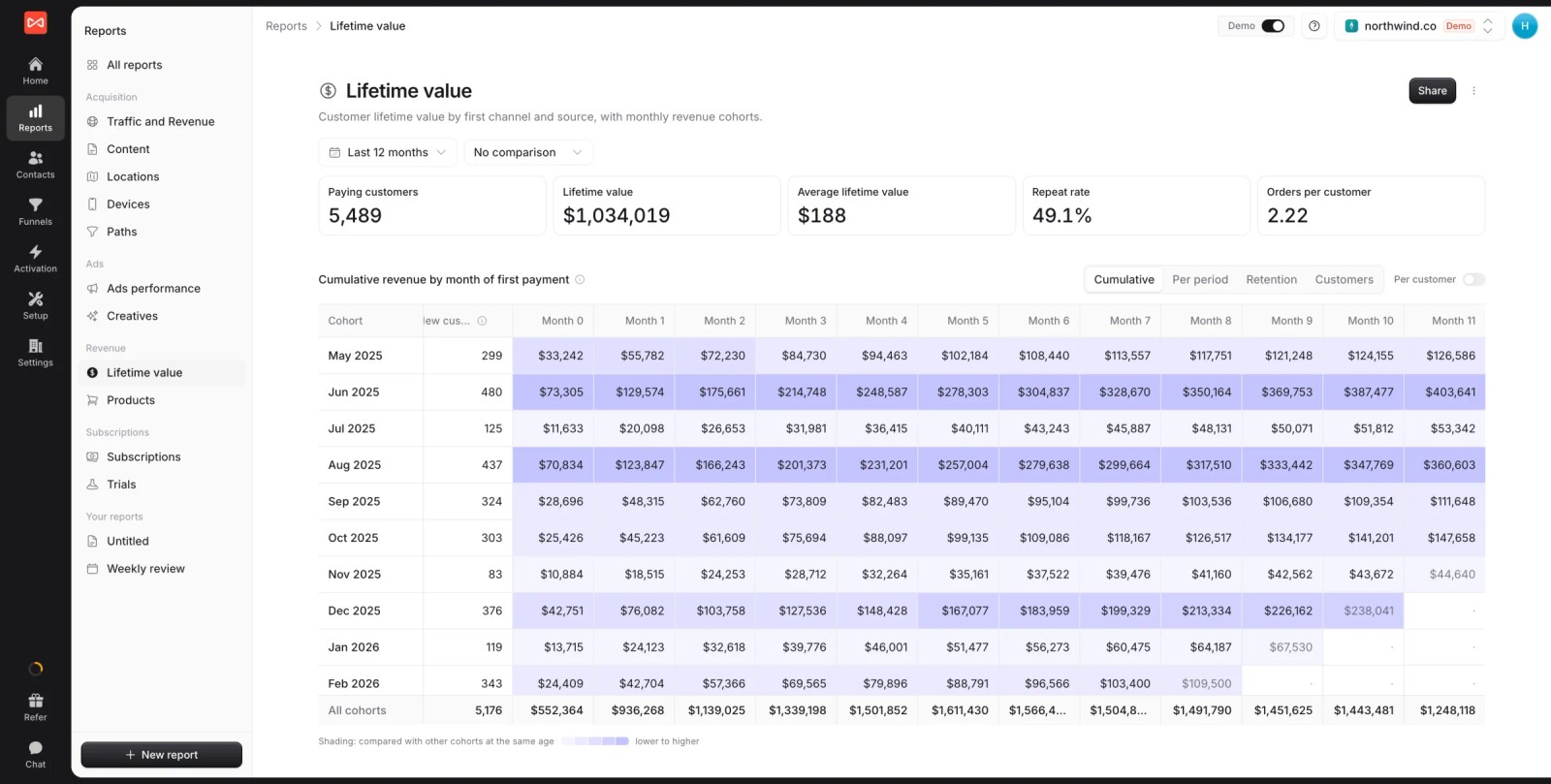
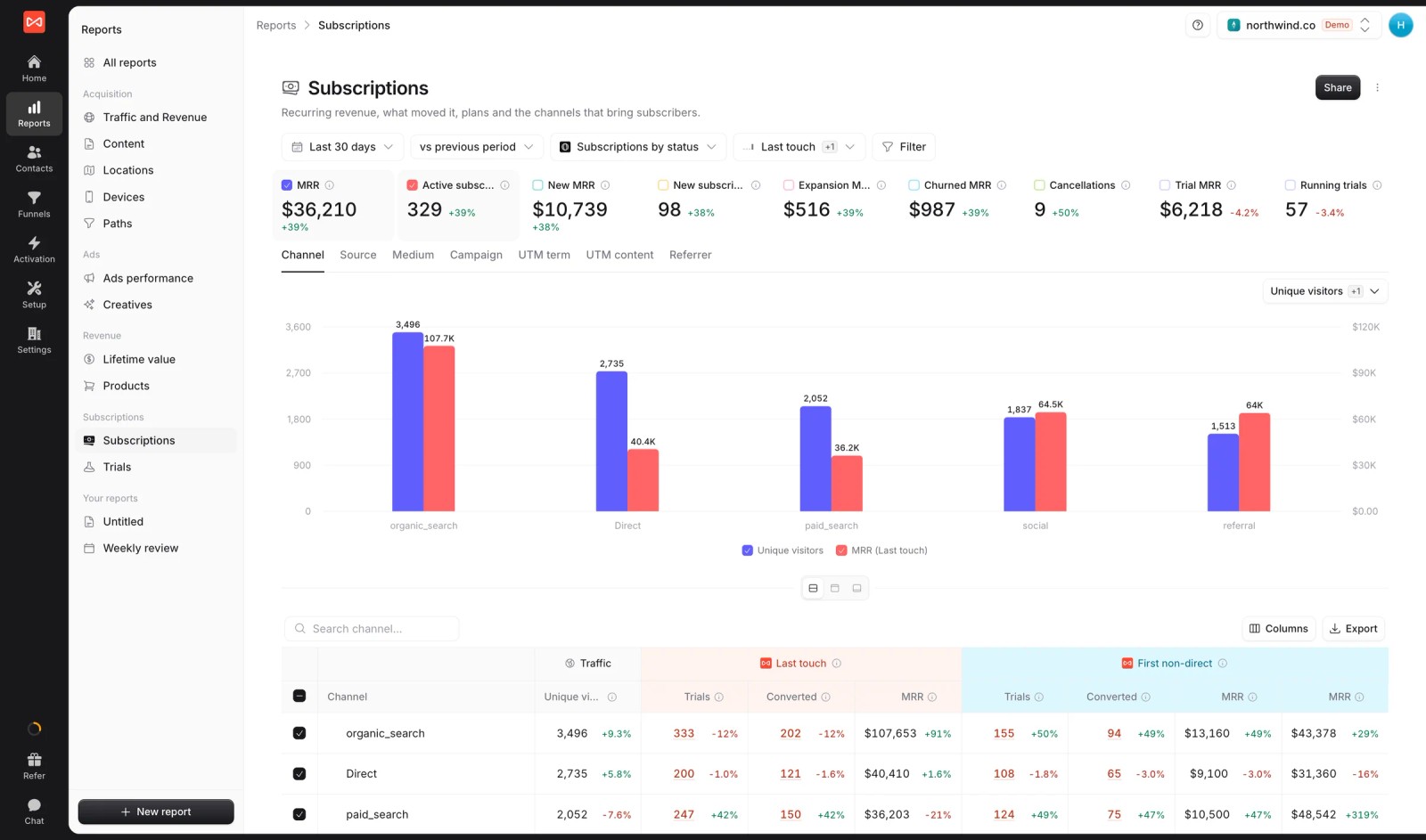
For subscription businesses, the Subscriptions report shows MRR, new MRR and churn by channel, with first touch and last touch next to each other.
A useful rule: set a target cost per customer for each channel separately, based on that channel's 12-month revenue per customer.
Mistakes to avoid
- Stopping at the form fill. If the CRM or payment system isn't connected, you're doing lead attribution with a different name.
- Using a short lookback for revenue. Thirty days works for impulse buys. It hides the start of any deal that needs a quote or a sales call to close.
- Counting refunds and trials as customers. A $0 trial or a refunded order shouldn't make a channel look good.
- Folding untracked revenue into Direct. Keep it Unattributed so you can see how much of your revenue tracking actually covers.
- Judging new channels too early. LTV takes months to mature. Compare cohorts of the same age.
For the bigger picture, read how closed-loop attribution connects marketing and sales data, how to build multi-touch attribution reports people actually use, and which revenue attribution tools are worth a look.
Frequently asked questions
-
What is revenue attribution in marketing?
Revenue attribution is the practice of crediting revenue, such as won deals, payments and subscriptions, to the marketing channels, campaigns and ads that led each customer to buy. It uses the same attribution models as lead attribution but measures money.
-
How is revenue attribution different from lead attribution?
Lead attribution counts form fills, calls and sign-ups. Revenue attribution follows those leads into the CRM and payment system and credits the money they eventually produce. The two often rank channels very differently, because lead quality varies by channel.
-
Which attribution model is best for revenue?
There's no single best one. First touch shows what starts revenue, last non-direct shows what closes it, and U-shaped is a sensible default when leads close through sales. Compare two models and pay attention to channels where they disagree.
-
What lookback window should I use for revenue attribution?
Long enough to cover your full sales cycle. For many lead generation and service businesses that's one to three months, and for SaaS or commercial deals it can be a year. SourceLoop uses 365 days for all revenue and CRM stage reports so the first touch on long deals isn't lost.
-
Do I need a CRM to do revenue attribution?
You need wherever your revenue is recorded. Lead generation and sales-led businesses need their CRM (or Jobber, for home services) connected so won deals count. Self-serve SaaS and businesses that take payment online can attribute revenue straight from Stripe, Paddle or similar.
-
How do I attribute revenue from customers acquired before tracking?
You can't credit a channel that was never observed. Keep that revenue labeled Unattributed. Over time, the share of revenue that's attributed grows as new customers come in through tracked journeys.




 Paid Social


