











Native CRMs
CRM sync
CRM attribution for HubSpot, Salesforce, Pipedrive, and Jobber
Every lead lands in your CRM with where it came from. Deals and revenue come back, so you see which channel makes money, not just leads. Any other CRM connects by webhook.
Free 7-day trial. No credit card required.
Trusted by teams running HubSpot, Salesforce, Pipedrive, and Jobber
Lead source pollution
Why the lead source field in your CRM cannot be trusted
Marketers call it lead source pollution: the one field that decides where budget goes is filled in by guesswork, overwritten by the next click, or left blank. Five things cause it.
- 01
Half your leads say Direct or blank
When no campaign tag survives the journey, the CRM records nothing useful and every report built on that field inherits the gap.
Affects DirectReferralBlank - 02
Each new touch overwrites the last
A single source field cannot hold a journey. The last click stamps over the first, so the campaign that introduced the buyer disappears from the record.
Affects Last-touch overwriteSingle-value fields - 03
A rep types it in by hand
Picklists get guessed at during data entry, and nobody goes back to correct them. Within a quarter the field is fiction that everyone still reports on.
Affects Manual entryPicklists - 04
HubSpot attribution only sees HubSpot
Native attribution reports credit the interactions your CRM recorded. They never see ad spend, so they can count contacts but cannot tell you cost per customer.
Affects HubSpot attribution reportsSalesforce campaign members - 05
Revenue never travels back
The deal closes in the CRM and nothing tells marketing which campaign earned it, so budget keeps chasing lead volume instead of customers.
Affects Closed-wonDeal value
With SourceLoop
A lead source field that is right on create
Real source written the moment the contact is created, first and last touch both kept, and closed-won revenue flowing back to the campaign that earned it.
- 01 The real source written on create, never Direct and never blank
- 02 First touch and last touch both stored, neither overwriting the other
- 03 Written automatically, so no rep has to guess at a picklist
- 04 Ad spend joined to CRM deals, not CRM-only data
- 05 Closed-won revenue flows back to the campaign that produced it
CRM sync stack
Source, journey, and revenue, written straight into your CRM
Native CRMs in one click, any other CRM by webhook. Source on every contact and deal, only the leads worth calling, and revenue flowing back to the campaign that earned it.


Any other CRM
Everything else via webhook, Zapier, n8n, and Make.
Contacts and deals
Source on every contact and deal, in fields you choose.
Good leads only
Spam never reaches your sales team.
Deals sync back
Deals and revenue flow back to the campaign that earned them.
Connected CRMs · 4
 HubSpot 3,210 Live
  Salesforce 1,940 Live
  Pipedrive 872 Live
  Jobber 436 Live
 Native CRM integrations
HubSpot, Salesforce, Pipedrive, and Jobber, in one click
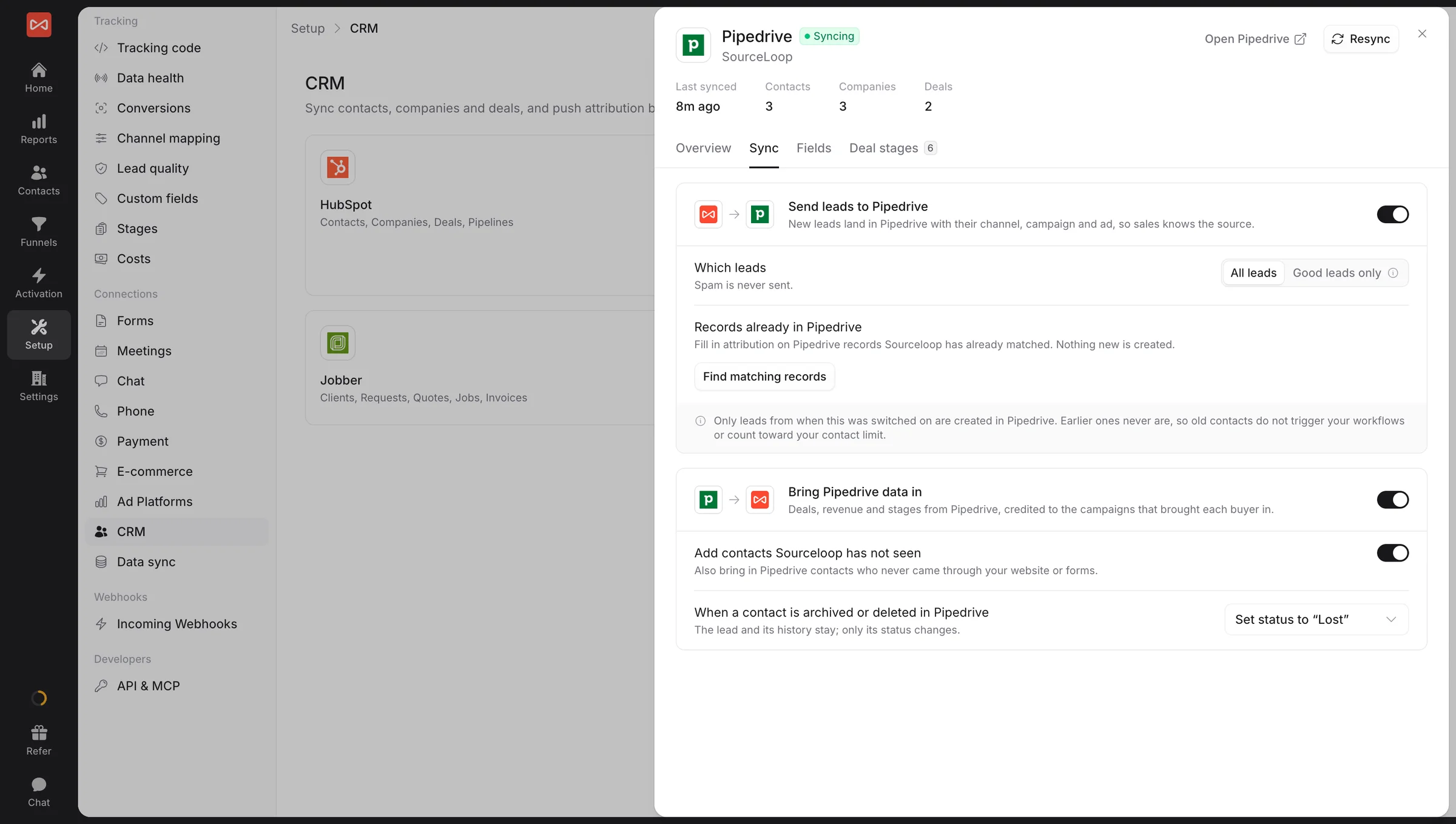
Sign in once. New leads go into your CRM with their first and latest touch, lead score, and lead quality. Deals, stages, and revenue come back the other way. For Jobber, requests and jobs come in too, so a finished job ties back to the ad that booked it.
- Send to your CRM, pull from it, or both
- Only new leads become new records, your old ones stay put
Inside HubSpot
Your reps see how every lead found you, without leaving HubSpot
Open any contact, company, or deal and the SourceLoop panel sits in the sidebar: first and latest touch in plain words, lead quality, and the last few visits. Reps know what the lead read before they pick up the phone. No extra login, nothing to set up.
- On contacts, companies, and deals
- A deal shows the journey of everyone on it
SourceLoop Good lead First touch Paid search, campaign brand-uk Landed on /pricing
Latest touch Email, campaign october-webinar 7 visits before converting
Latest visits
Open full journey - TodayEmail → /demoBooked demo
- Oct 6Organic → /blog/attribution
- Oct 2Paid search → /pricing
Deal · Acme Co
+ $24,000 Stage Closed won
First touch channel Paid search
First touch campaign brand-uk
Latest touch channel Email
Visits before deal 14
Journey Open in SourceLoop
Deals and revenue, closed loop
Revenue by channel, in SourceLoop and in your CRM
When a deal moves stage or closes, SourceLoop credits the amount to the channel and campaign that brought its people. The source is also written onto the deal itself, so your CRM's own revenue reports can finally group by first-touch channel.
- Deal stage and amount come back automatically
- First and latest touch written onto every deal
Any CRM via webhook and automation
Not on a native CRM? Fire a webhook instead
Not on HubSpot, Salesforce, Pipedrive, or Jobber? Send a webhook, or connect through Zapier, n8n, or Make, and every lead still lands with its source, first and latest touch, and lead quality. The same details native CRMs get, so your reports match across every tool.
- Webhook plus Zapier, n8n, and Make support
- Same lead details as the native CRMs
Webhook destinations · 4
Webhook endpoint 1,420 Live
 Zapier 986 Live
 n8n 512 Live
Make 308 Live
How it works
Three steps from connect to closed-loop sync
No middleware to run, no fields to build by hand, no engineering ticket to file.
- 01
Connect your CRM
Sign in to HubSpot, Salesforce, Pipedrive, or Jobber, or point a webhook at any other CRM.
-
Field mapping
- first_touch First channel
- lead_quality Lead quality
- lead_score Lead Score
02Map your fields
SourceLoop creates its fields for you. Change where each one goes if you like.
-
Sync live
- Leads pushed 6,022
- Deals synced 418
- Revenue tied $1.2M
03Switch sync on
New leads go in with their source. Deals and revenue come back on their own.
Customer stories
Teams that see the true source on every CRM record
From agencies and SaaS companies to clinics and law firms, teams use SourceLoop to trace every lead and every dollar back to the campaign that earned it.

Halden & Wright Agency
We run paid media for 14 clients. Every lead now lands in their CRM with the campaign, keyword and ad behind it, so we can prove our impact with numbers clients can check for themselves.
- Lower cost per lead
- 41%
- Client accounts tracked
- 14

ploomly B2B SaaS
We started sending only qualified demos back to Google Ads as conversions. Within six weeks, paid search was filling our calendar with buyers who fit our ICP, and close rates followed.
- SQLs from paid search
- +38%
- Demo-to-close rate
- 2.1x

Cedar Row Dental Clinics
Half our new patients book by phone. Multi-touch attribution on every call showed us which ads start a booking and which ones close it, so we cut the two channels that did neither.
- Of bookings now attributed
- 63%
- Monthly spend reallocated
- $9k

Fernhill Legal Professional services
Most of our leads showed up as Direct in the CRM. SourceLoop now gives us the full journey behind every inquiry, chat and call, from the first search to the booked consultation.
- More consults per dollar
- 27%
- Lead channels in one report
- 4
FAQ
CRM sync FAQ
Which CRMs do you integrate with natively?
HubSpot, Salesforce, Pipedrive, and Jobber connect natively. You sign in once, choose what to sync, and it is live in minutes. No middleware and no API keys to rotate by hand.
My CRM isn't on the list. Can I still sync?
Yes. Send every lead to any other CRM with a webhook, or connect through Zapier, n8n, or Make. Each lead arrives with its source, first and latest touch, and lead quality, the same details native CRMs get.
What data do you write into my CRM?
On each contact: first touch and latest touch (channel, source, medium, campaign, and more), lead score, lead quality, and lead value. On each deal: first and latest touch channel, source, and campaign, the number of visits before the deal, and a link to the full journey in SourceLoop. You pick which CRM fields each one maps to.
What's the difference between one-way and two-way sync?
They are two switches. Sending to your CRM writes source and lead details onto contacts and deals. Pulling from your CRM brings deals, stages, and revenue back into SourceLoop. Turn on one or both. With both on, your reports run from first click to closed won.
Can I attribute closed-won revenue back to the channel?
Yes. Deals sync back with their stage and amount. When one closes, SourceLoop credits that revenue to the channel and campaign that brought the people on the deal. The source is also written onto the deal itself, so revenue by first-touch channel works inside your CRM's own reports.
Can I send only good leads to my CRM?
Yes. Set the connection to Good leads only and spam, tests, and junk never reach your reps. Leads are marked by your lead quality rules or by Ask AI.
Will SourceLoop flood my CRM with old leads?
No. Only leads that arrive after you switch sync on become new CRM records. For records already in your CRM, you can choose to fill in their source fields, without creating anything new.
Can my sales team see the journey inside HubSpot?
Yes. The SourceLoop panel sits in the sidebar of every HubSpot contact, company, and deal. It shows first and latest touch, lead quality, and recent visits, and reps don't need a SourceLoop login.
Will this create duplicate contacts or field sprawl?
No. Each person matches one CRM record by email, or by phone for phone-only leads. SourceLoop writes into a small, labeled group of fields you approve, so nothing writes anywhere you didn't choose.
What is lead source pollution?
It is the slow decay of the lead source field in a CRM. Values get overwritten by the most recent touch, typed in by hand during data entry, or left as Direct when no campaign tag survived. The field still looks populated, so reports keep using it long after it stopped being true. SourceLoop writes the real source when the contact is created and keeps first and latest touch as separate values, so nothing overwrites anything.
Can I use linear or multi-touch attribution in HubSpot?
HubSpot offers several attribution models on Marketing Hub Professional and Enterprise, and they work on interactions HubSpot itself recorded. What they cannot include is ad spend, or touchpoints from tools outside HubSpot. SourceLoop runs first touch, last touch, last non-direct, linear, U-shaped, and time decay on the full journey, next to your spend, using the deals HubSpot already has.
Can you track leads in Salesforce with multi-touch attribution?
Yes. Salesforce handles multi-touch natively through campaign members, which needs every touch set up as a campaign, usually by an admin. SourceLoop writes the source onto the Lead and Contact directly, reads your Opportunities back, and credits closed-won revenue across the whole journey, without that campaign upkeep.
What are examples of lead sources?
Common ones are paid search, paid social, organic search, direct, referral, email, affiliate, events, and outbound. For local businesses, Google Local Services, Yelp, Angi, and Thumbtack are common too. The useful split is between the channel someone came from and the exact campaign, ad, or page behind them. SourceLoop stores both.

 Paid Social


