











Traffic
Website analytics
Website analytics software built for revenue attribution
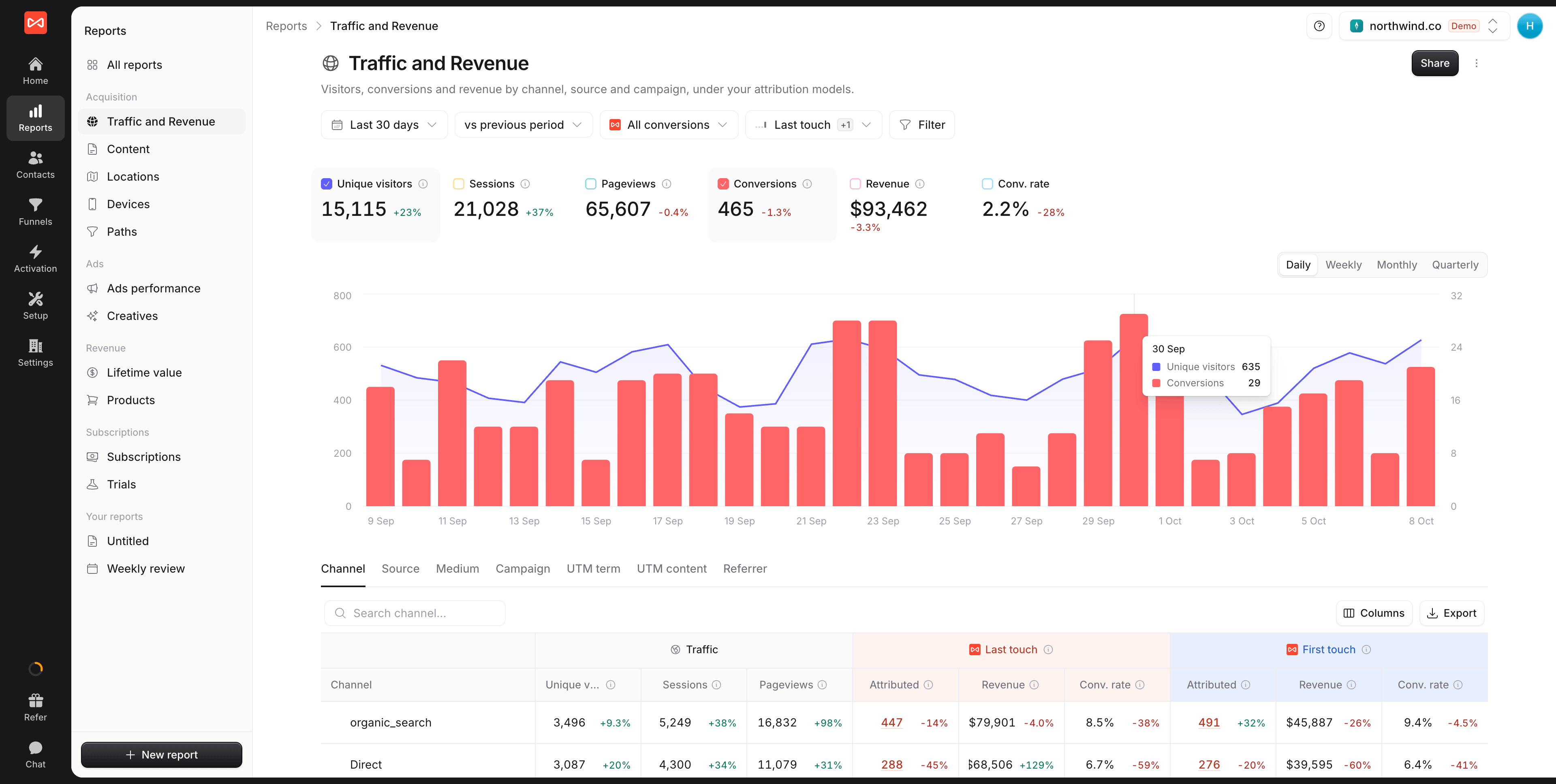
Conversion-focused website analytics that ties every visit, form, call, and CRM deal to revenue, so you see which marketing actually works.
Free 7-day trial. No credit card required.
Used by 750+ marketing teams, agencies, and SaaS companies
The GA4 alternative
A Google Analytics alternative for B2B marketing and revenue
GA4 counts sessions well. It was never built to tell you which campaign produced a customer, and five specific things get in the way.
- 01
You get sessions, never people
Visitors stay anonymous, so you can count traffic but never say which company arrived or what they were worth.
Affects PageviewsSessionsBounce rate - 02
Reports get sampled as you grow
Past a threshold GA4 estimates from a subset, so the same report can return a different number twice.
Affects Data samplingThresholding - 03
Your data expires at 14 months
GA4 deletes user-level data on a default 14-month clock. A B2B cycle longer than that outlives its own first touch.
Affects 14-month retentionUniversal Analytics - 04
Returning visitors become Direct
UTMs are scoped to the session. Someone clicks an ad, leaves, comes back a week later, and the campaign credit is gone.
Affects UTM parametersDirect traffic - 05
The alternatives stop at page counts
Privacy-first tools are cleaner than GA4 but end at visits. Enterprise suites reach revenue at enterprise cost and setup.
Compared with PlausibleFathomMatomoAdobe AnalyticsMicrosoft Clarity
With SourceLoop
Everything GA4 leaves out, on one dataset
Every visit tied to a person, a company, and the revenue it produced, kept for as long as the deal takes to close.
- 01 Every visit tied to a named person and their company
- 02 Never sampled, so every report counts every visit
- 03 Full history kept, so a two-year sales cycle still resolves
- 04 The original source stays attached across sessions and devices
- 05 Page views through to closed revenue, without an enterprise contract
Analytics stack
Analytics that go from page view to closed revenue
Replace GA4 plus a stitch of pixels and tag managers with one first-party tool that ties every visit to a source, a lead, and revenue.
 Organic search
 Google Ads
 LinkedIn
 Direct
 Privacy-first
First-party and cookieless, GDPR-ready with no banners.
Conversions
Conversions and revenue by channel, not just sessions.
Durable tracking
Survives iOS 14, server-side capture keeps paid traffic from resetting to direct.
Attribution models
Compare all 7 models, and catch where last-click and first-touch disagree.
Profiles
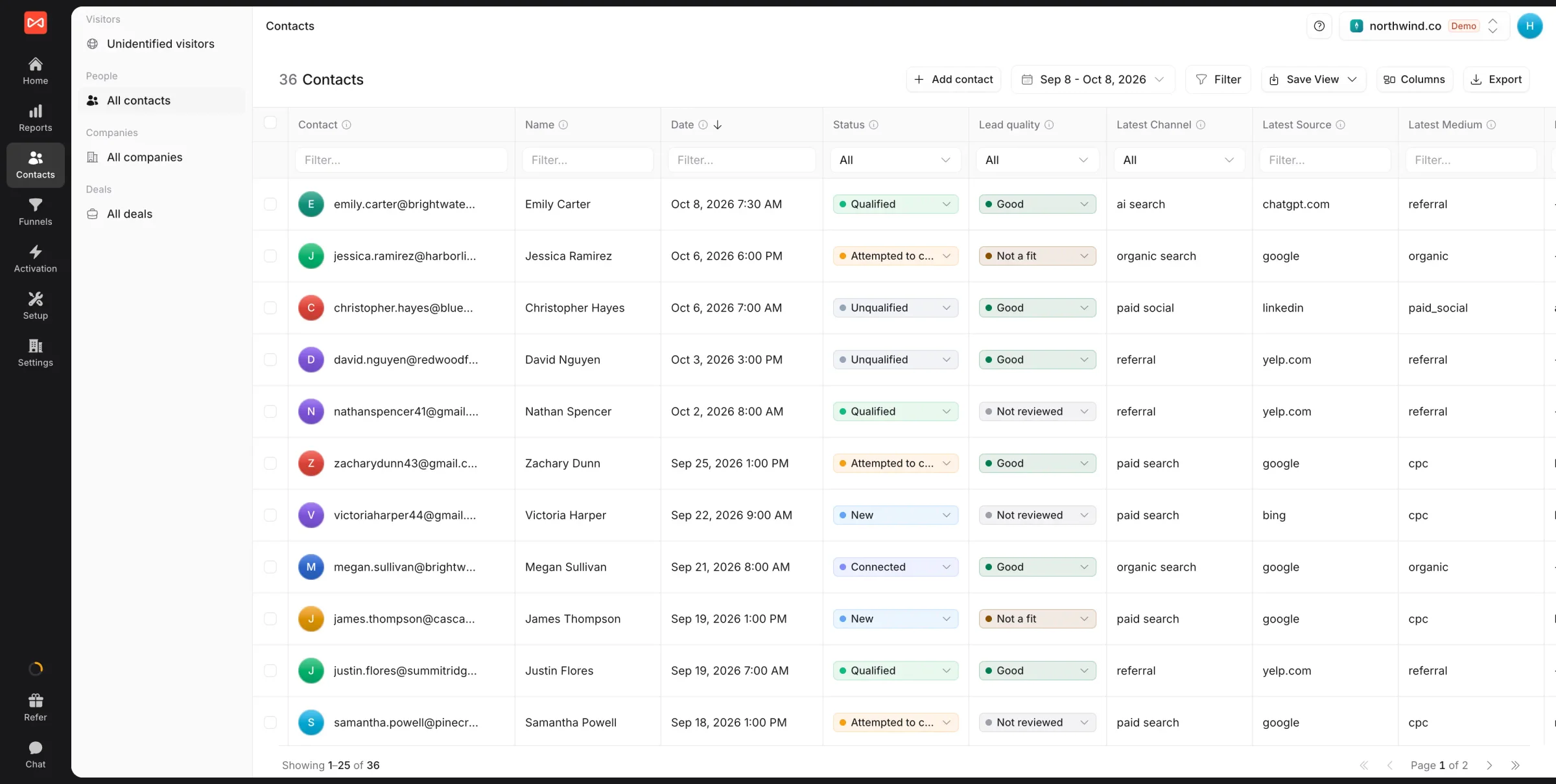
Every visitor gets a profile with company, source, and revenue
See the company, source, journey, and pageviews behind every identified visitor, no separate CDP or data team required.
-
Person-level profiles
Every visit stitched to one identity.
-
Company and firmographics
Know the account behind the visit.
-
Source on every profile
First-touch and last-touch attached.
-
Synced to your CRM
HubSpot, Salesforce, and Pipedrive.
Journey
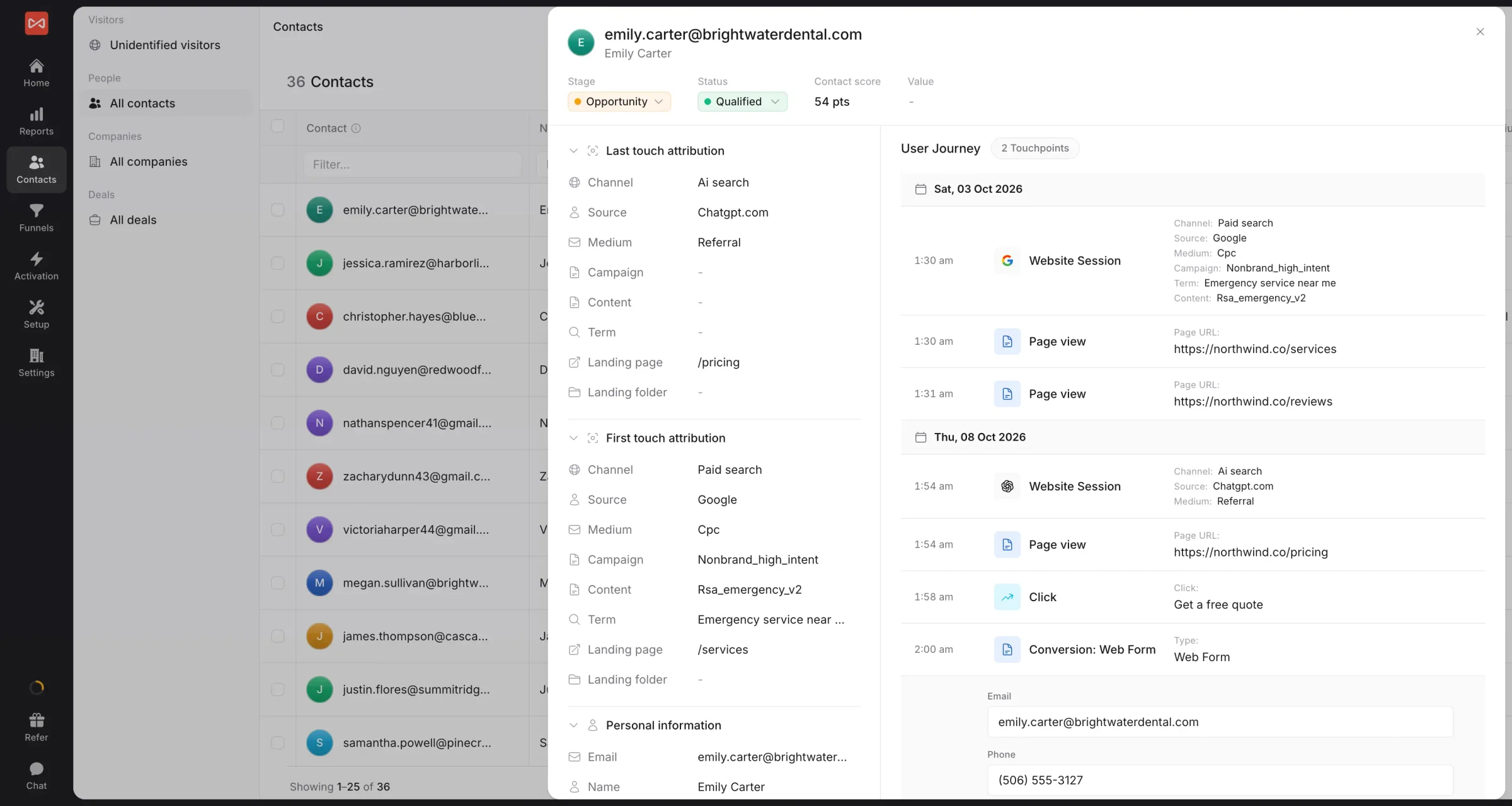
Replay every page and touchpoint on the path to conversion
Every page, session, and touch a visitor took before they converted, in order and tied to the channel that drove each visit.
-
Page-by-page timeline
The exact path to each conversion.
-
Across sessions and days
Stitched even weeks apart.
-
Channel at every step
See what drove each visit.
-
Tied to the outcome
Lead, deal, and revenue linked.
Funnel
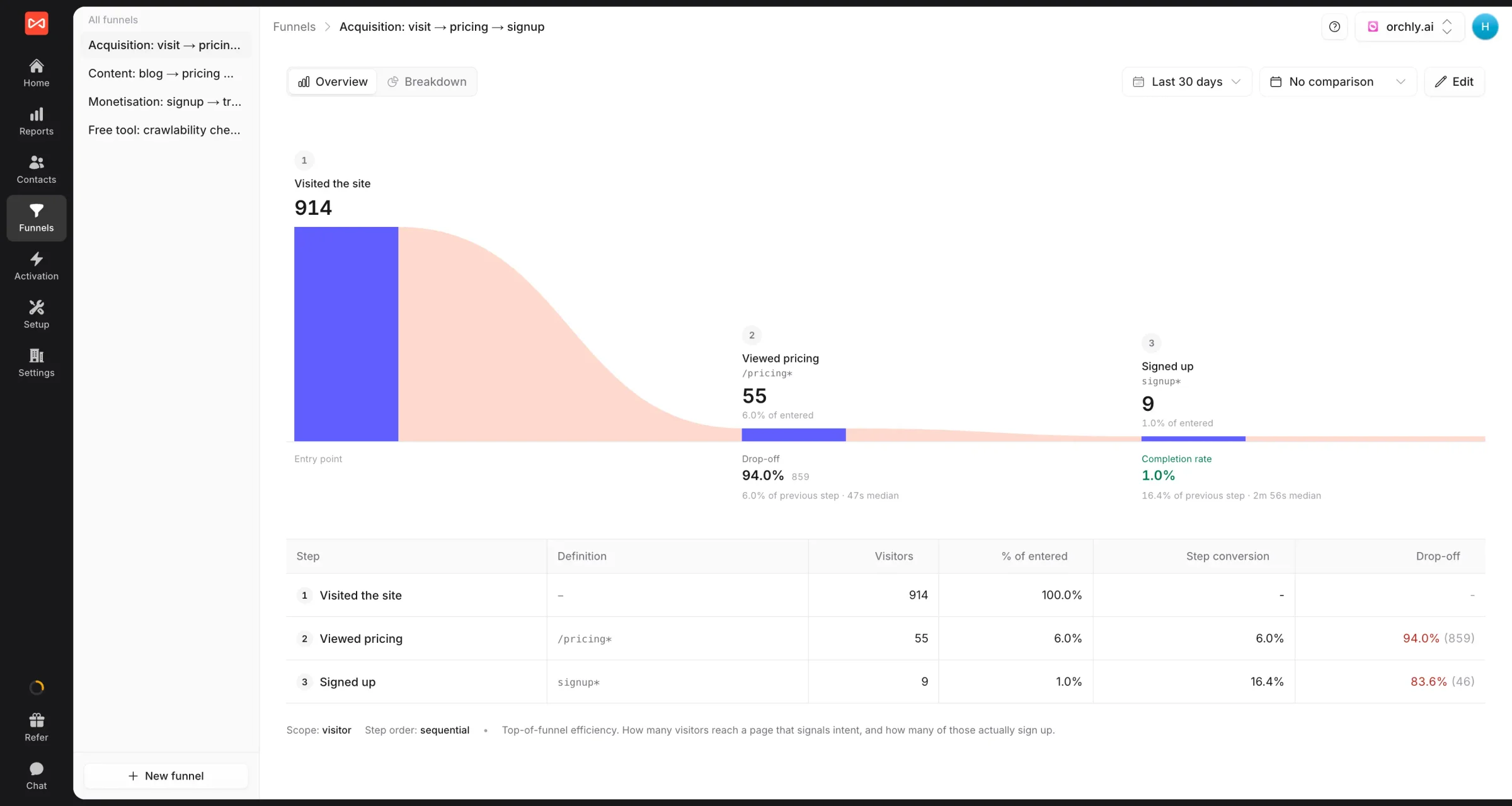
See exactly where visitors drop off at each funnel step
Build conversion funnels from any pages or events and find the biggest leaks by source, no SQL or warehouse rebuild.
-
Build funnels in clicks
Any pages or events as steps.
-
Drop-off at each step
Spot the biggest leaks fast.
-
Best-converting sources
Which channels convert at each step.
-
From visit to revenue
Funnels tied to closed deals.
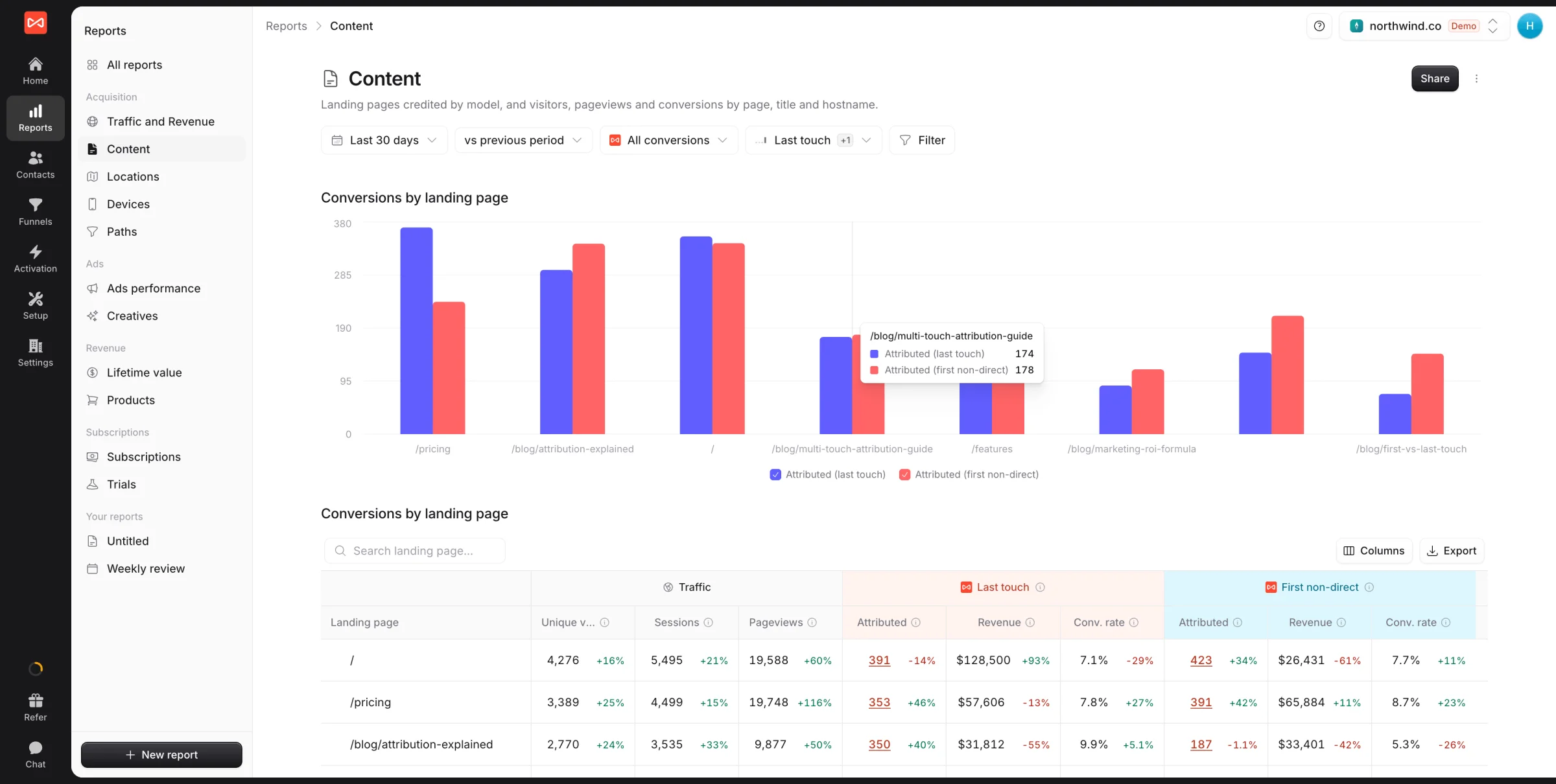
Content analytics
See which blog posts and pages actually drive pipeline
Tie every blog post, landing page, and comparison page to the leads, deals, and revenue it influenced, not just the pageviews it collected.
-
Pipeline by page
Blog posts and landing pages ranked by revenue.
-
Revenue, not just traffic
See which content draws buyers who close.
-
Assisted and closing touches
Credit content for influence, not last click.
-
Top of funnel to bottom
Map content to each stage of the journey.
How it works
Three steps from snippet to website analytics with revenue
One script tag, no event configuration, no schema redesign.
-
<script async src="https://t.sourceloop.ai/tracking-v3.js"></script>
01Install the snippet
Drop one script tag in your <head>. Five minutes, no engineer required.
- /
Top pages
- /pricing 8,420
- /blog/utm-guide 5,210
- /features/... 3,140
02We track every visit and event
Page views, sessions, click events, conversions, and revenue events captured with full first-party fidelity.
- $
Last 30 days
- Google Ads $48.2K
- LinkedIn $32.4K
- Organic $19.8K
03Traffic, behavior, and revenue in one place
Sources, pages, funnels, conversions, and revenue, all in pre-built dashboards.
FAQ
Website analytics, FAQ
What is website analytics software?
Website analytics software measures how people find, navigate, and convert on your site: visits, sources, page performance, and conversion events. SourceLoop adds the layer most tools stop short of, tying every visit to a lead, a deal, and the revenue it produced.
How is SourceLoop different from Google Analytics (GA4)?
GA4 samples high-traffic accounts, breaks attribution at 90 days, and keeps every visitor anonymous. SourceLoop never samples, keeps the source attached for the whole sales cycle, and ties each visit to a person, a company, and the revenue it produced.
How is SourceLoop different from Plausible, Fathom, or Simple Analytics?
Privacy-friendly analytics tools like Plausible, Fathom, and Simple Analytics give you clean visitor counts but stop at page views. They don't tie traffic to leads, deals, or revenue, and they don't run multi-touch attribution. SourceLoop ships the same privacy-first, first-party model and adds the marketing-and-revenue layer they leave out.
Is SourceLoop cookieless?
SourceLoop uses first-party cookies and local storage on your domain only. No third-party cookies, no cross-site tracking. SourceLoop follows Google Consent Mode, so a visitor who declines is not tracked. If you want no cookies at all, turn on cookieless mode with one switch.
Can I track conversions and revenue, not just pageviews?
Yes. Form fills, chat opens, demo bookings, and payment events all flow into the same analytics layer alongside page views, so you can build reports like 'visits to /pricing that converted into signups by source' without a custom data team.
Why does Google Analytics show so much direct traffic?
GA4 files a visit as Direct whenever it cannot see a source, and links from Slack, WhatsApp, email clients, PDFs, and apps all arrive without one. SourceLoop keeps the first source attached to the person across sessions, so those visits resolve to the real campaign.
How do I see which companies are visiting my website?
Standard analytics cannot tell you, because it only records anonymous sessions. SourceLoop groups people into companies by their email domain and your CRM. Once anyone at a company fills a form or books a meeting, their earlier visits join that company, so you see which accounts are researching you and what they read.
How do I know which marketing channel actually drives revenue?
Most analytics never see it, because the deal closes in your CRM or billing tool. SourceLoop pulls revenue back from HubSpot, Salesforce, Pipedrive, and Stripe and attributes it to the campaign that started the journey, so you rank channels by revenue rather than sessions.
Can I leave out my own team's visits?
Yes. Exclude IP addresses, pages, or forms in Setup. Your office traffic, staging pages, and login forms stay out of your reports.
Will it slow down my site or affect Core Web Vitals?
The snippet is under 8 KB gzipped, loads asynchronously, and runs after page load. Zero impact on LCP, FID, INP, or CLS.
How do I switch from Google Analytics to SourceLoop?
Install the snippet and run both side by side for a few weeks. You will quickly see where GA4 reported Direct for traffic that actually came from a campaign. No historical migration is needed, because SourceLoop builds its own record from day one.
Can I export the raw data to a warehouse?
Yes. Send visits, leads, deals, and revenue to your own Snowflake, BigQuery, Amazon S3, or Google Cloud Storage on a schedule, or pull them through the API. Looker Studio connects directly too.

 Paid Social

