
Cost Per Conversion: How to Calculate and Lower It
What cost per conversion really measures, how to work out the number you can afford, and 7 practical ways to bring it down.
Table of contents
- What cost per conversion means
- The 4 numbers people call "cost per conversion"
- 1. Platform conversions ($42)
- 2. New leads in your CRM ($58)
- 3. Good leads ($97)
- 4. New customers ($632)
- What is a good cost per conversion?
- Work out your maximum cost per lead
- How to track your real cost per conversion with SourceLoop
- Step 1: Capture every kind of conversion
- Step 2: Add every cost, not just ad spend
- Step 3: Define what a good lead is
- Step 4: Compare cost per conversion by channel and campaign
- 7 ways to lower your cost per conversion
- 1. Cut search terms that never convert
- 2. Tell the platforms which leads were good
- 3. Give bidding enough data and time
- 4. Make the landing page faster
- 5. Shorten the path to the conversion
- 6. Stop paying for conversions you'd get anyway
- 7. Move budget toward the cheapest good leads
- Mistakes that inflate or hide the real cost
Google Ads says your cost per conversion is $42. Your sales team says the leads are rubbish. Finance says customer acquisition cost is over $600.
All three can be right at the same time.
Cost per conversion is a simple division. What you divide by changes everything. In this guide, I'll cover how to calculate it honestly, what number you can afford, and how to bring it down.
What cost per conversion means
Cost per conversion is what you spend on ads divided by the number of conversions those ads produced.
Cost per conversion = ad spend ÷ conversions
Google Ads shows it as Cost / conv. and defines it as your total cost divided by your conversions. Meta calls it cost per result. You'll also see it called cost per acquisition, or CPA.
Spend $3,000 and get 60 conversions, and your cost per conversion is $50.
The spend side is easy to read off an invoice. The conversion side is where most of the confusion lives.
The 4 numbers people call "cost per conversion"
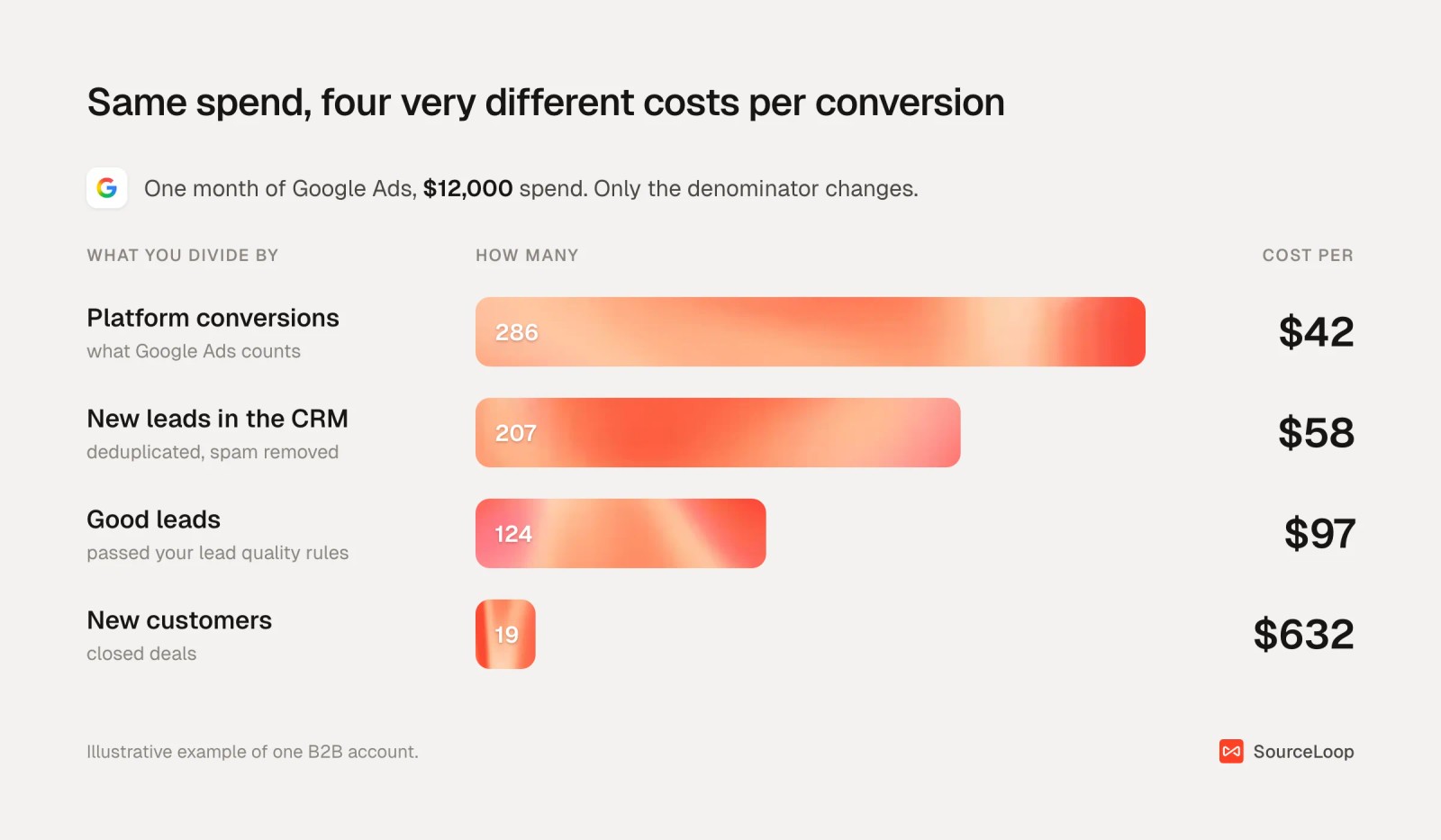
Take one month of Google Ads at $12,000. Here's what happens to the cost per conversion as the definition of a conversion gets stricter.
1. Platform conversions ($42)
What Google Ads or Meta counts. It includes conversions from repeat form fills, view-through credit and anything else inside the platform's attribution window. It's the number the platform bids on, and the most flattering.
2. New leads in your CRM ($58)
Real, deduplicated people. The gap from platform conversions comes from double counting, spam and conversions the platform credited to itself that another channel also claims. We explain that overlap in our guide to advertising effectiveness measurement.
3. Good leads ($97)
Leads your team would actually call: right company size, real email, a genuine need. This is usually the most useful number for weekly decisions.
4. New customers ($632)
Spend divided by closed deals, which is customer acquisition cost for this channel. It's the number that decides whether the campaign makes money, but it arrives weeks or months late.
| Conversion definition | Count | Cost per | Use it for |
|---|---|---|---|
| Platform conversions | 286 | $42 | Comparing ads inside one platform |
| New CRM leads | 207 | $58 | Comparing channels on volume |
| Good leads | 124 | $97 | Weekly budget decisions |
| New customers | 19 | $632 | Deciding if the channel pays back |
When someone quotes a cost per conversion, ask which of these four they mean.
What is a good cost per conversion?
Benchmarks give you a rough sense of the market. In 2026 the average cost per lead on Google search ads was $66.69 across industries, with legal services above $130 and automotive repair under $30.
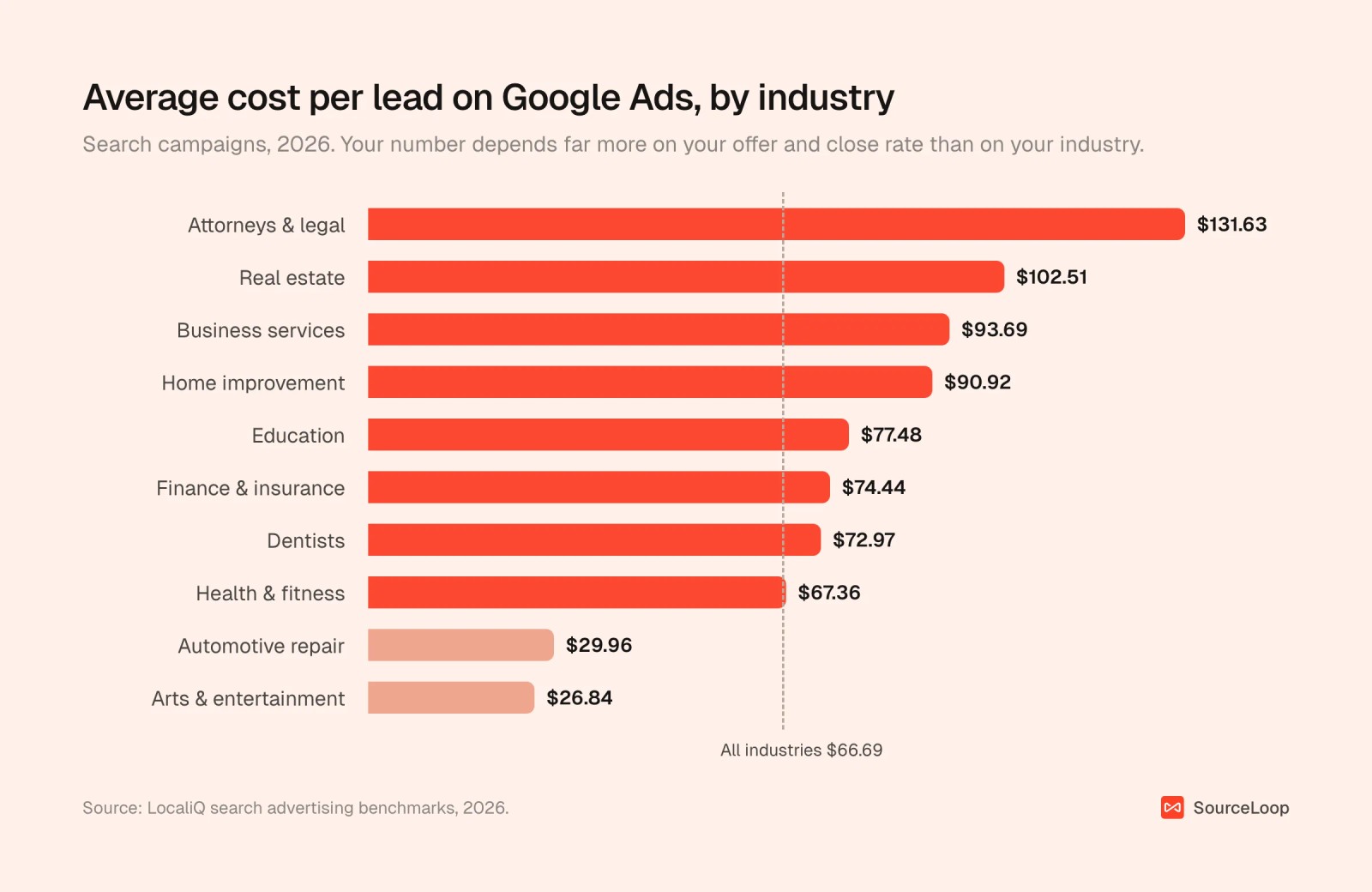
A benchmark won't tell you whether your cost per lead is good, though. A $130 lead is cheap for a law firm that closes one in five at $8,000 a case. A $30 lead is expensive if nobody buys.
The better question is how much you can afford to pay.
Work out your maximum cost per lead
Start from what a customer is worth and walk back down the funnel:
- Customer value. Use first-year revenue, or lifetime value if you trust it.
- Gross margin. What's left after the cost of delivering the product or service.
- Target return. Many SaaS teams aim for customer value of about three times acquisition cost. Pick a ratio that leaves room for overheads.
- Close rate. The share of good leads that become customers.
- Lead quality rate. The share of all leads that are good.
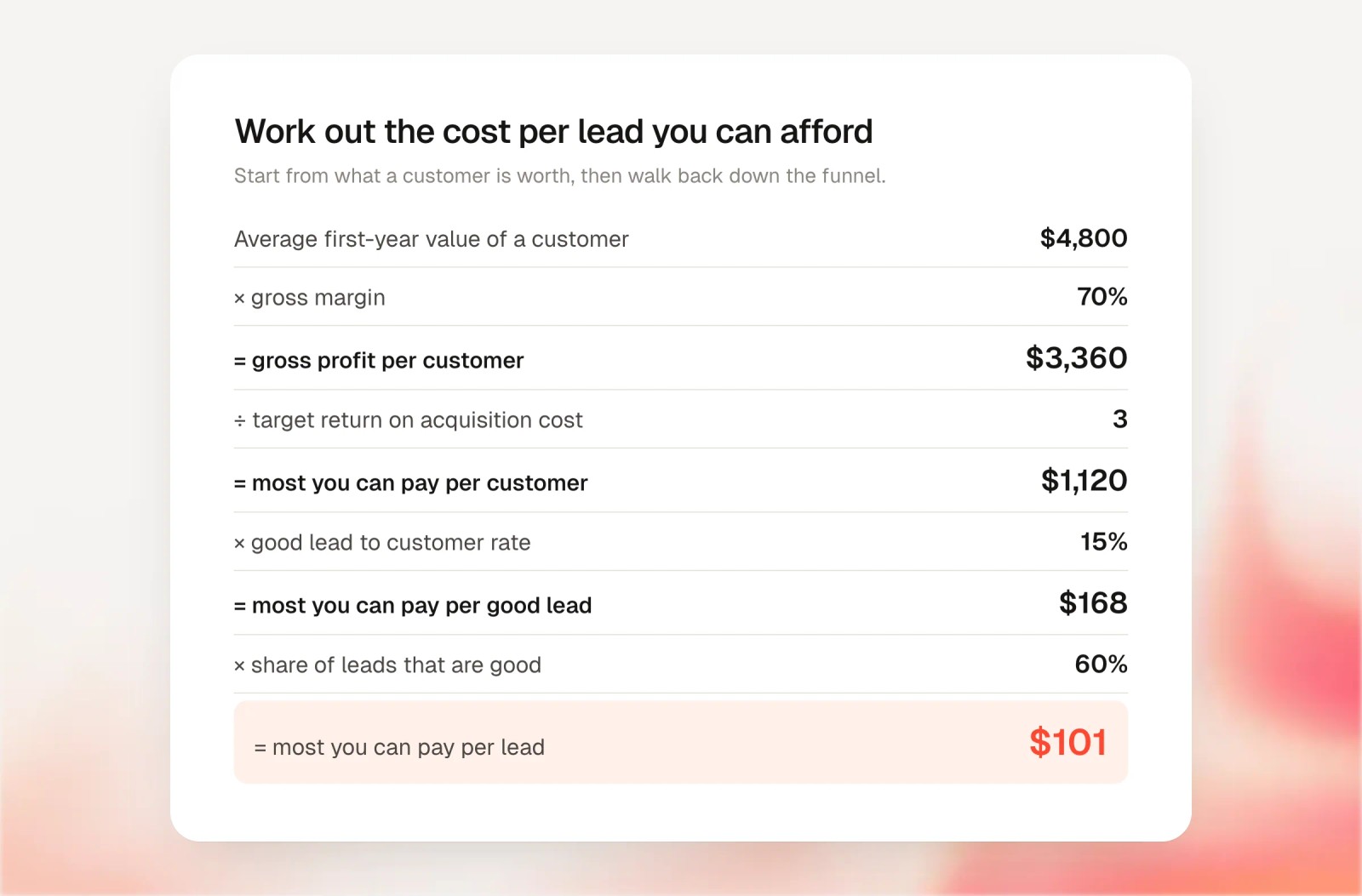
In this example, the business can pay up to $168 per good lead or $101 per lead and still hit its target. The $42 Google Ads shows is irrelevant to that decision. The $97 per good lead is comfortably inside it.
Our customer acquisition cost calculator and lead conversion rate calculator will help you fill in your own numbers.
How to track your real cost per conversion with SourceLoop
Platform dashboards can only show you the first of the four numbers. To see the other three, you need spend and outcomes in one place.
The steps below use SourceLoop, a marketing attribution and revenue measurement tool. It tracks every visit and lead on your site, follows each lead into your CRM, and divides your real marketing spend by the outcome you choose: leads, good leads, deals or revenue.
Step 1: Capture every kind of conversion
Install the tracking script, then turn on the conversion sources you use under Setup: forms, meetings, chat, phone calls and payments.
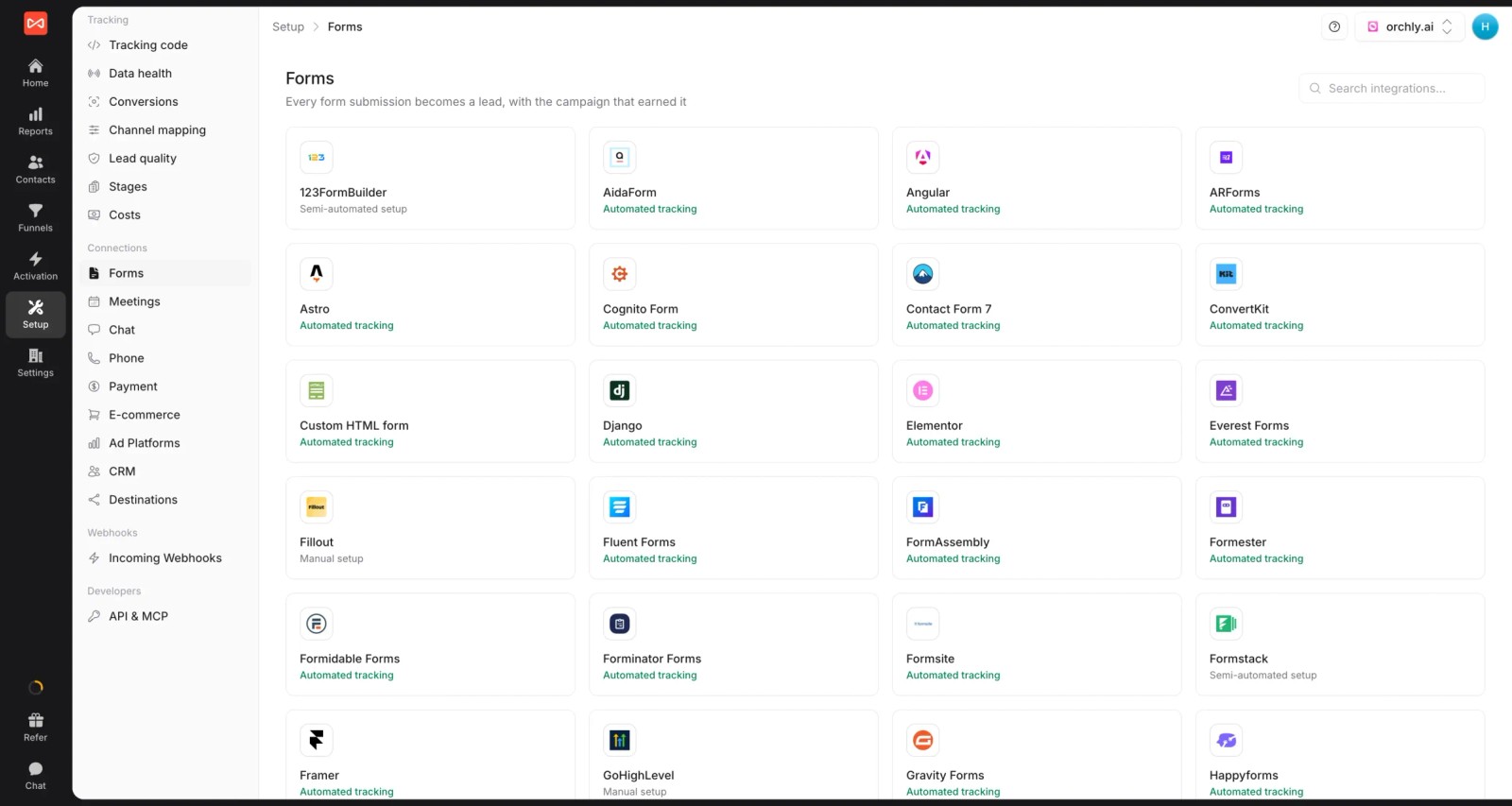
This matters for cost per conversion more than people expect. If phone calls or booked meetings aren't counted, every channel looks more expensive than it is, and the channels that drive calls look worst of all. Call tracking and form tracking close that gap.
Step 2: Add every cost, not just ad spend
Connect Google Ads, Meta and ChatGPT Ads under Setup > Ad platforms so spend imports daily.
Then add everything else under Setup > Costs: an SEO retainer, agency fees, a trade show, sponsorships. Each cost gets a channel and a schedule, either monthly, one-off or spread over a period.
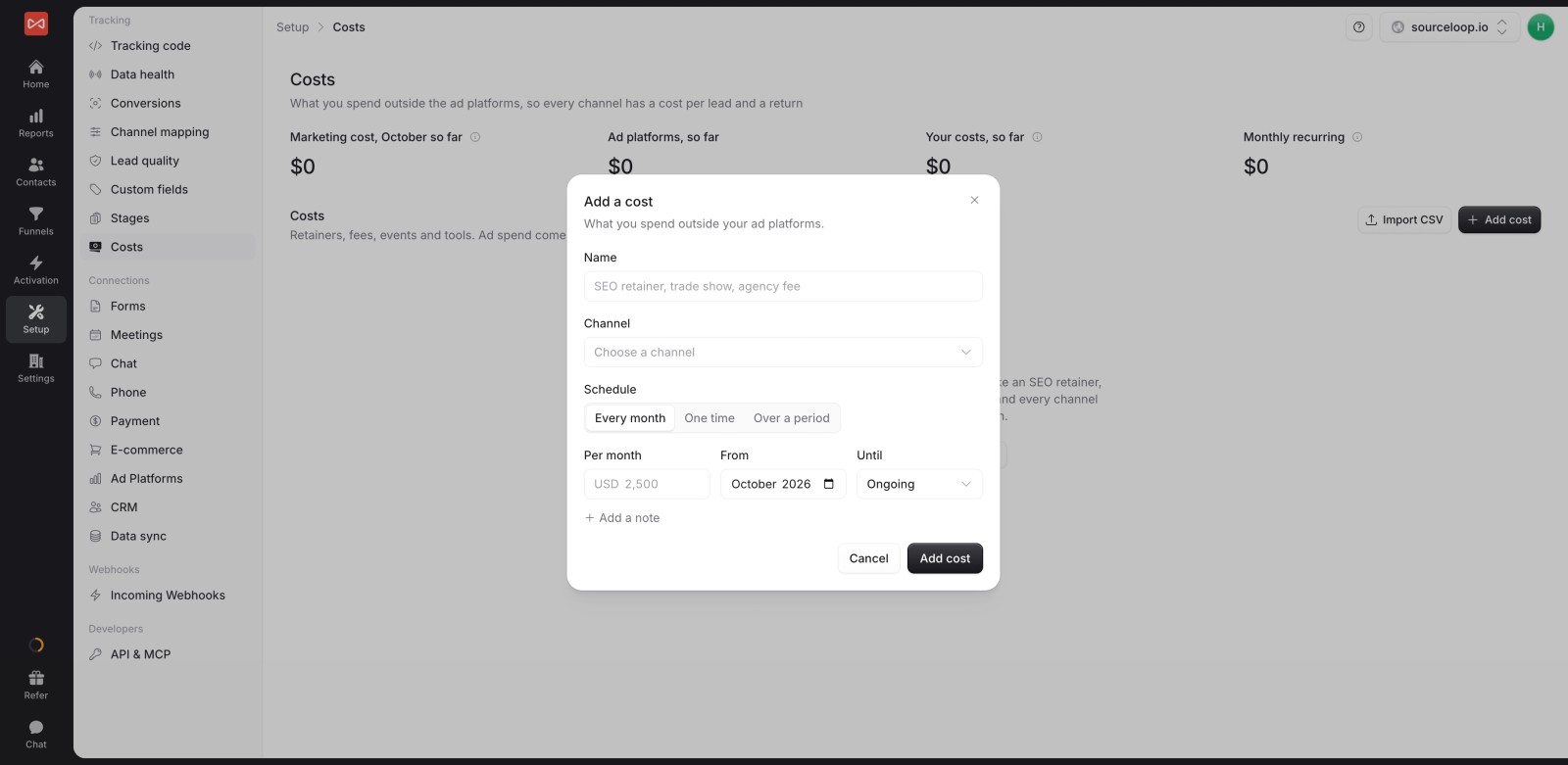
Now every channel has a cost per lead, including the ones without an ad account. Organic channels that look free on paper finally carry their real cost.
Step 3: Define what a good lead is
Open Setup > Lead quality and start from a template, or write your own rules. Leads are marked Good, Not a fit or Spam.
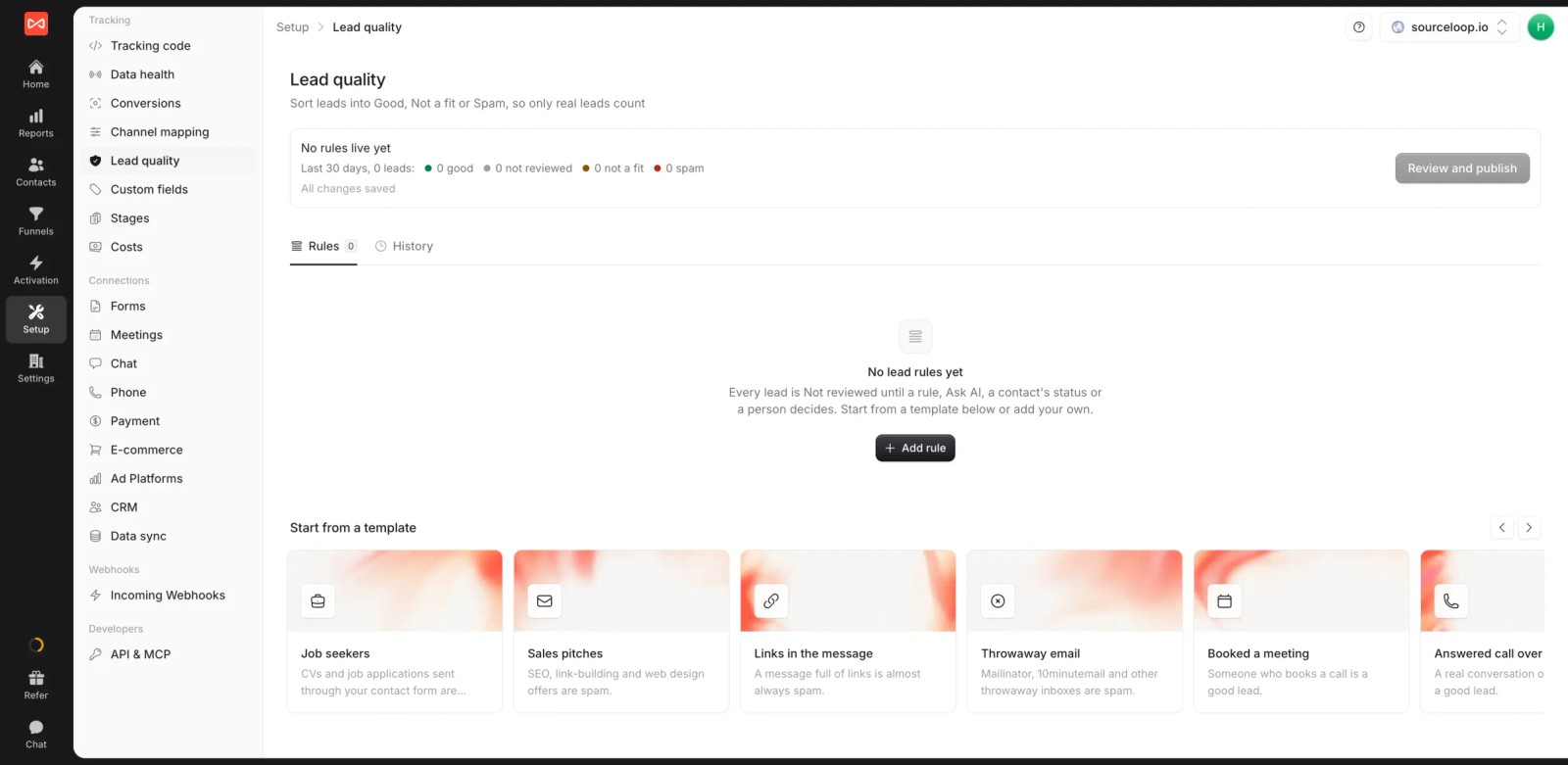
A few rules that work for most B2B teams:
- Booked a meeting: Good.
- Answered call over 60 seconds: Good.
- Free email domain on a demo form: Not a fit.
- Message mentions "SEO services" or "guest post": Spam.
Every report can then show cost per good lead next to cost per lead. The lead quality rules guide covers the options.
Step 4: Compare cost per conversion by channel and campaign
Open Reports > Ads performance. Spend and platform-reported conversions sit next to the conversions SourceLoop credits to each platform and campaign.
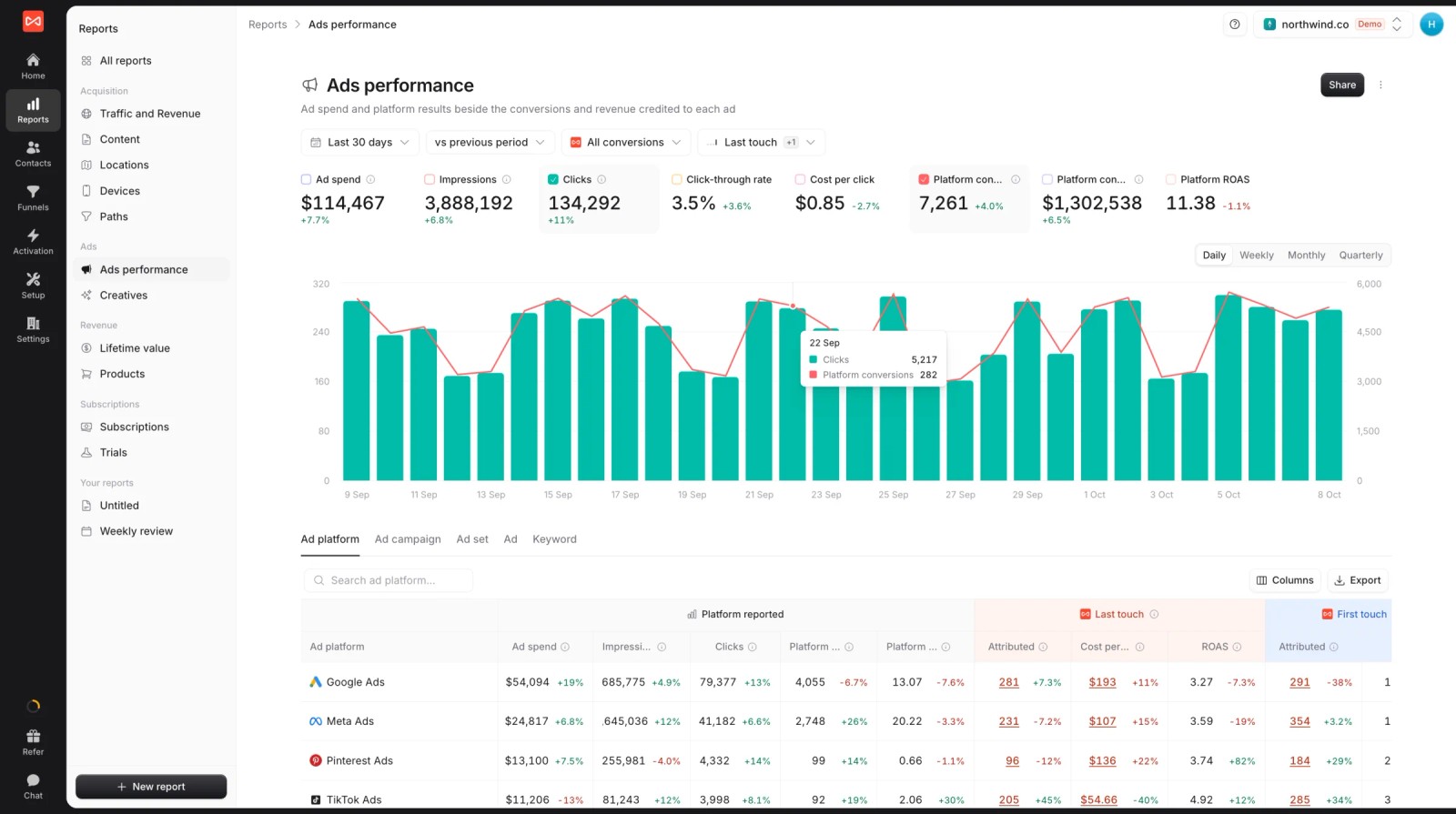
Switch the outcome from conversions to good leads, CRM stages or deals, and the cost per column changes with it. That's numbers 2, 3 and 4 from the list above, side by side.
If you connect HubSpot, Salesforce or Pipedrive, deal stages and won revenue come back automatically through CRM sync.
7 ways to lower your cost per conversion
Once you're measuring the right number, these are the changes that move it most, roughly in order of effort.
1. Cut search terms that never convert
Open the search terms report in Google Ads and sort by spend. Any query with real spend and no good leads is a candidate for a negative keyword.
Judge them on good leads, not platform conversions. Some queries convert cheaply into junk.
2. Tell the platforms which leads were good
This is usually the biggest lever. Bidding algorithms optimize toward whatever you report. Report every form fill and they'll find more form fills, including bad ones.
SourceLoop's conversion sync sends good leads, booked meetings, won deals and revenue back to Google Ads, Meta and ChatGPT Ads, matched by click ID and hashed email and phone.

Your platform cost per conversion may go up after you switch, because there are fewer conversions to divide by. Watch cost per good lead and cost per customer, which should come down.
3. Give bidding enough data and time
Smart bidding needs volume. Google suggests waiting two to three conversion cycles before judging a Target CPA or Target ROAS change. Meta says an ad set needs about 50 optimization events in a week to leave the learning phase.
If a campaign gets five conversions a week, optimizing for customers won't work. Optimize for good leads or booked meetings, which happen more often but still mean something.
4. Make the landing page faster
Speed shows up directly in conversion rate. In a Google-commissioned study of 37 brands, a 0.1 second improvement in mobile load time lifted retail conversions by 8.4% and travel conversions by 10.1%.
A higher conversion rate on the same clicks is a lower cost per conversion.
5. Shorten the path to the conversion
Ask for less at the first step. Drop form fields you don't use, offer a calendar booking next to the form, and put the phone number where mobile visitors can tap it. Our guide to conversion optimization goes deeper.
6. Stop paying for conversions you'd get anyway
Brand search campaigns often show the lowest cost per conversion in the account, because the people searching your name were coming anyway. Test pausing them in some regions before you treat that number as real.
7. Move budget toward the cheapest good leads
Once you can see cost per good lead by campaign, shift budget from the worst to the best in steps of 20% to 30%. Then wait a full conversion cycle before the next move, so each change has time to show up in the numbers.
Mistakes that inflate or hide the real cost
- Counting every conversion action. A newsletter signup and a demo request shouldn't share one cost per conversion.
- Leaving out non-ad costs. Agency fees and tools are part of what each lead costs.
- Missing phone and chat leads. Channels that drive calls look far worse than they are.
- Comparing platforms on their own numbers. Each one uses its own attribution window.
- Chasing the lowest CPA. The cheapest leads are rarely the cheapest customers. Meta lead quality is the classic case.
Frequently asked questions
-
How do you calculate cost per conversion?
Divide total ad spend by the number of conversions in the same period. $3,000 spent for 60 conversions is $50 per conversion. Make sure both numbers cover the same campaigns and dates, and decide upfront which conversions count.
-
What is the difference between cost per conversion and CPA?
They're usually the same thing. Some teams use CPA only for paying customers and cost per conversion for any tracked action, such as a lead or signup. Agree on one definition and label your reports clearly.
-
What is a good cost per conversion?
It depends on what a customer is worth to you. Work back from customer value, margin, close rate and lead quality to the most you can pay per lead. As a market reference, the average cost per lead on Google search ads was about $67 in 2026.
-
Why is my Google Ads cost per conversion lower than my real cost per lead?
Google counts conversions inside its own attribution window, including ones another channel also claims and repeat submissions from the same person. Your CRM counts each real person once, so the cost per lead is higher.
-
Does a higher cost per conversion always mean worse performance?
No. If you start optimizing for good leads or customers, the platform's cost per conversion often rises because there are fewer conversions. What matters is whether cost per good lead and cost per customer come down.




 Paid Social


