
Marketing Attribution Models: How to Pick and Test One
Google dropped most rules-based models in 2023. Here's how to choose an attribution model for your sales cycle and check it against real results.
Table of contents
- What an attribution model decides
- The 3 families of attribution models
- 1. Rules-based models
- 2. Data-driven models
- 3. Measured models
- What changed when Google retired four models
- How to choose and test a model with SourceLoop
- Step 1: See how your buyers actually convert
- Step 2: Pick a default model and a comparison model
- Step 3: Set a lookback window that fits your cycle
- Step 4: Attribute pipeline and revenue, not just leads
- Step 5: Compare the two models and read the disagreements
- Step 6: Check the model against a holdout test
- Step 7: Keep the default and review it each quarter
- Mistakes to avoid
Most articles about attribution models stop at definitions. First touch gives all the credit to the first visit, linear splits it evenly, and so on.
That part is easy. Choosing one, and knowing whether you chose well, is the hard part.
In this guide, I'll cover the three families of models, what changed when Google retired most of its rules-based options, and a step-by-step way to pick a model and test it.
If you want every model explained on one example journey first, start with our guide to multi-channel attribution models.
What an attribution model decides
An attribution model is a rule for splitting the credit for one conversion across the touchpoints that came before it.
It decides which channel looks responsible for a sale, and that decides where the next dollar goes.
That's why the choice matters. On a typical B2B journey, the same paid social campaign can get anywhere from none of the credit to all of it, depending on the model.
The 3 families of attribution models
Every attribution model falls into one of three groups, depending on how it decides who gets the credit.
1. Rules-based models
A fixed rule decides the split. These are the ones most people know:
- First touch: all credit to the first visit.
- Last touch: all credit to the visit right before converting.
- Last non-direct: last touch, but skipping a final Direct visit.
- Linear: equal credit to every visit.
- U-shaped: 40% to the first visit, 40% to the last, 20% shared across the middle.
- Time decay: more credit to visits closer to the conversion.
They're transparent and easy to explain. Their weakness is that the rule is a guess about what matters, and it never learns.
2. Data-driven models
A model learns the split from your data. Google's data-driven attribution compares the paths of people who convert with the paths of people who don't, then gives more credit to the interactions that show up more often on converting paths.
It adapts, and it's now the default in Google Ads. Google recommends at least 200 conversions and 2,000 ad interactions in 30 days for it to work well.
The catch is what it can see. Google's model only covers Google's own ads: Search, Shopping, YouTube, Display and Demand Gen. Your Meta ads, emails and podcast mentions aren't in its paths, so it can't give them credit.
3. Measured models
Holdout tests and marketing mix modeling don't split credit along a journey. They estimate what a channel caused, by comparing results with and without it.
They're slower and need more volume, but they're the only way to check whether the other two families are telling the truth. We cover both in our guide to advertising effectiveness measurement, and compare them in multi-touch attribution vs marketing mix modeling.
| Family | How credit is decided | Best for | Main limit |
|---|---|---|---|
| Rules-based | A fixed rule, such as 40/20/40 | Weekly reporting, explaining results to a team | The rule is a guess and never learns |
| Data-driven | Learned from converting and non-converting paths | Bidding inside one ad platform | Only sees that platform's touchpoints |
| Measured | Experiments or regression on spend and sales | Budget decisions between channels | Slow, and needs a lot of volume |
What changed when Google retired four models
In April 2023, Google announced it was removing first click, linear, time decay and position-based attribution from Google Ads and Google Analytics 4.
In Google Ads, you couldn't pick them for new conversion actions from June 2023. From September 2023, actions still using them were moved to data-driven. GA4 removed the same four models that year.
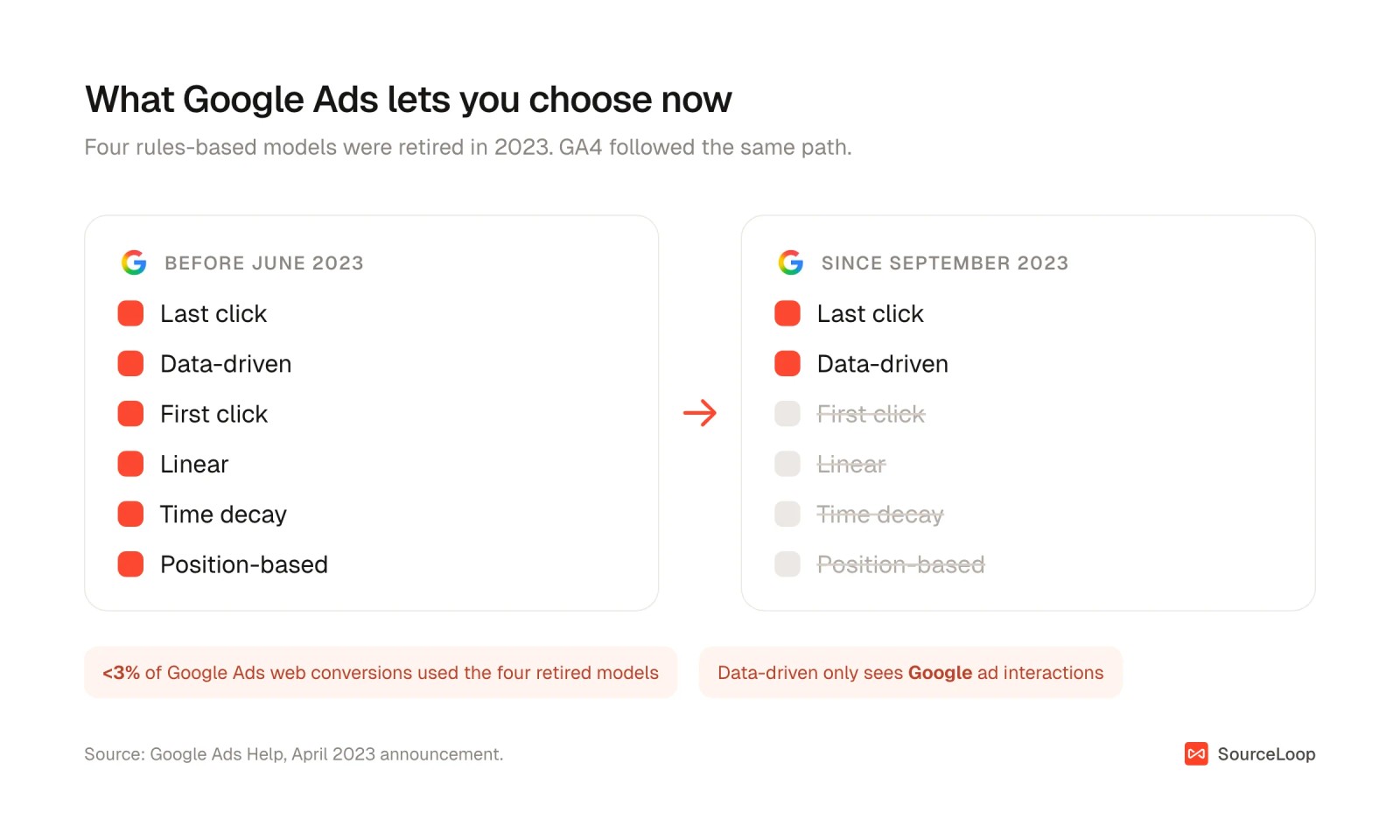
Google's reason was low use:
Less than 3% of Google Ads web conversions were attributed using first click, linear, time decay, or position-based models.
That makes sense for bidding, where data-driven works well. It's a problem for reporting. You can no longer ask Google's tools how your channels look under a different rule, and data-driven still can't see anything outside Google.
So if you want to compare models across every channel, it has to happen in a tool that holds all your journeys. That's also why GA4's attribution numbers and Google Ads rarely agree with anything else.
How to choose and test a model with SourceLoop
The steps below use SourceLoop, a first-party marketing attribution and measurement tool. It records every visit to your site from every channel, ties each one to the lead, deal or payment it led to, and works out credit when you run a report.
That last part matters here. Because SourceLoop stores the whole journey, switching models doesn't need any re-processing. You can put two models side by side on the same data in seconds.
Step 1: See how your buyers actually convert
Before picking a model, look at the journeys it'll be judging.
Open Reports > Paths. Check three numbers at the top: touches to convert, days to convert, and the share of conversions that involved more than one channel.
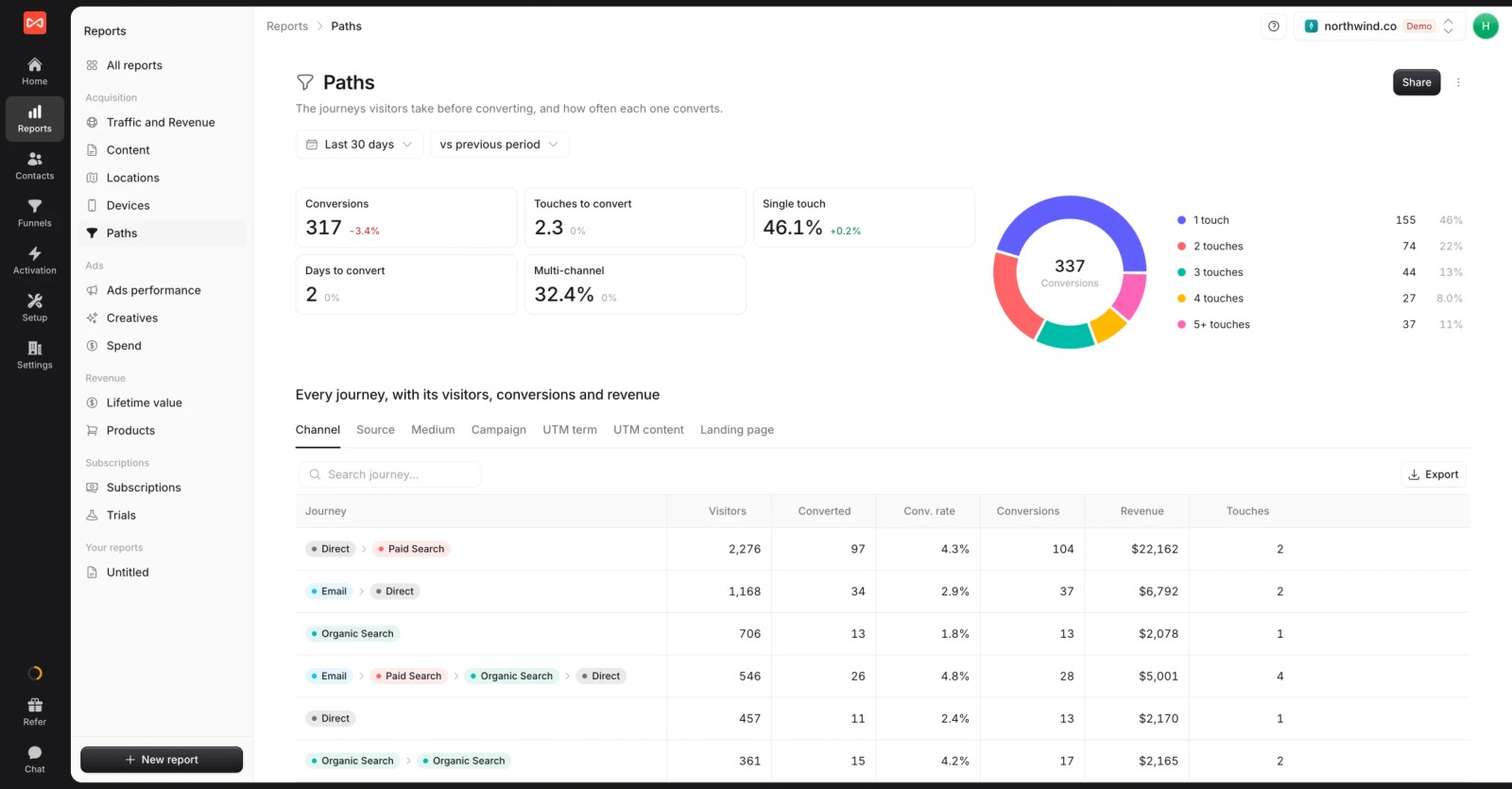
If most conversions happen on the first visit, the model barely matters and last non-direct is fine.
If a third or more are multi-channel, the model will change your decisions, and the rest of these steps are worth doing. The Paths guide explains each figure.
Step 2: Pick a default model and a comparison model
Choose one default for everyday reporting and one comparison model to check it against. Start from your sales cycle:
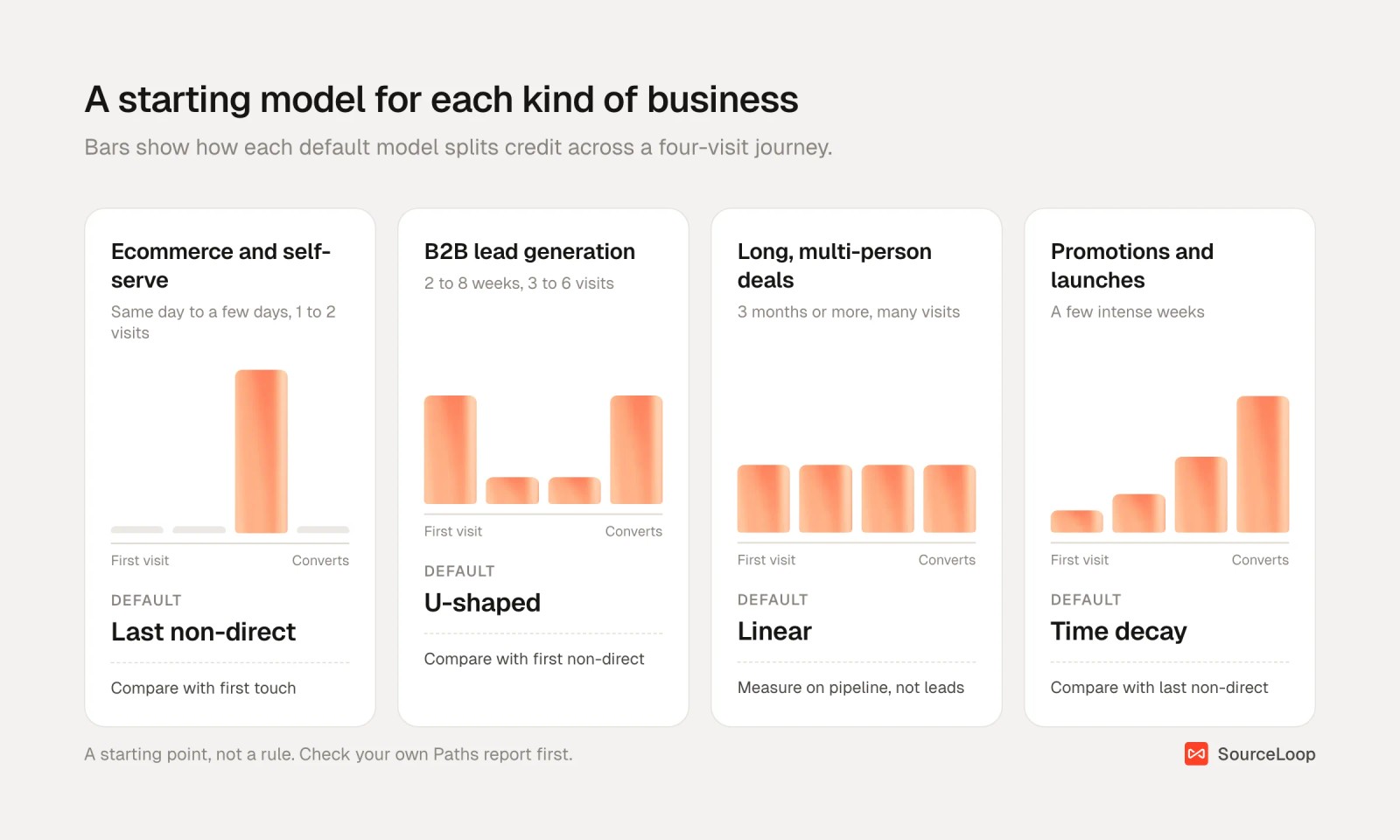
- Ecommerce and self-serve: last non-direct, compared with first touch.
- B2B lead generation: U-shaped, compared with first non-direct. Our B2B attribution models guide goes deeper.
- Long deals with several people involved: linear or U-shaped, measured on pipeline stages.
- Promotions and launches: time decay, for the weeks when recent touches really do the work.
Every SourceLoop report has a model picker with first touch, last touch, first non-direct, last non-direct, linear, U-shaped and time decay. Time decay uses a 7-day half-life, so a visit a week before converting gets half the weight of one on the day.
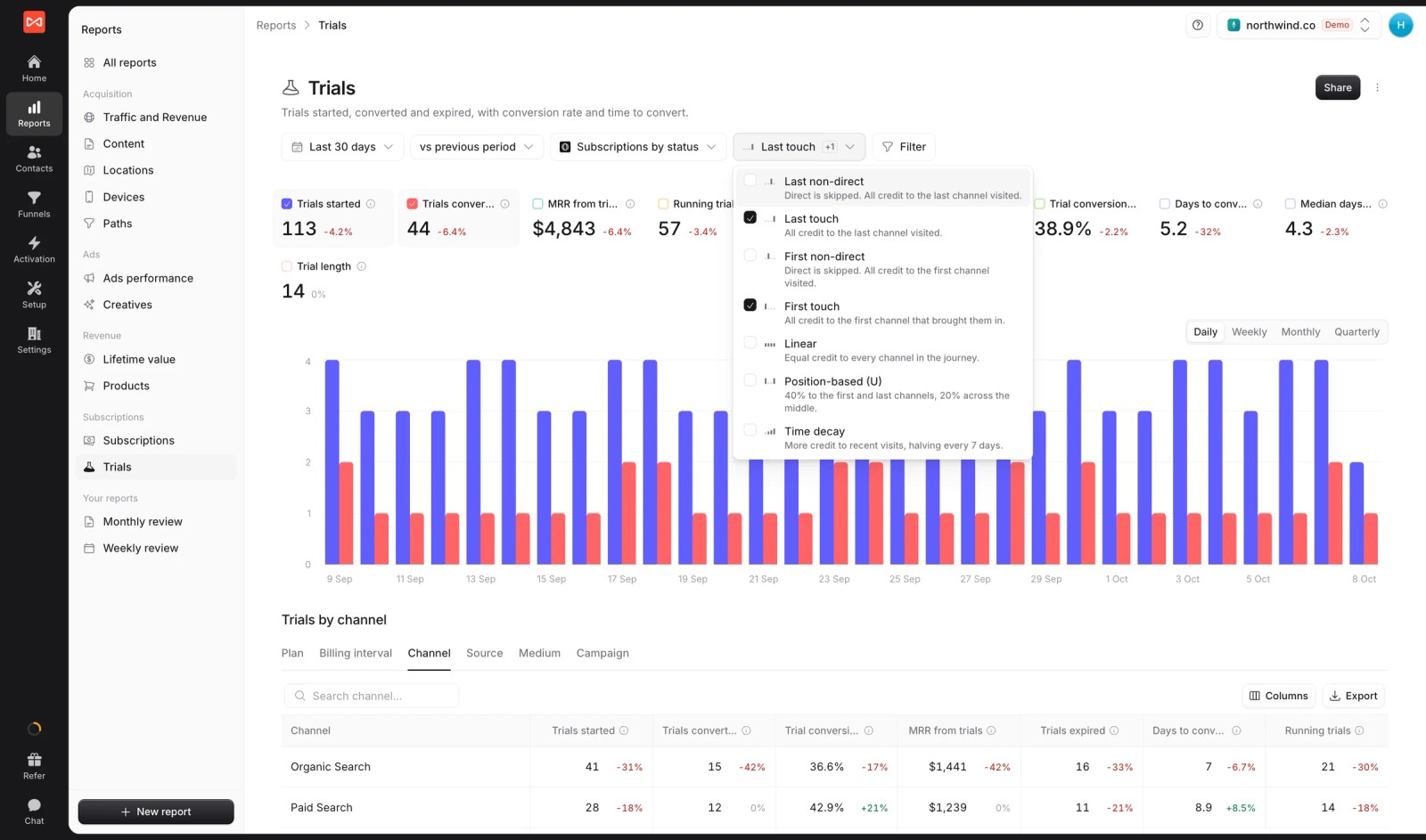
SourceLoop doesn't offer W-shaped or custom-weighted models. In our experience, U-shaped compared with first touch covers what most teams use those for.
Step 3: Set a lookback window that fits your cycle
The lookback window decides how far back a visit can be and still get credit. Too short, and long deals lose their first touch.
Set it under Settings > Preferences. The default is 90 days and you can go up to 365. Lead reports use it. Reports on CRM stages and revenue always look back a full year, so an 80-day deal keeps its first visit.
For B2B, also set Credit visits from to everyone at the buyer's company. A colleague's first visit then counts as part of the same buying journey.
Step 4: Attribute pipeline and revenue, not just leads
A model that's tuned to leads will favor whatever brings the most form fills.
Connect HubSpot, Salesforce or Pipedrive, then switch the report's outcome from conversions to contacts by stage, deals or revenue. The same journeys and the same model now answer a better question.
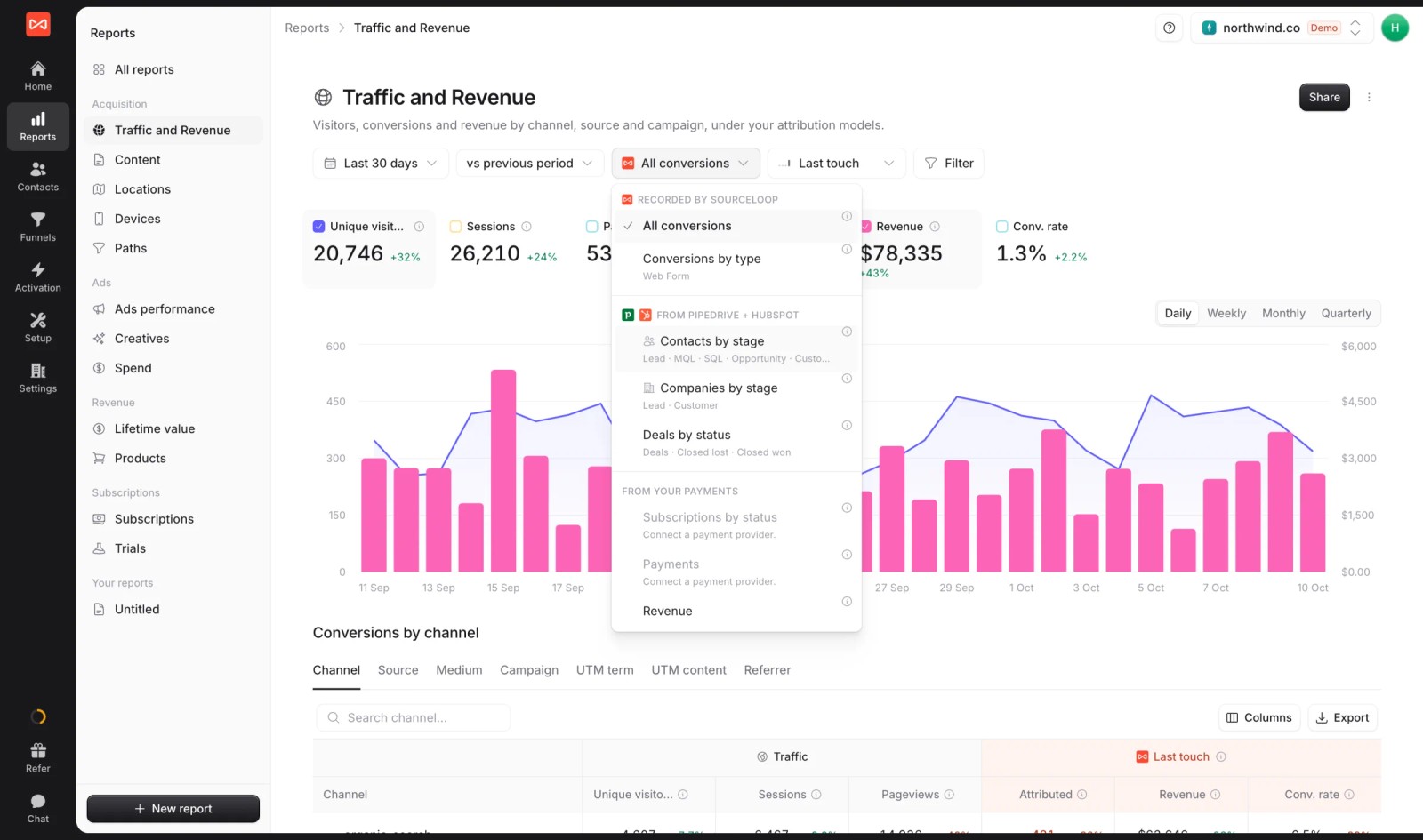
It's common to see a channel rank first on leads and fourth on revenue. Our guide to revenue attribution covers this in more detail.
Step 5: Compare the two models and read the disagreements
Open Reports > Traffic and Revenue. Each channel shows its credited conversions and revenue under your default model, with the comparison model next to it.

The disagreements are the useful part:
| What you see | What it usually means | What to do |
|---|---|---|
| Both models give a channel similar credit | Its role is clear | Act on it with confidence |
| First touch credits it far more than last touch | It opens journeys that other channels close | Judge it on pipeline it started, not last-touch leads |
| Last touch credits it far more than first touch | It closes journeys others started, like brand search, retargeting or email | Test it before scaling. It's often over-credited. |
| Its credit swings a lot between models | Mixed role or too little data | Check its journeys in Paths and wait for more volume |
Step 6: Check the model against a holdout test
Every rules-based model is a guess, and so is a data-driven one. A holdout test is how you find out which guess is closest.
Run a geo holdout on one channel, as described in our advertising effectiveness guide. Work out the channel's incremental share of results. Then see which model's credit lands nearest to it.
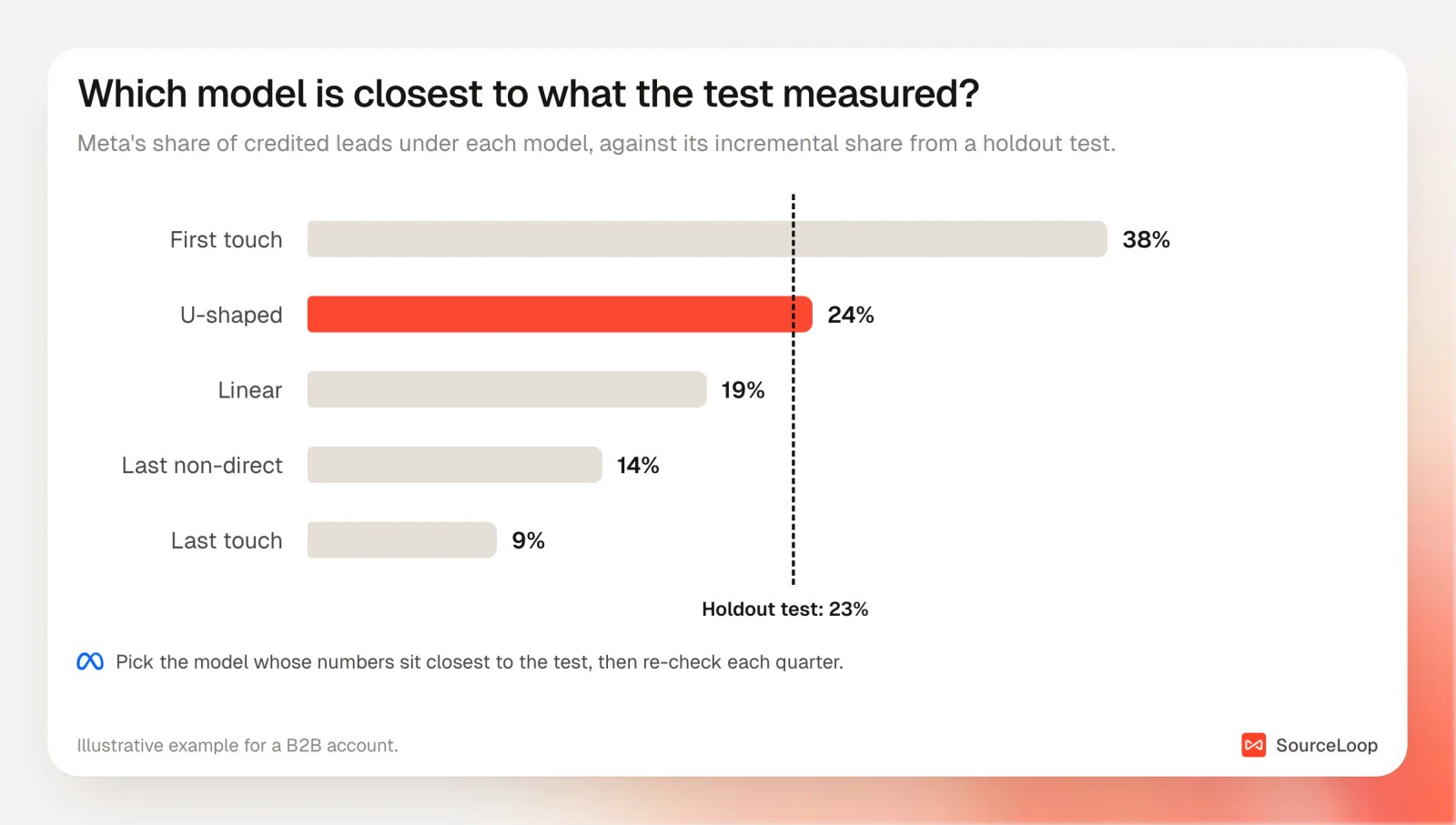
One test won't settle it for every channel. But after two or three, you'll know whether your default model tends to over-credit or under-credit the channels you spend most on.
Step 7: Keep the default and review it each quarter
Trends only mean something under the same model. Pick a default and stay with it for reporting.
Review it each quarter, or when something big changes: a new channel, a much longer sales cycle, or a holdout test that disagrees with it.
Also keep your channel rules tidy under Setup > Channel mapping. A model can only split credit between the channels it's given, and SourceLoop re-sorts past visits when you change a rule. The channel mapping guide shows how.
Mistakes to avoid
- Switching models every month. Each switch resets your trend lines. Change the default only after a review.
- Comparing your model with ad platform totals. Each platform credits itself under its own rules, so their totals add up to more than your real conversions.
- Trusting data-driven attribution outside its platform. Google's model only sees Google's own ads.
- Choosing a model on leads alone. The model that flatters cheap leads usually flatters the wrong channels.
- Skipping the Paths check. If 80% of conversions take one touch, you're debating something that hardly changes the answer.
Frequently asked questions
-
Which marketing attribution model is best?
There isn't one best model. Last non-direct suits short, mostly single-visit purchases. U-shaped suits most B2B lead generation. Linear works for long, multi-person deals. Use one as your default, compare it with a second, and check both against a holdout test.
-
Does Google Ads still offer first click and linear attribution?
No. Google announced in April 2023 that first click, linear, time decay and position-based models would be removed from Google Ads and GA4. Since September 2023, Google Ads offers data-driven and last click, plus external attribution.
-
Is data-driven attribution better than rules-based models?
Inside one ad platform, usually yes, because it learns from your data and helps bidding. Across channels, it's limited: Google's model only sees Google ad interactions. Rules-based models on your own first-party data can cover every channel, which makes them better for budget comparisons.
-
How many conversions do I need for data-driven attribution?
Google says any volume is eligible but recommends at least 200 conversions and 2,000 ad interactions within 30 days for good results. Below that, credit can be less precise.
-
How do I know if my attribution model is wrong?
Run a holdout test on one channel and compare its measured incremental share with the credit your model gives it. If the model gives the channel much more credit than the test shows it caused, the model over-credits that channel.
-
Can I change attribution models without losing data?
In tools that store full journeys, yes. SourceLoop keeps every visit and calculates credit when you run a report, so you can switch or compare models on past data at any time.




 Paid Social


