
Why Google Ads Doesn't Match Google Analytics
Google Ads and Analytics numbers rarely match. Learn why 10-20% discrepancies are normal, the 4 mechanisms causing gaps, and how to get accurate attribution data.
Table of contents
- What Counts as a Click vs. a Session
- What Counts as a Conversion? It Depends Who You Ask
- Why Conversion Numbers Don't Match
- 1. Different Counting Rules
- 2. Date Attribution Differences
- 3. Attribution Model Mismatch
- 4. Cross-Device Tracking Gaps
- 5. The Consent Mode Effect
- Configuration Issues That Amplify Discrepancies
- 1. Missing or Broken GCLID Parameters
- 2. Auto-Tagging Disabled
- 3. Multiple Google Ads Accounts Linked to One Property
- 4. Incorrect Attribution Window Settings
- How to Audit Your Data and Find the Truth
- Step 1: Establish Your Baseline
- Step 2: Isolate the Counting Rule
- Step 3: Compare Attribution Models
- Step 4: Check for Technical Issues
- Step 5: Monitor the Gap as a Series
- The Attribution Solution: First-Party Tracking
- FAQ
Google Ads reports 487 conversions. Google Analytics shows 312. You check your dates, refresh both dashboards, and the numbers still don't match.
The discrepancy is not a bug. It is a feature of two platforms that measure conversions in fundamentally different ways. Discrepancies of 10-20% are completely normal due to different tracking methods, attribution models, and how each platform defines clicks versus sessions.
What Counts as a Click vs. a Session
Google Ads and Google Analytics measure different things from the start. Google Ads counts clicks on your advertisements. Every time someone clicks your ad, that is one click, regardless of what happens next.
Google Analytics tracks sessions on your website. A session begins when a user lands on your site and the analytics tracking code loads. Here is where the first discrepancy appears.
If someone clicks your ad but closes their browser before the page finishes loading, Google Ads registers the click. Google Analytics never records the session because the tracking code did not execute. This happens more often than you might think, especially on mobile devices with slow connections.
Ad blockers create another gap. Browser extensions like uBlock Origin and Privacy Badger block Google Analytics tracking scripts. The user clicked your ad (Google Ads knows), visited your site (your server logs confirm), but Google Analytics sees nothing.
Multiple clicks in one session work differently too. A user might click your ad multiple times, browse three pages, click the back button to the search results, and click your ad again. Google Ads records two clicks. Google Analytics records one session.
According to industry benchmarks, a 10-20% variance between Google Ads clicks and analytics sessions falls within the expected range. When your Google Ads account shows 500 clicks and your Google Analytics property shows 425 sessions, that 15% difference is normal, not broken.
What Counts as a Conversion? It Depends Who You Ask
Before you can understand why conversion numbers differ, you need to know that Google Ads and GA4 define conversions differently from the start.
In Google Ads, you configure conversion actions that track specific business events like form submissions, phone calls, or purchases. Each conversion action has its own counting method and attribution window.
In GA4, conversions are events you mark as important. GA4 tracks dozens of events automatically, and you promote the meaningful ones to conversion status. The same form submission might be a conversion in both platforms, but how they count and credit it diverges immediately.
This definitional difference means data discrepancies start before any technical issues enter the picture. You are comparing two different measurement systems with different goals.
Why Conversion Numbers Don't Match
Clicks versus sessions explains part of the story. Conversion tracking discrepancies run deeper because both platforms use different rules to assign credit.
1. Different Counting Rules
Google Ads lets you configure each conversion action to count either one per click or every conversion. This setting determines what happens when one ad click produces multiple conversions.
Example: Someone clicks your ad on March 1st. They purchase three products on March 15th. With "every conversion" selected, Google Ads reports three conversions. With "one per click," it reports one.
GA4 and Google Ads handle this differently. Google Analytics counts each conversion event, but then applies an attribution model to distribute credit. That same purchase might appear as 0.4 conversions in GA4 if the data-driven model splits credit across paid ads, organic search, and email.
2. Date Attribution Differences
Google Ads attributes conversions to the date of the click, not the date of the conversion. Google Analytics attributes conversions to the date they occurred.
This creates reporting period mismatches. Click your ad on February 28th and convert on March 2nd. Google Ads puts that conversion in February's report. Google Analytics puts it in March.
Pull a seven-day report during a campaign ramp, and the numbers cannot possibly align. Over a full quarter with steady volume, this difference washes out. During short reporting windows or campaign launches, it produces significant data discrepancies.
3. Attribution Model Mismatch
Google Ads assigns whole conversions to the ad interaction. One click gets full credit for one conversion.
Google Analytics 4 uses a data-driven attribution model by default. This model splits credit fractionally across every touchpoint in the customer journey, analyzing the contribution of each interaction based on patterns across similar conversion paths.
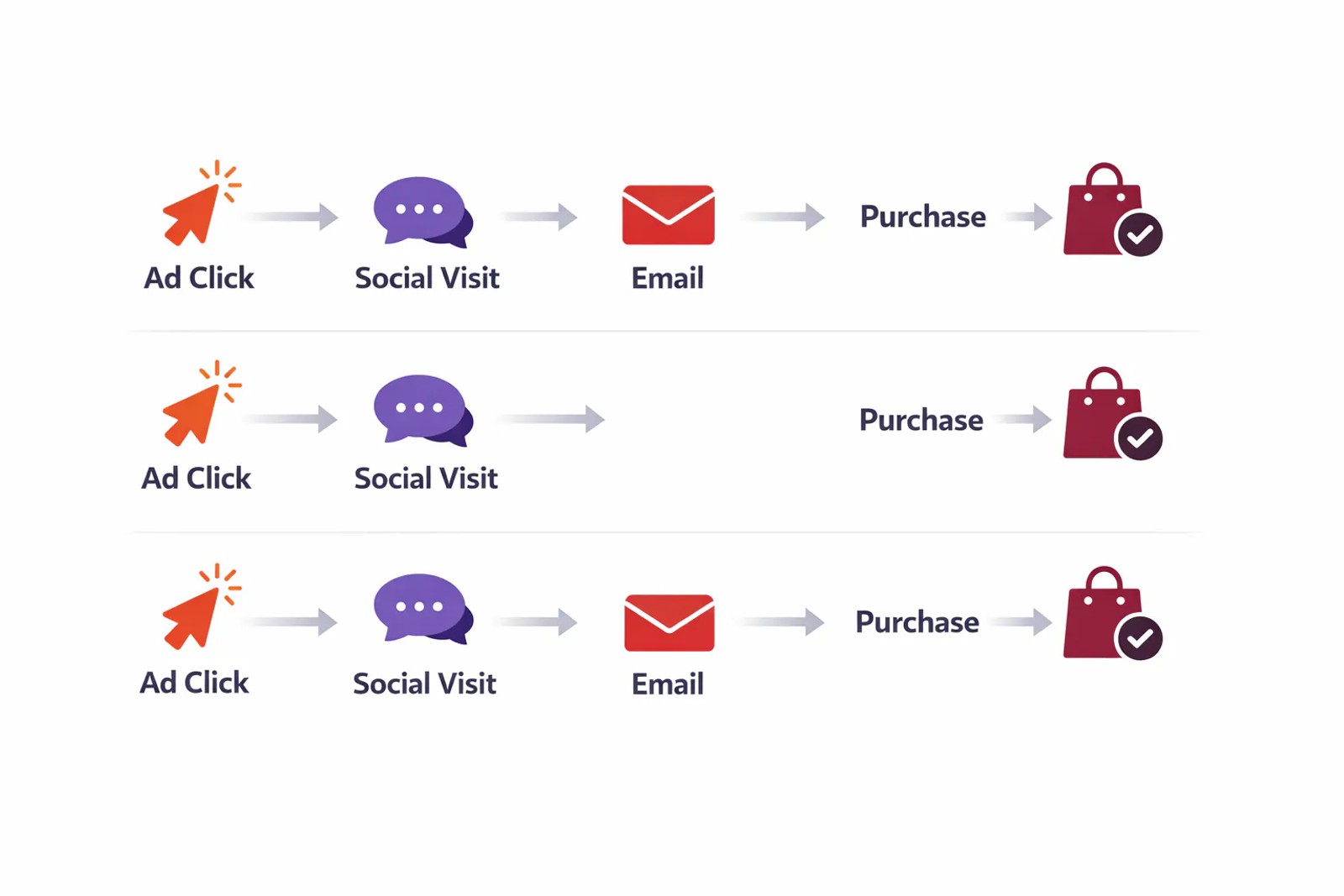
A visitor's journey might include:
- Google Ad click (paid search)
- Organic Google search (organic)
- Email click (email marketing)
- Conversion
Google Ads gives the paid search ad 1.0 conversions. GA4 might give paid search 0.3, organic 0.4, and email 0.3. These are not the same units, and no configuration converts one into the other.
4. Cross-Device Tracking Gaps
Google Ads can connect a mobile ad click to a desktop purchase using Google's signed-in user data across devices. Click an ad on your phone, buy later on your laptop, and Google Ads tracks it as one conversion journey.
Google Analytics relies on your identity resolution setup. If you track by device ID only (the default), that mobile-to-desktop conversion appears as two separate, unconnected sessions. In GA4, cross-device tracking requires Google signals or a user ID implementation.
This gap widens for businesses with long sales cycles where customers research on mobile and purchase on desktop.
5. The Consent Mode Effect
Privacy regulations and tracking restrictions make discrepancies between Google Ads and Google Analytics worse, not better, over time.
When a visitor denies analytics cookies under Consent Mode v2, Google Analytics receives a limited ping instead of full tracking data. Google fills this gap with behavioral modelling, estimating conversions it could not measure directly.
Google Ads models denied conversions too, but with access to a much larger signal pool. It draws on cross-site signed-in behavior and conversion patterns aggregated across millions of advertisers. Two platforms modelling the same missing events with different amounts of evidence do not converge on the same estimate.
The result: privacy changes push Google Analytics numbers down further than Google Ads. A consent denial rate of 40% might reduce Google Analytics conversions by 30-35%, while Google Ads only drops 15-20%.
Consent rates vary by geography, device, and traffic source. Visitors from Europe reject cookies more often than US visitors. Mobile users reject more than desktop users. This means your discrepancies between Google Ads and GA4 change based on your traffic mix, even when nothing about your tracking setup changes.
Configuration Issues That Amplify Discrepancies
Some data discrepancies result from measurement differences. Others come from setup problems you can fix.
1. Missing or Broken GCLID Parameters
Google Ads adds a GCLID parameter (Google Click Identifier) to your landing page URLs. This parameter connects the ad click in Google Ads to the session in Google Analytics.
Your landing page URL should look like: https://yoursite.com/landing?gclid=abc123xyz
If the GCLID parameter is missing, broken, or stripped by redirects, Google Analytics cannot connect the session back to the Google Ad. The conversion still appears in Google Analytics, but it shows up as direct traffic or (not set) instead of paid search.
Common causes:
- Redirects that strip query parameters
- Landing page builders that do not preserve URL parameters
- Conflicting JavaScript that removes the GCLID before the Google tag loads
Check if your GCLID parameters are working: click one of your ads and inspect the landing page URL. The GCLID should be present and remain through any page loads.
2. Auto-Tagging Disabled
Google Ads auto-tagging must be enabled for GCLID parameters to work. In your Google Ads account, go to Settings → Account settings → Auto-tagging and verify it is turned on.
If you also use manual tagging with UTM parameters on your destination URLs, this creates conflicts. Google recommends using auto-tagging exclusively. When you use both manual tagging and auto-tagging together, you risk duplicate or overwritten parameters that confuse tracking codes.
3. Multiple Google Ads Accounts Linked to One Property
Linking multiple Google Ads accounts to a single Google Analytics property creates attribution conflicts. When two ads from different accounts drive traffic to the same domain, Google Analytics cannot always determine which account deserves the conversion credit.
This setup is common when different departments or agencies manage separate Google Ads accounts but share one website. The solution is either consolidating ads accounts or implementing proper cross-account conversion tracking with a Google Ads manager account.
4. Incorrect Attribution Window Settings
Attribution windows determine how long after a click or impression a conversion can be credited back to that interaction.
Google Ads defaults:
- 30 days for search click-through
- 1 day for display view-through
- 10 days for engaged video views
- 30 days for acquisition conversions
- 90 days for all other conversions
If Google Analytics uses a 90-day window and Google Ads uses 30 days, Google Analytics credits conversions to ad clicks that happened 60 days ago. Google Ads has already forgotten those clicks.
Aligning your attribution windows does not eliminate all data discrepancies, but it removes one variable. Set your Google Ads click-through window to match Google Analytics, or vice versa.
How to Audit Your Data and Find the Truth
Chasing perfect alignment between Google Ads and Google Analytics wastes time. The two platforms were built to answer different questions. Focus instead on understanding which type of discrepancy you are dealing with.
Step 1: Establish Your Baseline
Pull three months of data from both platforms for the same conversion action. Calculate the average percentage difference. If Google Ads shows 1,000 conversions and Google Analytics shows 800, your baseline gap is 20%.
This baseline is not a correction factor. It describes your current mix of traffic, consent rates, device usage, and campaign types. When the gap stays within 5 percentage points of this baseline, your tracking is behaving normally.
Step 2: Isolate the Counting Rule
In your Google Ads account, temporarily change your conversion action counting to "one per click" instead of "every conversion." Re-pull the same time period.
If your discrepancy drops significantly, multiple conversions per click account for much of the difference. This is not a problem to fix, it reflects real customer behavior.
Step 3: Compare Attribution Models
In GA4, switch from the data-driven attribution report to the last-click attribution report. Compare the last-click numbers against Ads and GA4 side by side.
The gap between these two reports isolates how much of your discrepancy comes from fractional credit splitting. If last-click brings you closer to the Google Ads number, attribution models explain the difference.
Step 4: Check for Technical Issues
Verify your GCLID parameters are working:
- Click one of your ads
- Check the landing page URL for
?gclid=or&gclid= - Navigate to another page on your site
- Confirm the GCLID persists through page loads
Test your tracking codes setup:
- Open Google Analytics in real-time view
- Click your ad from a private browsing window
- Complete a test conversion
- Verify the conversion appears in real-time with the correct source/medium (google / cpc)
If your GCLID is missing or conversions do not appear with the correct source, you have a technical problem that needs fixing before analyzing discrepancies between Google platforms.
Step 5: Monitor the Gap as a Series
Create a weekly report tracking both numbers side by side with the percentage difference calculated.
Week | Google Ads | Google Analytics | Difference
1 | 523 | 421 | 19.5%
2 | 498 | 407 | 18.3%
3 | 512 | 398 | 22.3%
4 | 487 | 312 | 35.9%
When the difference stays consistent (weeks 1-3 above), both systems are working as designed. When it jumps outside the normal band (week 4), something changed. That change is your signal to investigate.
The Attribution Solution: First-Party Tracking
Google Ads and Google Analytics each serve specific purposes. Google Ads optimizes bids. Google Analytics measures channel mix. Neither tells you which campaigns produced customers worth keeping.
First-party attribution tracking captures the complete customer journey on your own domain, from the first ad click through form submission, CRM entry, and eventual revenue.
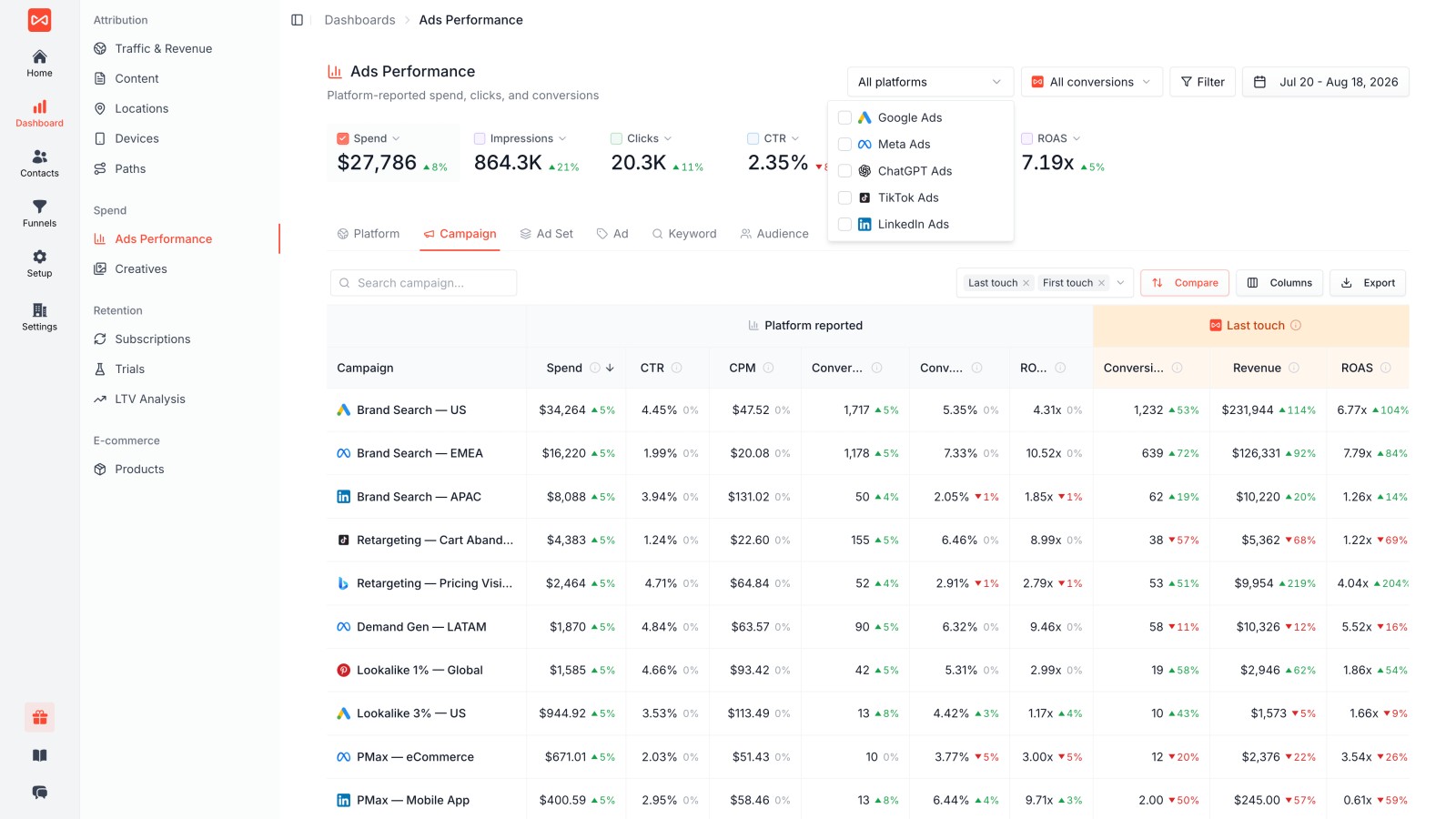
How first-party tracking works:
- A visitor clicks your Google Ad
- Your tracking captures the GCLID, UTM parameters, landing page, and referrer
- The visitor browses multiple pages across several sessions
- They submit a form or book a meeting
- Attribution data flows into your CRM alongside the lead record
- When the deal closes, revenue connects back to the original source
This creates a third number that both GA4 and Google Ads lack: conversions keyed to real people with actual revenue attached.
Why this matters for Google Ads campaigns:
Most businesses optimize Google Ads based on conversion counts. A conversion count tells you nothing about whether those leads qualified, whether they closed, or whether they churned in month two. You might be spending more on campaigns that produce high lead volume but low revenue.
Sourceloop connects every lead and customer back to the specific Google Ad, keyword, and landing page that produced them. When you can see which campaigns drive qualified pipeline and closed revenue, not just form fills, you optimize toward business outcomes instead of activity metrics.
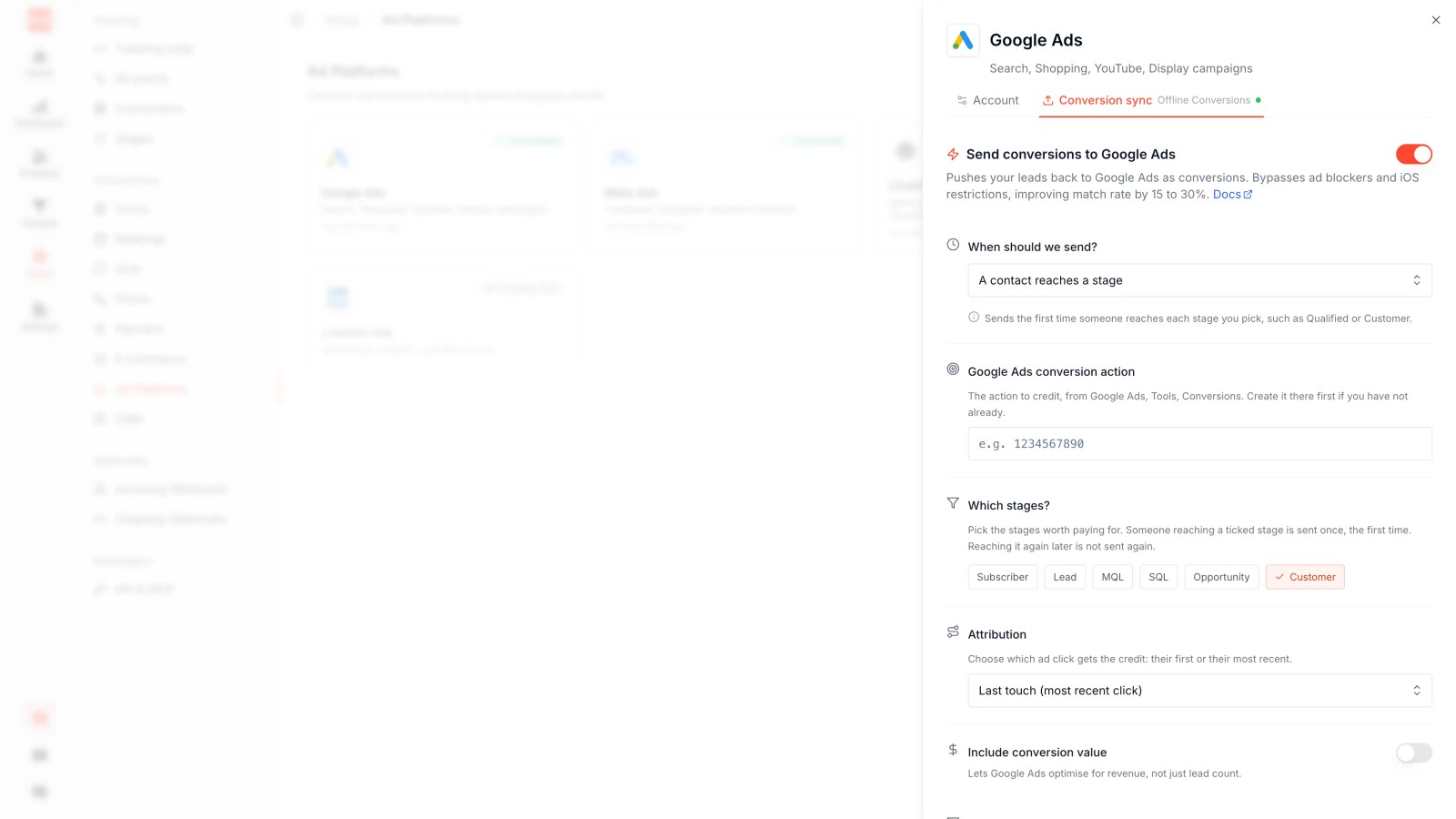
The platform syncs qualified leads and closed deals back to Google Ads as offline conversions. This feedback loop teaches Google's bidding algorithm to optimize toward customers who convert into revenue, not just visitors who click submit.
Learn more about how proper attribution tracking works: How to Track Lead Source Across Every Channel.
FAQ
Why does Google Ads show more clicks than Google Analytics shows sessions?
Google Ads counts every ad click, while Google Analytics only tracks sessions where the page loaded and the tracking codes executed. Ad blockers, quick exits, slow page loads, and multiple clicks within one session all create gaps. A 10-20% difference is normal.
How do I see Google Ads conversions in Google Analytics?
Link your Google Ads account to your Google Analytics property. In Google Analytics 4, go to Admin → Product Links → Google Ads links → Link. Once connected, Google Ads data appears in your Acquisition reports under the google / cpc source/medium. Make sure auto-tagging is enabled in your Google Ads account.
Why do Google Ads and Google Analytics report different conversion numbers?
Four mechanisms create the gap: different counting rules (one per click vs. every conversion), date attribution (click date vs. conversion date), attribution models (whole credit vs. fractional credit), and cross-device tracking capabilities. These are systematic differences, not errors.
How long does it take for Google Ads conversions to show in Google Analytics?
Google Analytics processes data within 24 hours, though real-time reports show activity within seconds. Conversions appear in standard reports the day after they occur. If you are comparing reports, make sure you are using the same date range and timezone in both platforms.
What is a normal discrepancy between Google Ads and Google Analytics?
Industry benchmarks show 10-20% discrepancies are normal and expected. Investigate when gaps exceed 30% or when the percentage suddenly jumps by more than 10 points in one week. Smaller, consistent differences reflect how the platforms measure differently, not tracking problems.
Can I make Google Ads and Google Analytics match exactly?
No. The platforms were built to answer different questions using different methods. You can reduce discrepancies by aligning attribution windows, fixing GCLID issues, and enabling auto-tagging, but perfect alignment is neither possible nor necessary. Focus on understanding which discrepancy type you have.
Why does Consent Mode make discrepancies worse?
When visitors deny cookies, both platforms estimate conversions using behavioral modeling. Google Ads has access to more data (cross-site behavior, aggregated advertiser data), so it recovers more of the missing conversions than Google Analytics. Privacy restrictions push Google Analytics numbers down more than Google Ads numbers.




 Paid Social


