
First-Party Data: What It Is and How to Put It to Work
First-party data is what you collect directly from your customers. Here's what to capture, how to keep it clean, and how to send it to ad platforms.
Table of contents
- What is first-party data?
- The 4 kinds of customer data
- 1. Zero-party data
- 2. First-party data
- 3. Second-party data
- 4. Third-party data
- 3 changes that made first-party data matter more
- 1. Browsers limit tracking, even when it's yours
- 2. Apps need permission to track
- 3. Ad platforms now run on data you send them
- What first-party data to collect
- How to collect and use first-party data with SourceLoop
- Step 1: Install tracking that respects consent
- Step 2: Capture identity at every conversion
- Step 3: Send the source to your CRM
- Step 4: Send outcomes back to the ad platforms
- Step 5: Keep a copy in your own warehouse
- Privacy rules to get right
- Mistakes that waste first-party data
Google Ads wants enhanced conversions. Meta wants the Conversions API. ChatGPT Ads wants offline conversions.
Every major ad platform is now asking the same thing: send us your own data.
What you send back decides who they bid on next. In this guide, I'll cover what first-party data is, what to collect, and how to capture and use it without breaking privacy rules.
What is first-party data?
First-party data is information you collect directly from people who interact with your business. Visits to your site, the campaign that brought them, forms they fill in, deals in your CRM and payments in your billing system all count.
You collect it yourself, on your own properties, with your own consent notice. That's what makes it reliable, and it's why no browser update can take it away from you.
The 4 kinds of customer data
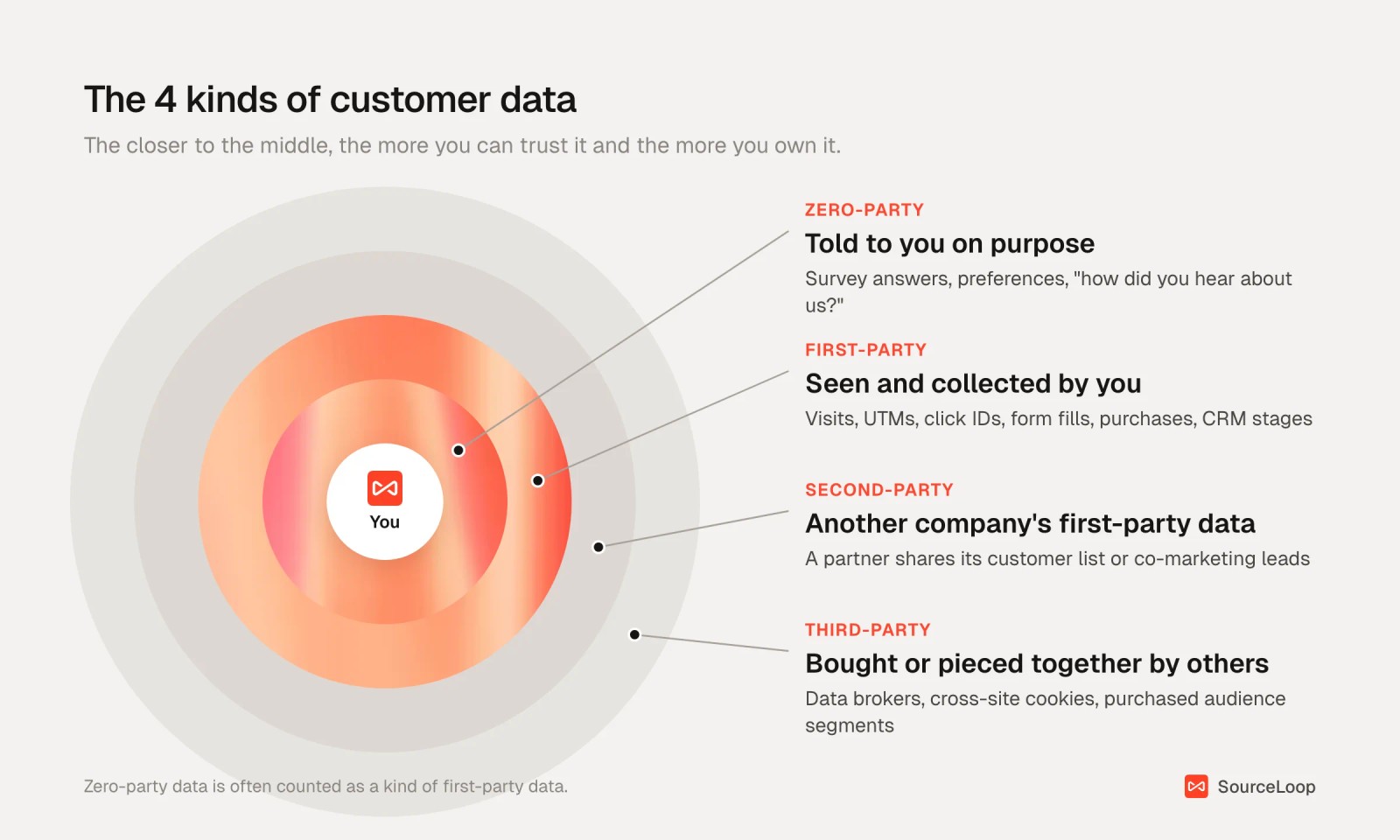
1. Zero-party data
What a customer tells you on purpose. Preference centers, quiz answers, and the "how did you hear about us?" field all belong here.
It's honest about intent but patchy. People skip optional questions and misremember where they first saw you.
2. First-party data
What you observe and collect directly: page views, UTM parameters, ad click IDs, form fills, chat transcripts, CRM stages and revenue.
Most people treat zero-party data as a subset of this. For marketing measurement, first-party data does the heavy lifting.
3. Second-party data
Another company's first-party data, shared with you under an agreement. A co-marketing partner passing over webinar registrants is the typical case.
4. Third-party data
Data collected by someone with no direct relationship to the person, then sold or pooled. Cross-site cookies and purchased audience segments are the classic examples.
| Type | Who collects it | Example | How far you can trust it |
|---|---|---|---|
| Zero-party | You, by asking | "How did you hear about us?" answer | High intent, patchy coverage |
| First-party | You, by observing | UTMs, click IDs, CRM stage, revenue | High |
| Second-party | A partner | Shared event registrant list | Depends on the partner |
| Third-party | Brokers and ad networks | Bought audience segments | Low, and shrinking |
3 changes that made first-party data matter more
First-party data has always been useful. Three shifts in the last few years made it hard to work without.
1. Browsers limit tracking, even when it's yours
Safari blocks third-party cookies outright. It also caps cookies set by JavaScript at 7 days, and at 24 hours when the visitor arrives from a tracker's link with parameters on it, which describes most ad clicks.
Firefox isolates cookies per site by default, so one site can't read another's.
Chrome went the other way. Google dropped its plan to remove third-party cookies in April 2025, and in October 2025 it retired most of the Privacy Sandbox replacements.
So third-party cookies still work in one big browser. They don't work in Safari, Firefox or most iPhone apps, which is why any plan built on them leaks.
2. Apps need permission to track
Since iOS 14.5, apps must ask before tracking people across other companies' apps and sites, through Apple's App Tracking Transparency prompt.
Industry trackers put the share of users who say yes somewhere between a third and a half. Everyone else is invisible to cross-app tracking.
3. Ad platforms now run on data you send them
Google's enhanced conversions and offline conversion imports, Meta's Conversions API, and ChatGPT Ads' conversion uploads all work the same way.
You send a conversion with a click ID or a hashed email or phone number. The platform matches it to a person who saw or clicked an ad. Then its bidding learns from it.
Better inputs mean better matching. Better matching means bidding that finds more of the right people.
What first-party data to collect
You don't need everything. You need the fields that connect an ad click to revenue.
| Data point | Where it comes from | What it's for |
|---|---|---|
| UTM parameters | Your campaign links | Channel, source, campaign and keyword reporting |
| Click IDs (gclid, gbraid, wbraid, fbclid) | Added by the ad platform to the landing URL | Matching a conversion to the exact ad click |
| Landing page and referrer | The first page view | Organic and referral attribution, content reporting |
| Email and phone | Forms, chats, calls, bookings | Identity stitching and hashed matching |
| Consent choices | Your cookie banner | Deciding what you're allowed to store and send |
| Lifecycle stage and deal value | Your CRM | Measuring pipeline, not just leads |
| Revenue and renewals | Stripe, Paddle or your store | ROAS and customer lifetime value |
If you only fix one thing, fix click IDs. Without them, a lead in your CRM can't be tied back to the click that produced it. Our click IDs explainer covers each one.
How to collect and use first-party data with SourceLoop
The hard part isn't knowing what to collect. It's keeping every field attached as a visitor moves from an ad click to a form, into your CRM and through to payment.
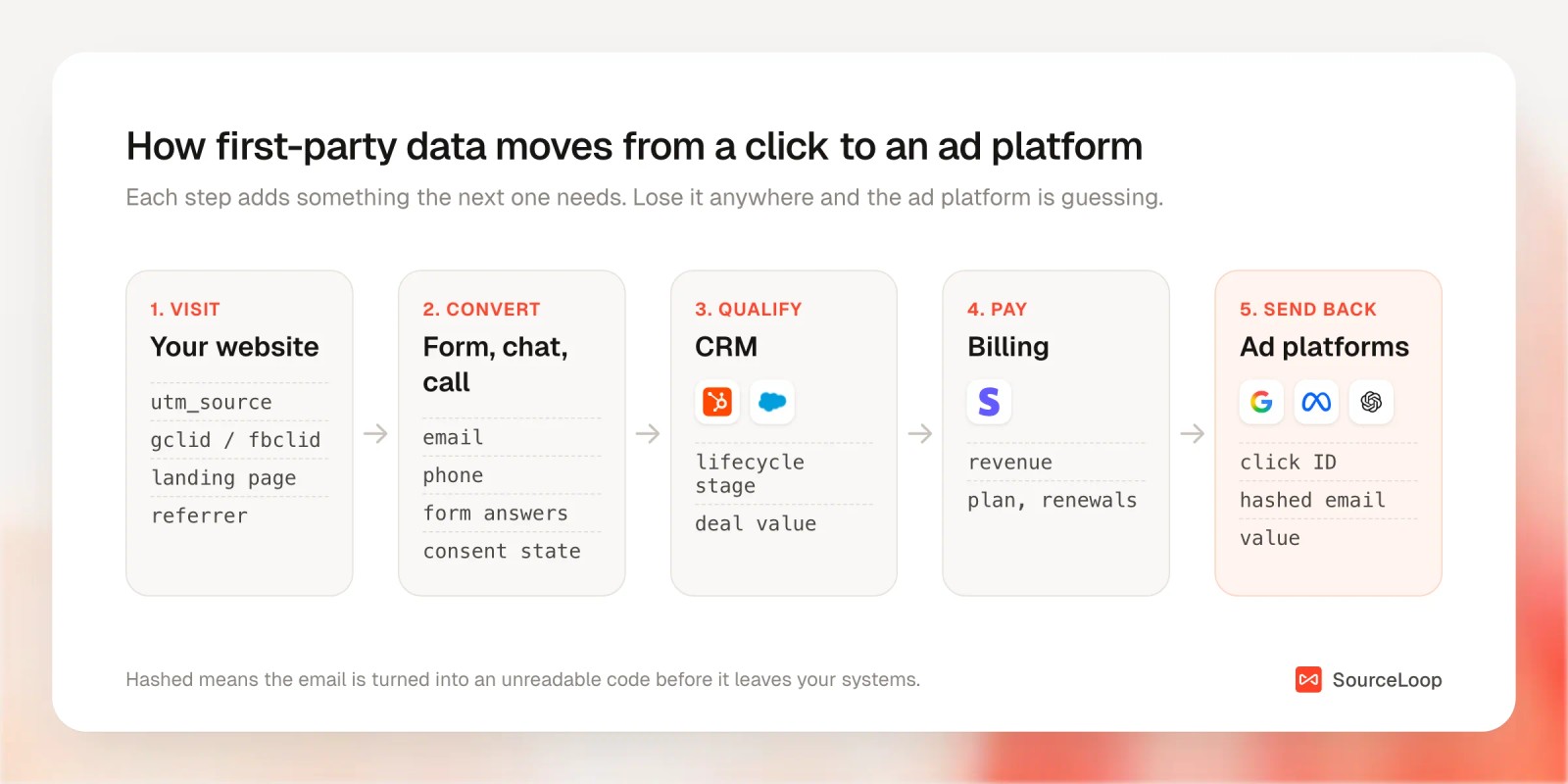
SourceLoop, a first-party marketing attribution and measurement tool, handles that chain. It tracks visits on your site, ties them to the person when they convert, syncs the result to your CRM, and sends hashed outcomes back to the ad platforms.
Step 1: Install tracking that respects consent
Add the snippet from Setup > Tracking code. It records each visit's UTMs, click IDs, landing page and referrer in a first-party cookie on your own domain. If you'd rather not store cookies at all, turn on Cookieless mode on the same page.
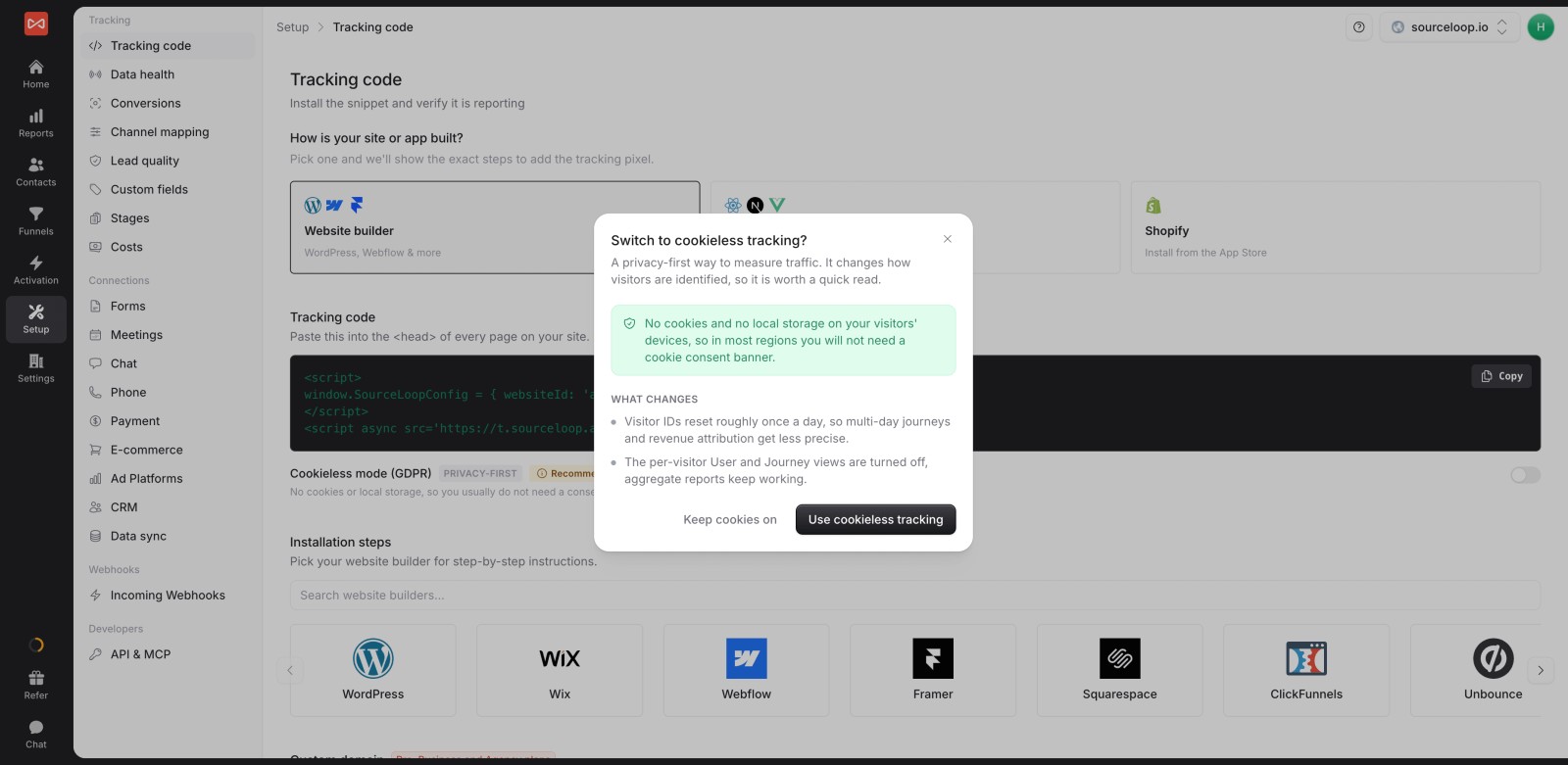
The tracker reads Google Consent Mode v2 signals. If someone declines analytics storage, they aren't tracked. If they decline ad storage, click IDs are dropped. If they decline ad user data, emails and phone numbers aren't sent.
The consent and cookies guide walks through each case, and our post on GDPR-compliant conversion tracking covers the legal side.
Step 2: Capture identity at every conversion
A first-party record is only useful once you know who it belongs to. SourceLoop picks up the email or phone from forms, chats, calls and meeting bookings, then attaches the visitor's whole history to that person.
If the same email shows up from a phone and a laptop, the two journeys are merged into one contact.

There are setup guides for most tools, from Gravity Forms and HubSpot Forms to Calendly and CallRail.
Step 3: Send the source to your CRM
Your sales team lives in the CRM, so that's where the first-party data has to end up. Connect HubSpot, Salesforce or Pipedrive under Setup > CRM, then map SourceLoop fields to CRM properties.
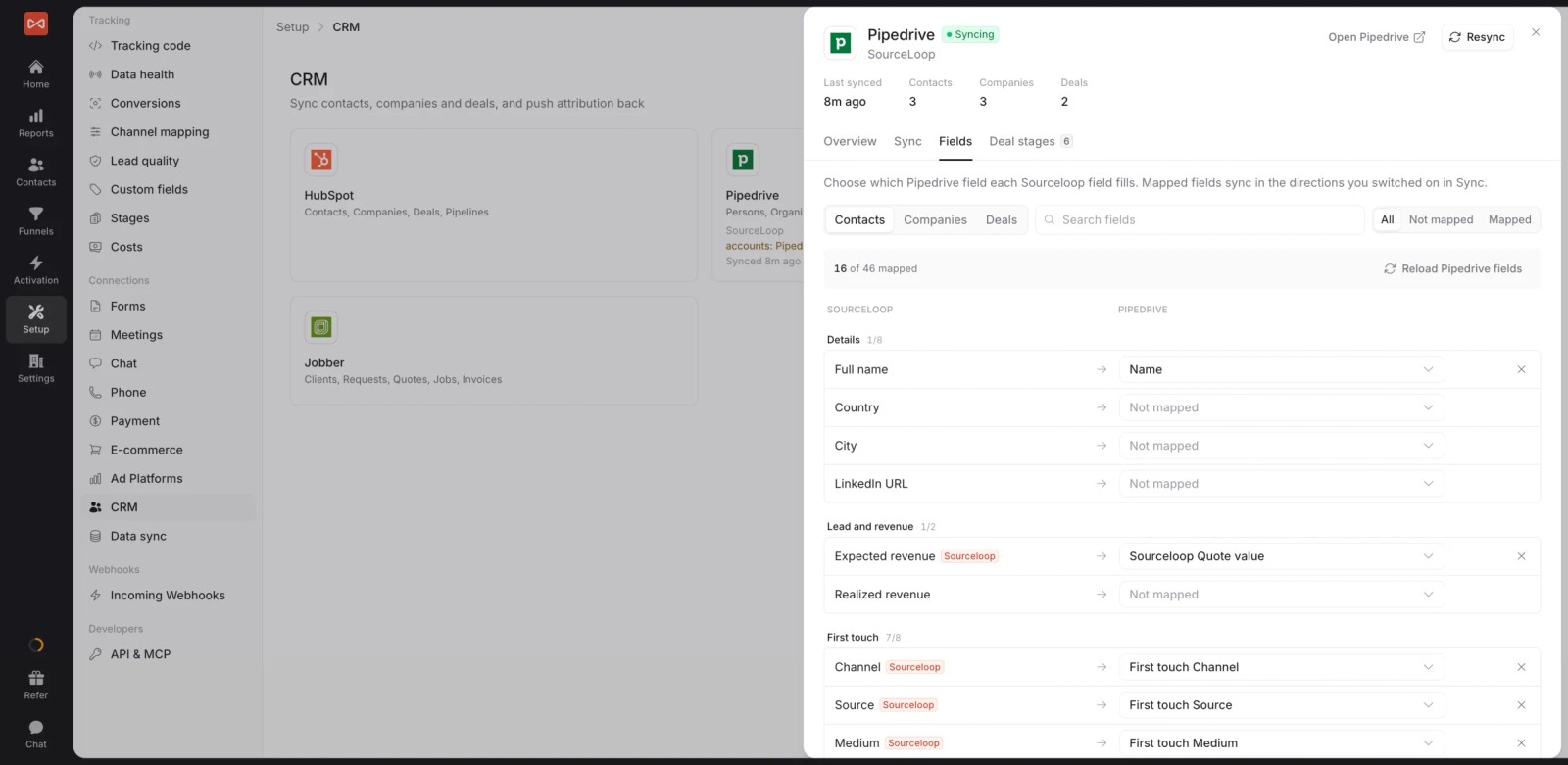
The sync runs both ways. Stage changes and won deals flow back into SourceLoop, so reports can measure pipeline and revenue by channel. There's more on this in how to send lead source to your CRM.
Step 4: Send outcomes back to the ad platforms
This is where first-party data pays for itself. Under Activation > Conversion sync, choose a platform, the moment to send (a new lead, a good lead, a stage, a won deal or a payment) and the value.

SourceLoop sends the click ID plus a hashed email and phone, which is what Google's enhanced conversions and Meta's Conversions API use for matching. It works for Google Ads, Meta and ChatGPT Ads.
Send the outcomes you actually want more of. The platform will chase whatever you call a conversion. Lead quality rules keep spam out of what you send.
Step 5: Keep a copy in your own warehouse
On the Agency plan, SourceLoop can export everything to your warehouse: visits, people, deals, revenue, ad spend and the attribution credit for every touch. Snowflake, BigQuery, Amazon S3 and Google Cloud Storage are supported.
It runs hourly, every 6 hours or daily, and only sends what changed. Your data team can then join it with product usage or finance data.
Privacy rules to get right
- Have a lawful basis. Under GDPR, that's usually consent or legitimate interest. Ad tracking in the EU and UK generally needs consent.
- Hashing isn't anonymizing. A hashed email can still identify a person, so it's still personal data. Treat it like any other personal data.
- Pass consent through. If someone declines ad storage, their click ID shouldn't reach an ad platform. Consent Mode is how Google expects to hear about it.
- Collect what you'll use. Every extra field is something to secure and justify.
Mistakes that waste first-party data
- Losing UTMs at the form. If the form tool doesn't store the source, the CRM sees "Direct" or nothing at all.
- Sending every lead to the ad platforms. Spam and students teach bidding to find more spam and students. Low-quality Meta leads usually start here.
- Hashing badly. Emails need trimming and lowercasing before hashing, or nothing matches.
- Counting on Chrome. Third-party cookies still work there, but not in Safari, Firefox or iPhone apps.
- Treating the CRM as the end. If revenue never makes it back to attribution, you'll keep optimizing for leads.
If you're planning past cookies more broadly, see our cookie deprecation strategy, cookieless attribution and server-side tracking guides.
Frequently asked questions
-
What is first-party data in simple terms?
It's information you collect directly from people who use your website, product or services. Examples are page visits, the ad that brought someone to you, form submissions, CRM records and purchases.
-
What is the difference between first-party and third-party data?
You collect first-party data yourself, from people who deal with you directly. Third-party data is collected by companies with no direct relationship to the person, then sold or shared. First-party data is more accurate and doesn't depend on cross-site cookies.
-
Is zero-party data the same as first-party data?
Zero-party data is what a customer tells you on purpose, such as survey answers or preferences. Most people count it as a subset of first-party data. The difference is that it's declared, not observed.
-
Does Chrome still allow third-party cookies?
Yes. In April 2025 Google decided not to remove third-party cookies from Chrome or add a new consent prompt for them. Safari and Firefox still block or isolate them by default, though, so they can't be relied on.
-
How do you send first-party data to Google Ads and Meta?
Use Google's enhanced conversions or offline conversion imports, and Meta's Conversions API. You send each conversion with the ad click ID and a hashed email or phone. A tool like SourceLoop can do this automatically when a lead, deal or payment happens.
-
Is hashed email data compliant with GDPR?
Hashing helps, but a hashed email is still personal data under GDPR. You still need a lawful basis, usually consent for advertising, and you should only send data for people who agreed to it.




 Paid Social


