
What Is a Call Tracking Number? Types, Setup and Costs
A call tracking number shows which ad, search or listing made your phone ring. The types, how many you need, the costs, and how to set them up.
Table of contents
- What is a call tracking number?
- 3 types of call tracking numbers
- 1. Static tracking numbers
- 2. Dynamic numbers (DNI)
- 3. Google forwarding numbers
- Local vs toll-free tracking numbers
- How many tracking numbers you need
- What call tracking numbers cost
- Keep your local SEO listings consistent
- How to see which calls turn into revenue
- Step 1: Install the SourceLoop tracker on your site
- Step 2: Connect your call tracking platform
- Step 3: Decide which calls count as good leads
- Step 4: See the journey behind each call
- Step 5: Report calls next to every other lead
- Step 6: Send qualified calls back to Google Ads and Meta
- Common call tracking mistakes
A plumber spends $6,000 a month on Google Ads, a Yelp listing and a few local radio spots. Most of the jobs come in by phone.
Ask which of those three is paying off and the honest answer is usually a shrug.
A call tracking number fixes that. In this guide, I'll cover how they work, the three types, how many you need, what they cost, and how to connect calls to revenue so you can see which ones were worth answering.
What is a call tracking number?
A call tracking number is a phone number that forwards to your real business line and is assigned to one marketing source. Every call to it gets logged with that source.
The caller hears nothing different. Behind the scenes, the call tracking platform records the time, duration, caller ID, the number dialed and, if you turn it on, a recording.
Phone calls are still a big part of how people buy. In a Google survey of 3,000 mobile searchers, 70% said they had used click to call from search results.
If you run ads and take calls, but only track forms, you're judging your marketing on part of the results.
3 types of call tracking numbers
Call tracking numbers come in three types, and most businesses end up using more than one.
1. Static tracking numbers
One fixed number per source. Put one on a billboard, another on your Google Business Profile, a third in a print ad.
Static numbers are simple and cheap. They're the only option for offline media, because nobody visits a web page before calling the number on a truck.
The limit is detail. A static number on your website can tell you someone called from the site, but not which ad or keyword brought them there.
2. Dynamic numbers (DNI)
Dynamic number insertion swaps the phone number on your website for a number from a pool, assigned to that one visitor. When they call, the platform knows their session: the source, campaign, keyword and pages they viewed.
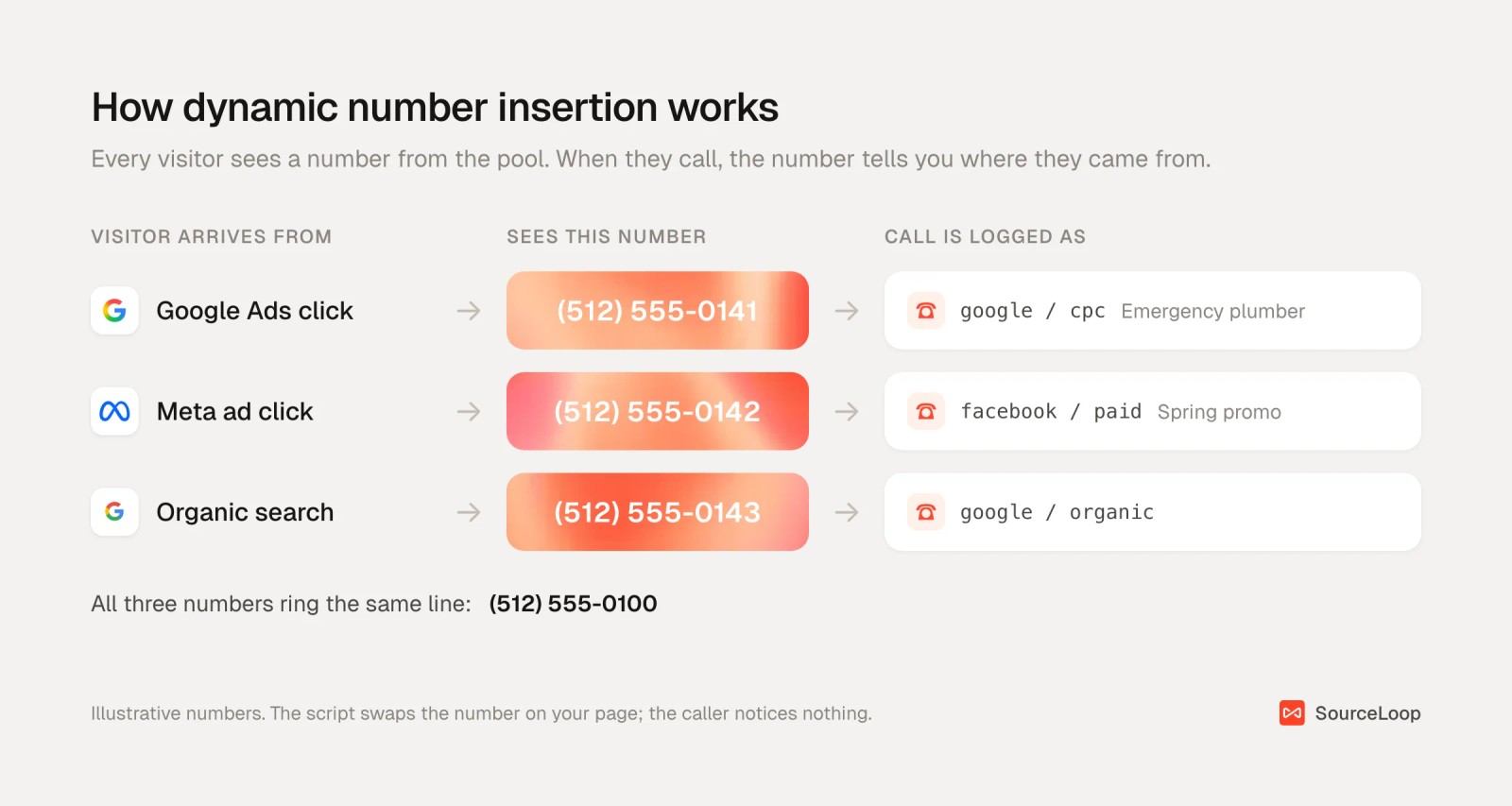
This is what most people mean by call tracking today. It's the only way to tie a phone call to a specific ad, keyword or landing page.
3. Google forwarding numbers
Google Ads offers its own forwarding numbers for call assets and, with a phone snippet on your website, for calls from your site after an ad click.
They're free and built in. But they only measure calls that follow a Google ad, so they can't tell you about Meta, organic search or your Yelp listing.
Google has also changed how it judges these calls. It now classifies call conversions using call recordings where it can, and falls back to a minimum call length you set when recording isn't available.
| Type | What it tracks | Best for | Limit |
|---|---|---|---|
| Static number | One source per number | Billboards, print, radio, directory and Google Business Profile listings | No keyword or page detail |
| Dynamic (DNI) | Each website visitor's session | Paid search, paid social, SEO traffic | Needs a pool sized for your traffic |
| Google forwarding number | Calls after a Google ad | Google Ads accounts on a tight budget | Sees Google Ads only |
Most businesses end up with a mix: static numbers for offline and listings, a dynamic pool for the website.
Local vs toll-free tracking numbers
| Local number | Toll-free number | |
|---|---|---|
| Looks like | (512) 555-0141 | (800), (888), (877), (866), (855), (844) or (833) |
| Signals | A business in the caller's area | A national or established brand |
| Best for | Home services, clinics, law firms, anything local | Ecommerce, national service brands, support lines |
| Typical cost with CallRail | $3 a month per extra number | $5 a month per number |
If you serve one city, use local numbers with the same area code as your main line. A familiar area code tells callers you're nearby.
Toll-free numbers suit businesses that sell nationwide. One thing people miss: the seven toll-free prefixes are not interchangeable. 1-800-555-0141 and 1-888-555-0141 are different numbers and can belong to different businesses.
We cover the toll-free side, including vanity numbers, in how to get an 800 number for your business.
How many tracking numbers you need
Static numbers are easy: one per source you want to measure.
Dynamic pools take a little math. Each visitor holds a number for the length of their visit, plus a hold period afterwards so a late call still matches. If the pool runs out, two visitors see the same number and calls get credited to the wrong source.
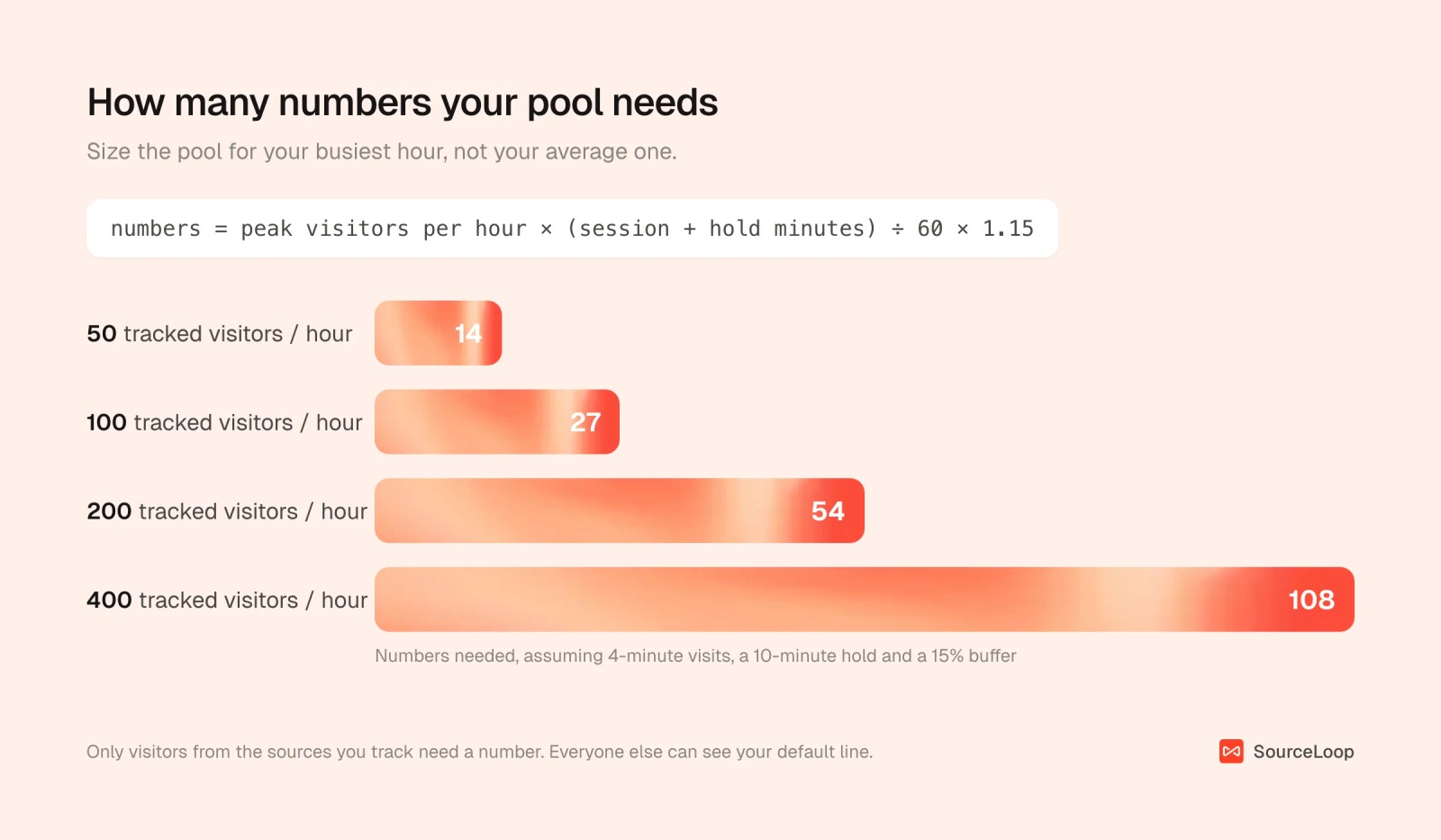
To size yours:
- Find your busiest hour. In your analytics, look at peak hourly visitors over the last month, counting only the sources you want to track.
- Add visit length and hold time. Average visit length plus the platform's hold period. Four minutes plus ten is a common starting point.
- Multiply and add a buffer. Peak visitors per hour, times those minutes, divided by 60, plus 15%.
So 100 paid visitors in the peak hour, with 4-minute visits and a 10-minute hold, needs about 27 numbers.
You rarely need a number for every visitor. Most platforms let you show your normal line to direct and returning traffic, and assign pool numbers only to ads and search.
What call tracking numbers cost
Pricing is usually a monthly base fee plus numbers and minutes. CallRail's published pricing is a good reference point:
- Base plan: $50 a month, with 5 local numbers and 250 local minutes included.
- Extra numbers: $3 a month for each local number, $5 for each toll-free number.
- Extra minutes: $0.05 per local minute.
Here's what a typical small-business setup comes to:
| Item | Quantity | Monthly cost |
|---|---|---|
| Base plan | Includes 5 numbers, 250 minutes | $50 |
| Dynamic pool for paid search and social | 27 numbers | |
| Static numbers (Google Business Profile, Yelp, radio) | 3 numbers | |
| Extra local numbers | 30 minus 5 included = 25 × $3 | $75 |
| Extra minutes | 1,500 minus 250 = 1,250 × $0.05 | $62.50 |
| Total | $187.50 |
Higher tiers bundle extra features, so check what's included before you pay for an add-on.
Keep your local SEO listings consistent
Local rankings lean on your business name, address and phone number matching everywhere online. Swapping numbers carelessly can muddy that.
A few rules keep it safe:
- Google Business Profile: put the tracking number as the primary phone and your real number as an additional one. Google lets you add up to two extra numbers, and call tracking vendors like WhatConverts recommend this setup.
- Directories and citations: keep your real number on Yelp, Bing Places, Apple Maps and industry directories, unless you track that listing with its own static number.
- Your website: DNI only swaps the number for visitors from the sources you track. Search engine crawlers arrive without a tracked source, so they see your real number, and so does your schema markup.
How to see which calls turn into revenue
A tracking number tells you a call came from Google Ads. It can't tell you whether that caller booked a job, or what it was worth.
To get there, you need the call joined to the rest of the buyer's journey and to your CRM. The steps below use SourceLoop, a marketing attribution and lead source tracking tool. It doesn't replace your call tracking platform. It connects to CallRail, CallTrackingMetrics, Invoca and Mediahawk, and turns each call into a lead with the visitor's full journey, alongside your forms, chats, bookings and payments.
Step 1: Install the SourceLoop tracker on your site
Add the SourceLoop script to every page where a tracking number appears (install guide).
It records each visit's source, UTMs and click IDs. That's the history every call gets attached to later. A call from a billboard number still shows up, just as Direct, because there was no visit before it.
Step 2: Connect your call tracking platform
Open Setup > Phone and connect your provider with an API key.
With CallRail, that's the whole job: SourceLoop registers call delivery for every company on the account, so you never copy a webhook URL by hand. The CallRail guide and CallTrackingMetrics guide walk through each step.
From then on, calls land within seconds of hanging up, as leads with type Call. Each one carries first and last touch source, campaign, keyword, landing page, call duration and the recording link.
Step 3: Decide which calls count as good leads
Not every call is a lead. Wrong numbers, sales pitches and existing customers calling about an invoice all ring the same line.
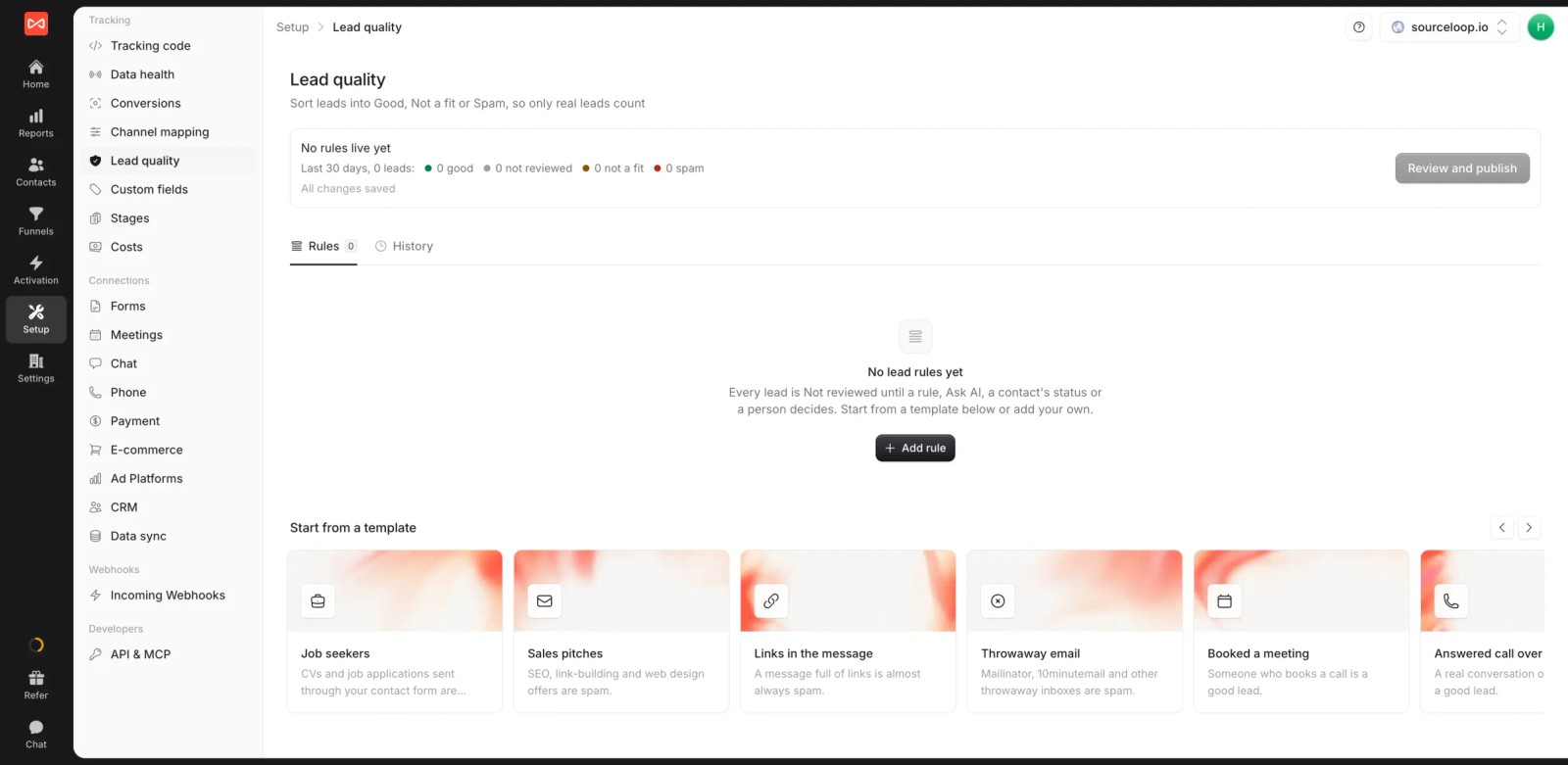
In Setup > Lead quality, start from the Answered call over 60s template and adjust it with any of the lead quality conditions, such as caller number or form answers. You can also mark leads as Good, Not a fit or Spam by hand.
Step 4: See the journey behind each call
Open any caller in Contacts. You'll see first and last touch, then every visit and page before they picked up the phone.

This is where calls get interesting. A caller whose last click was a branded search often found you weeks earlier through a paid social ad. The tracking number alone would credit branded search.
Step 5: Report calls next to every other lead
In Reports > Traffic and Revenue, switch the outcome to conversions by type to compare calls with form fills and bookings by channel, campaign or keyword.

With HubSpot, Salesforce or Pipedrive connected through CRM sync, you can attribute won deals and revenue too. A channel that brings plenty of short calls but few booked jobs stops looking cheap.
Step 6: Send qualified calls back to Google Ads and Meta
Google forwarding numbers only see calls after a Google ad. SourceLoop can send any qualified call back to the ad platform that started the journey.
In Activation > Conversion sync, create a sync that fires when a lead is marked Good, and narrow it to calls. Each call goes with its click ID plus the caller's hashed phone number, which gives Google Ads and Meta a strong match.

The conversion sync overview covers the options, and the Google Ads offline conversions guide covers the Google side. For a deeper look at call conversions in Google Ads, see how to set up phone call conversion tracking.
Common call tracking mistakes
- Pools that are too small. Callers share numbers and get credited to the wrong source. Size for your busiest hour.
- Tracking numbers in your citations. A different number on every directory hurts local consistency. Keep the real number there.
- Counting every call as a lead. Without a duration or quality rule, wrong numbers and sales pitches inflate your cost per lead.
- Stopping at the source. Knowing a call came from Google Ads is half the answer. Keyword-level tracking and CRM outcomes tell you whether to spend more.
- Forgetting offline sources. Give radio, print and vehicle signage their own static numbers, or those calls disappear into Direct.
Frequently asked questions
-
What is a call tracking number?
A call tracking number is a phone number assigned to one marketing source that forwards to your main business line. Every call to it is logged with that source, plus the time, duration and caller ID, so you can see which campaigns make the phone ring.
-
What is the difference between static and dynamic call tracking?
A static number is fixed to one source, like a billboard or a directory listing. Dynamic number insertion shows each website visitor a number from a pool, so a call can be tied to that visitor's ad, keyword and landing page.
-
Do call tracking numbers hurt local SEO?
Not if you set them up carefully. Put the tracking number as the primary phone on your Google Business Profile with your real number as an additional one, keep your real number on directories, and use DNI on your website so the real number stays in the page code.
-
How many tracking numbers do I need?
One static number per offline source or listing. For a dynamic pool, multiply your peak hourly tracked visitors by average visit length plus hold time in minutes, divide by 60 and add 15%. About 100 paid visitors in your busiest hour needs roughly 27 numbers.
-
How much does a call tracking number cost?
Local numbers typically cost about $3 a month each and toll-free numbers about $5, on top of a base plan. CallRail starts at $50 a month with 5 local numbers and 250 minutes included, then charges $0.05 per extra local minute.
-
Can I track phone calls without a call tracking platform?
Partly. Google Ads forwarding numbers track calls from Google ads for free, and a static number per source works for offline media. To tie calls from every channel to a visitor's journey, you need DNI from a platform like CallRail, connected to an attribution tool.




 Paid Social


