
Track SaaS signups, trials, and subscriptions
Attribute the full SaaS journey, from visit to signup, free trial, and paid subscription, back to the original click. Next.js and Stripe examples.
On this page
- Prerequisites
- Key concept: identify vs track
- Cross-subdomain note (important)
- Step 1: Capture the signup
- 1a. Email/password form
- 1b. Google / Facebook / GitHub OAuth signup (the important case)
- Step 2: The free trial (no payment yet)
- Step 3: Connect your payment provider
- Step 4: Stamp the checkout so revenue stitches back
- Stripe (server-side checkout session)
- Other providers (same meta object)
- If you cannot stamp metadata
- Step 5: Trial to paid and renewals (automatic)
- Putting it together (the minimal checklist)
- Common mistakes
- Where to see it
- Verify
This guide attributes the entire SaaS journey to the marketing source that started it:
Ad / SEO / referral
   → visits www.yoursite.com (marketing)
   → clicks "Start free trial" → app.yoursite.com (your app)
   → signs up (email form, OR Google / Facebook OAuth)
   → uses the free trial (no payment yet)
   → later subscribes (Stripe / LemonSqueezy / Paddle / Polar)
By the end, the signup and the eventual subscription revenue are both credited to the original ad/click.
Prerequisites
- Tracking installed on both the marketing site and the app, using the same
websiteId: the standard snippet on the marketing site (Install the tracking pixel) andmode: 'conversions'in the app (Install SourceLoop in your app). Subdomains (www.andapp.) share identity automatically, no extra setup. - Your payment provider connected in SourceLoop, under Setup, Payment. This is what lets SourceLoop receive the subscription and payment events. You only do it once, and it is Step 3 below.
- The server SDK installed in your app’s backend (
npm install @sourceloop-analytics/sdk, Node 18+). Strongly recommended, it is what makes OAuth signups and payments attribute reliably.
Key concept: identify vs track
You will use exactly two calls. Understanding the difference avoids 90% of mistakes.
identify({ email })links a known person (their email) to their anonymous visit. It is idempotent and creates no conversion. Call it every time a user logs in or signs up. Safe to call repeatedly.track({ eventName })records a conversion (a meaningful event likesignup_completedortrial_started). Call it once per real event, not on every page load.
Rule of thumb: identify = “this visitor is this person”, track = “this important thing happened”.
Cross-subdomain note (important)
When the user clicks from www.yoursite.com to app.yoursite.com, SourceLoop already treats them as the same visitor because the identity cookie (_sl_aid) is set on your root domain (.yoursite.com). You do not need to do anything for subdomains. (If your app is on a genuinely different root domain, e.g. marketing on brand.com, app on brandapp.io, see Cross-domain tracking.)
Step 1: Capture the signup
The email is what ties the anonymous visitor to a real account. How you capture it depends on the signup method.
1a. Email/password form
Call identify + track right after the account is created:
// Client-side, after your signup succeeds
import { identify, track } from '@sourceloop-analytics/sdk';

identify({ email: form.email });
track('signup_completed', { method: 'password', plan: 'free_trial' });
Call these after the account actually exists, not on submit, so a failed or rejected signup does not record a conversion.
1b. Google / Facebook / GitHub OAuth signup (the important case)
With OAuth, the email is only known on your server, in the callback, after the provider redirects back. So you bind it server-side, reading the visitor’s id from the request cookie. This is the single most important piece for SaaS attribution.
The pattern is always:
const anonymousId = getAnonymousId(<the incoming request>);
await sl.identify({ anonymousId, email });
await sl.track({ anonymousId, email, eventName: 'signup_completed' });
getAnonymousId reads the _sl_aid cookie (set on your root domain, so it is present on app.yoursite.com). Concrete examples:
NextAuth / Auth.js (App Router)
// app/api/auth/[...nextauth]/route.ts
import NextAuth from 'next-auth';
import { cookies } from 'next/headers';
import { Sourceloop, getAnonymousId } from '@sourceloop-analytics/sdk/server';

const sl = new Sourceloop({ websiteId: 'YOUR_WEBSITE_ID' }); // not a secret, paste it directly

const handler = NextAuth({
  // ...your providers...
  callbacks: {
    async signIn({ user, isNewUser }) {
      try {
        const anonymousId = getAnonymousId(cookies()); // Next App Router cookie store
        if (anonymousId && user.email) {
          // Runs on EVERY sign-in. identify is idempotent, so this is correct.
          await sl.identify({ anonymousId, email: user.email });

          // Only on account creation, otherwise every login is a "signup".
          if (isNewUser) {
            await sl.track({
              anonymousId,
              email: user.email,
              externalId: user.id,          // your DB user id (optional but recommended)
              eventName: 'signup_completed',
              properties: { plan: 'free_trial' },
            });
          }
        }
      } catch (e) {
        // Never block sign-in on analytics. Log and continue.
        console.error('sourceloop signIn tracking failed', e);
      }
      return true;
    },
  },
});

export { handler as GET, handler as POST };Clerk (webhook or a post-auth route handler)
// app/api/track-signup/route.ts  (call this from your client right after Clerk sign-up)
import { Sourceloop, getAnonymousId } from '@sourceloop-analytics/sdk/server';
import { currentUser } from '@clerk/nextjs/server';

const sl = new Sourceloop({ websiteId: 'YOUR_WEBSITE_ID' }); // not a secret, paste it directly

export async function POST(req: Request) {
  const user = await currentUser();
  const anonymousId = getAnonymousId(req); // reads _sl_aid from the request cookies
  const email = user?.emailAddresses[0]?.emailAddress;
  if (anonymousId && email) {
    await sl.identify({ anonymousId, email });
    await sl.track({ anonymousId, email, externalId: user!.id, eventName: 'signup_completed' });
  }
  return Response.json({ ok: true });
}
Supabase Auth (callback route)
// app/auth/callback/route.ts
import { Sourceloop, getAnonymousId } from '@sourceloop-analytics/sdk/server';
import { createServerClient } from '@supabase/ssr';
import { cookies } from 'next/headers';

const sl = new Sourceloop({ websiteId: 'YOUR_WEBSITE_ID' }); // not a secret, paste it directly

export async function GET(req: Request) {
  // ...exchange the code for a session as usual...
  const supabase = createServerClient(/* ... */);
  const { data: { user } } = await supabase.auth.getUser();

  const anonymousId = getAnonymousId(req);
  if (anonymousId && user?.email) {
    await sl.identify({ anonymousId, email: user.email });

    // This callback also runs on every returning OAuth login, so only record
    // the signup for a genuinely new account.
    const isNewUser = user.created_at === user.last_sign_in_at;
    if (isNewUser) {
      await sl.track({ anonymousId, email: user.email, externalId: user.id, eventName: 'signup_completed' });
    }
  }
  return Response.redirect(new URL('/dashboard', req.url));
}
The same rule applies to every provider: the auth callback is a login path first and a signup path only sometimes. Whatever your stack calls it, gate signup_completed on account creation and leave identify ungated.
getAnonymousIdaccepts whatever you have: a WebRequest, aHeadersobject, the Next.jscookies()store, a Pages-Routerreq, a rawCookieheader string, or a plain{ _sl_aid: '...' }map. Pass the request object you have in that handler.
At this point you have a signup conversion (revenue = 0) attributed to the visitor’s original marketing source, even though they signed up via OAuth.
Step 2: The free trial (no payment yet)
There is nothing extra to do for a no-card free trial. The signup conversion from Step 1 already exists and is attributed. When the user later pays, Step 3 connects the revenue to it.
If you want a distinct “trial started” event (e.g. for funnel reporting), fire one:
await sl.track({ anonymousId, email, eventName: 'trial_started', properties: { plan: 'pro' } });Step 3: Connect your payment provider
Everything about revenue depends on this, so do it before you touch checkout code. Connecting the provider is what lets SourceLoop see subscriptions, renewals, and refunds, which is how a payment months from now still credits the ad that started it.
You do this once, and it takes about two minutes.
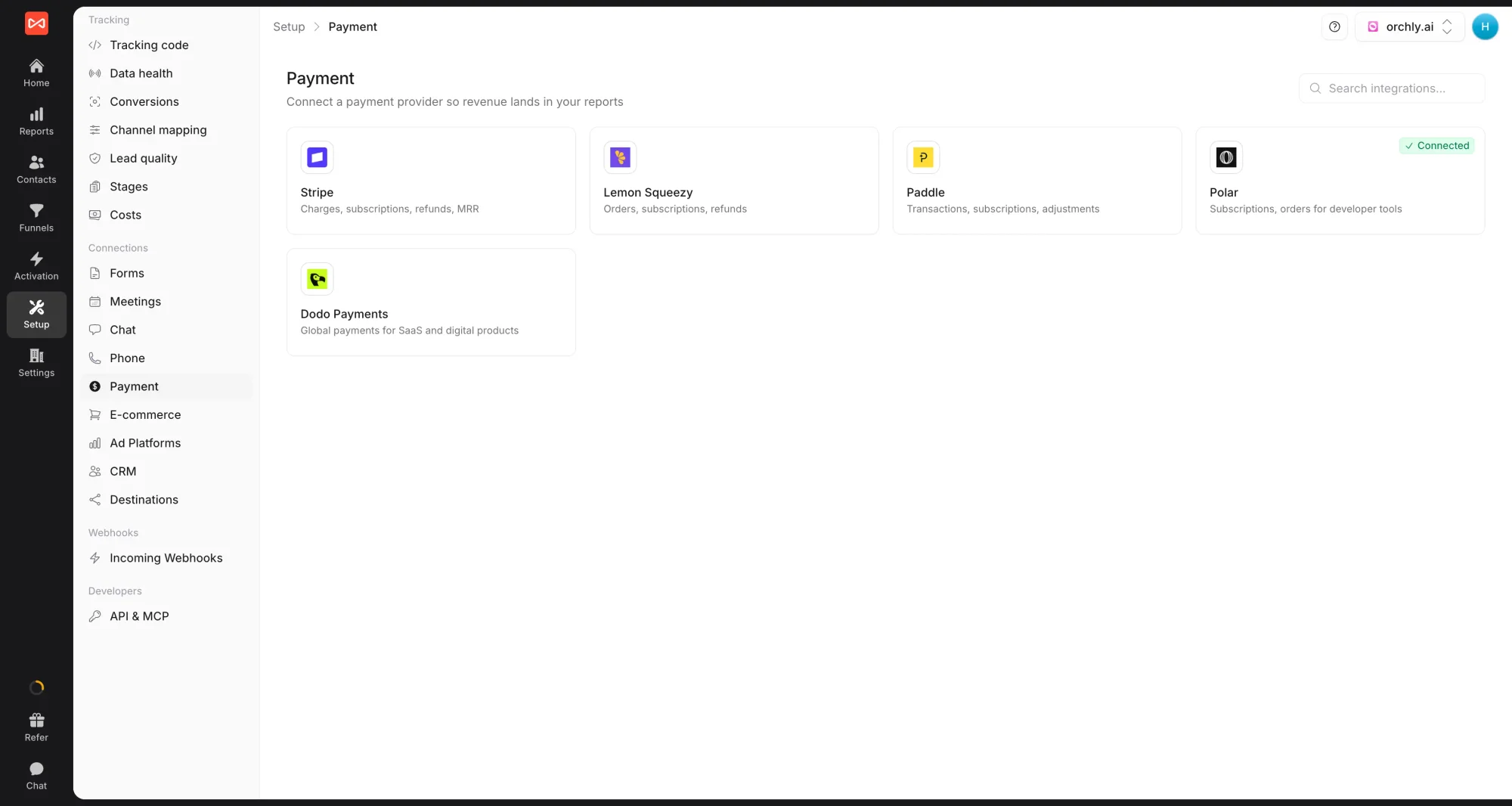
- In SourceLoop, open Setup -> Payment in the sidebar. Every supported provider is listed as a card: Stripe, Lemon Squeezy, Paddle, Polar, and Dodo Payments.
- Click your provider’s card. A drawer opens on the right with two tabs, Connect webhook and Wire attribution. Stay on the first tab and copy the webhook URL.
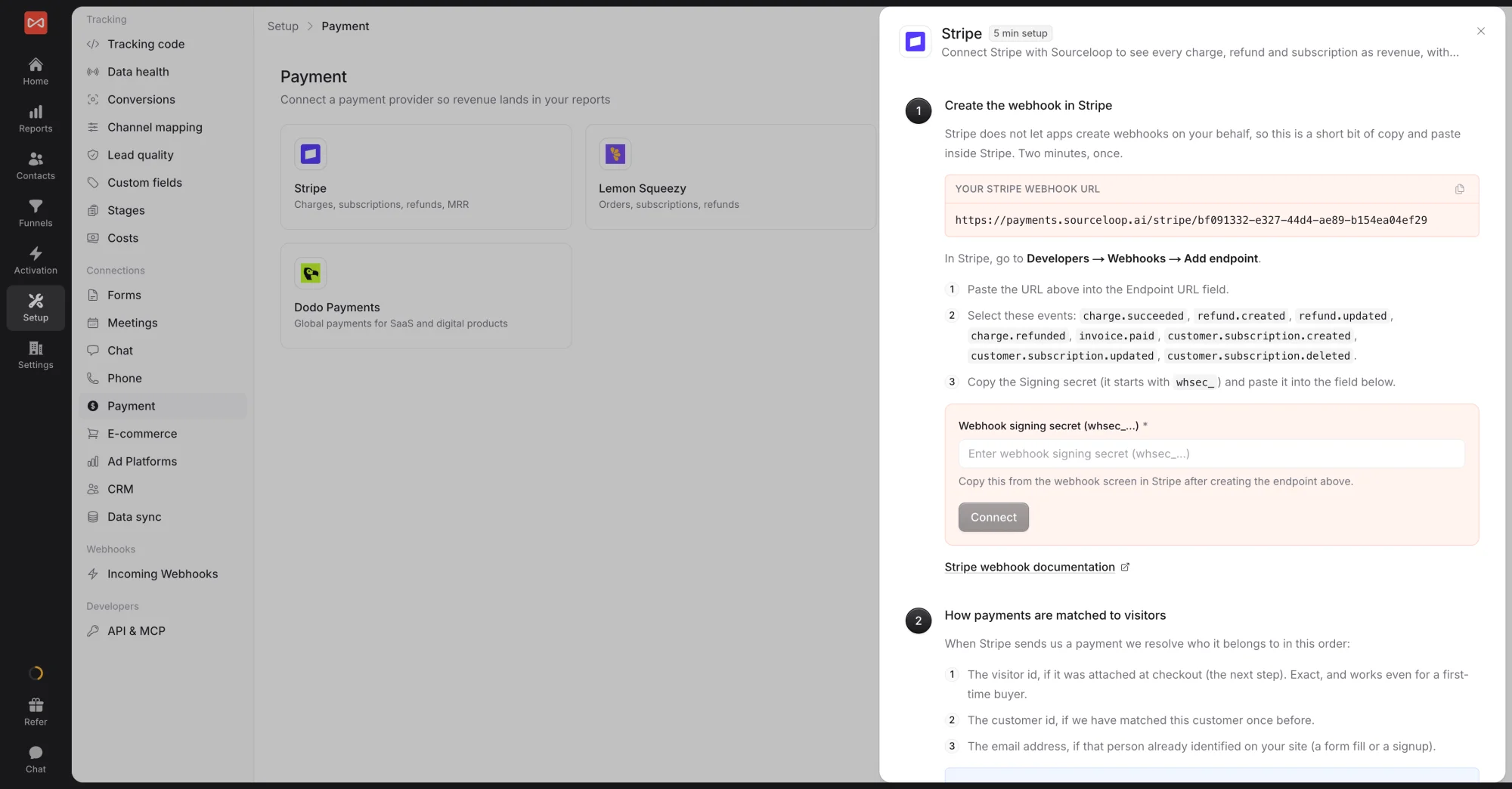
- Paste that URL into your provider’s dashboard as a new webhook endpoint, then copy the signing secret the provider gives you back into SourceLoop and save.
The exact menu path differs per provider, so follow the one you use:
| Provider | Where the webhook goes | Full guide |
|---|---|---|
| Stripe | Developers -> Webhooks | Stripe setup |
| Lemon Squeezy | Settings -> Webhooks | Lemon Squeezy setup |
| Paddle | Developer Tools -> Notifications | Paddle setup |
| Polar | Settings -> Webhooks | Polar setup |
| Dodo Payments | Developer -> Webhooks | Dodo setup |
Step 4: Stamp the checkout so revenue stitches back
This is what connects the eventual payment to the visitor. When you create the checkout/subscription, attach the visitor’s id as metadata. Do this server-side for maximum reliability.
checkoutMetadata(req) returns { sourceloop_anonymous_id }. Pass it into your provider’s metadata field.
Stripe (server-side checkout session)
// app/api/create-checkout/route.ts
import Stripe from 'stripe';
import { checkoutMetadata } from '@sourceloop-analytics/sdk/server';

const stripe = new Stripe(process.env.STRIPE_SECRET_KEY!);

export async function POST(req: Request) {
  const meta = checkoutMetadata(req); // { sourceloop_anonymous_id: '...' }

  const session = await stripe.checkout.sessions.create({
    mode: 'subscription',
    line_items: [{ price: 'price_xxx', quantity: 1 }],
    success_url: 'https://app.yoursite.com/welcome',
    cancel_url: 'https://app.yoursite.com/pricing',
    metadata: meta,
    // CRITICAL: also stamp the subscription, so renewals carry the id too:
    subscription_data: { metadata: meta },
  });

  return Response.json({ url: session.url });
}
Always set both
metadataandsubscription_data.metadata. The first attributes the initial payment; the second makes every renewal carry the id, which is what powers lifetime-value (LTV) reporting.
Other providers (same meta object)
const meta = checkoutMetadata(req); // { sourceloop_anonymous_id, sourceloop_id }

// LemonSqueezy (checkout custom data)
checkout: { custom: meta }

// Paddle (Paddle.js)
Paddle.Checkout.open({ items: [...], customData: meta });

// Polar / Dodo (checkout create)
{ metadata: meta }
If you cannot stamp metadata
Attribution still works as a fallback via email match, because Step 1 bound that email to the visitor. It is slightly lower confidence than the metadata stitch, but it holds. Stamping the metadata is strongly preferred when you can.
Step 5: Trial to paid and renewals (automatic)
Once your payment provider is connected (Step 3), these are handled for you from the provider’s webhooks, no code:
- Trial starts (card up front): recorded with no revenue.
- Trial converts to paid: the revenue and recurring subscription are recorded and attributed to the original click.
- Each renewal: revenue accrues to the same original acquisition (for LTV).
- Refunds / cancellations: reduce the recorded value / mark churn.
Putting it together (the minimal checklist)
- Same
websiteIdscript/SDK on marketing site and app. - Connect your payment provider under Setup, Payment.
- On signup (form or OAuth):
identify({ email })+track('signup_completed'). For OAuth, do it server-side withgetAnonymousId(req). - On subscribe: create the checkout with
metadata: checkoutMetadata(req)(andsubscription_data.metadatafor Stripe). - Done. Trials, conversions, and renewals attribute automatically.
Common mistakes
- Calling
track('signup_completed')on every page load or every login. It should fire once, at signup. Useidentify(idempotent) for repeated logins. - Installing the marketing snippet unchanged inside your app. It captures every form it sees, so invite, settings, and support forms become “leads” and in-app navigation eats your pageview allowance. Use
mode: 'conversions'in the app, or set your app’s pages to Code events only under Setup -> Tracking code -> Exclusions, with no snippet change. - Doing OAuth signup attribution only on the client. The email resolves on the server in OAuth, so do the
identify/trackin the callback withgetAnonymousId(req). - Forgetting
subscription_data.metadataon Stripe. Without it, renewals are not stitched and LTV is wrong. - Different
websiteIdon marketing vs app. Use one id everywhere or the journey splits into two strangers. - Blocking signup on analytics. Wrap SourceLoop calls in try/catch so a tracking hiccup never breaks auth or checkout.
Where to see it
- Subscriptions report: MRR, what moved it, plans, and the channels that bring subscribers
- Trials report: trials started, converted, and expired, with time to convert
- Lifetime value report: what customers from each channel pay over time, and payback
- Conversion sync: send trials and new paying customers back to your ad platforms
Verify
- After an OAuth signup, the user appears as a lead in Contacts, with a first-touch source matching the original ad/referrer.
- After a test subscription, a subscription/payment conversion appears, attributed to that same visitor, with revenue.
- A renewal increases that customer’s recorded value without creating a duplicate conversion.
Frequently asked questions
-
What is the difference between identify and track?
identify({ email }) links a known person to their anonymous visit. It is idempotent and creates no conversion, so call it every time a user logs in or signs up. track({ eventName }) records a conversion, a meaningful event like signup_completed or trial_started, so call it once per real event, not on every page load.
-
How do I attribute a Google or Facebook OAuth signup?
With OAuth the email is only known on your server, in the callback. Read the visitor's id from the request cookie with getAnonymousId(req), then call sl.identify and sl.track server-side. Doing it only on the client misses the email, which is why server-side binding is the most important step for SaaS attribution.
-
How does the eventual subscription revenue stitch back to the click?
When you create the checkout or subscription, attach checkoutMetadata(req) (which returns sourceloop_anonymous_id) to the provider's metadata field. For Stripe, set both metadata and subscription_data.metadata so renewals carry the id too. Once your payment provider is connected under Setup, Payment, trial conversions and renewals attribute automatically from the provider webhooks.
-
What if I cannot stamp checkout metadata?
Attribution still works as a fallback via email match, because the signup step bound that email to the visitor. It is slightly lower confidence than the metadata stitch, but it holds. Stamping the metadata is strongly preferred when you can.

 Paid Social


