
How to Track UTM Parameters in QuestionScout
QuestionScout UTM tracking made easy, follow these 4 easy steps to track the source of every lead.
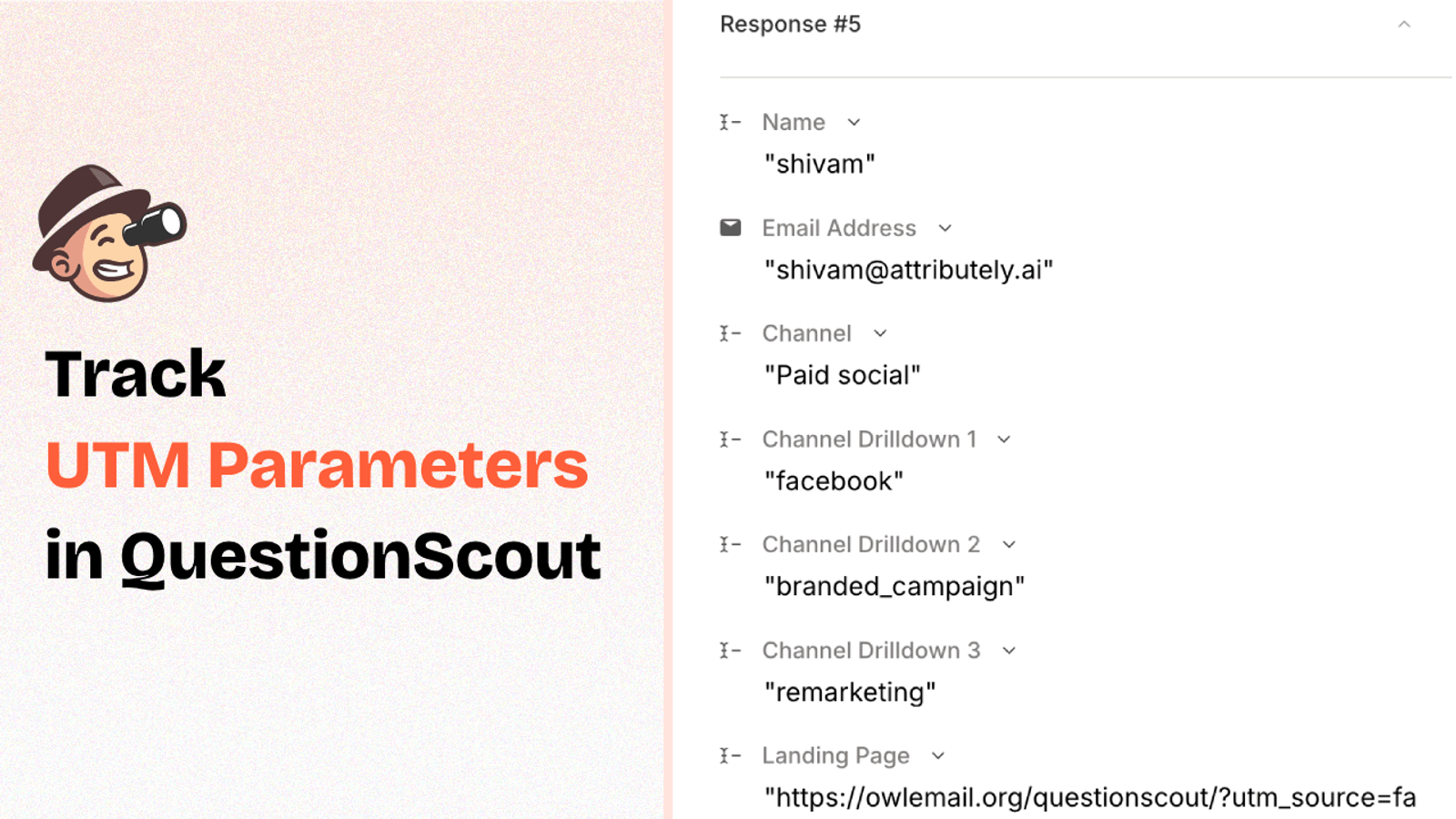
Table of contents
Ever wonder where your form or survey submissions are really coming from?
If you’re using QuestionScout to collect leads or feedback, tracking UTM parameters can tell you which marketing campaign drove the most responses, or whether that email CTA actually worked.
In this post, we’ll show you exactly how to track UTM parameters in QuestionScout so you can connect the dots between your marketing efforts and form conversions.
4 Easy Steps to Track UTM Parameters in QuestionScout
Here are 4 simple steps to capture UTM parameters in QuestionScout:
1. Add SourceLoop on Your Website

Head to SourceLoop.ai and create your free trial account.
Once you’re in, you’ll get a unique tracking script during onboarding.
Copy this script and paste it into the <head> section of your website.
If you’re not comfortable editing theme files, you can use tools like Google Tag Manager or the WP Code plugin for WordPress.
SourceLoop will now start tracking every visitor’s UTM parameters and store that data in browser cookies.
The best part? Instead of just saving the raw UTM string, SourceLoop.ai transforms them into clean, structured attribution insights:
Example:
Imagine a visitor lands on your page after clicking a TikTok ad for your lead magnet.
SourceLoop turns that visit into readable data like:
- Channel: Paid Social
- Channel Drilldown 1: TikTok
- Channel Drilldown 2: Video Ad
- Channel Drilldown 3: Summer Promo
- Landing Page: yoursite.com/lead-magnet
- Landing Page Folder: /lead-magnet
- Last Seen: May 1, 2025
All of this gets stored in cookies, ready to be injected into your QuestionScout form.
2. Add UTM Parameters to Your Links

Next, you need to make sure every link you use to drive traffic to your website includes proper UTM tags so that SourceLoop.ai has detailed information about each visitor source.
All ad platforms like Google Ads, Facebook Ads, and TikTok Ads provide easy options to dynamically add UTM tags into your links.
Example of a link with UTM parameters:
https://yoursite.com/quiz?utm_source=facebook&utm_medium=paid&utm_campaign=summer_sale
TIP: UTM tags aren’t just meant for ads. You can add them to other marketing channels like email CTAs, social media bios, influencer stories, podcast show notes, and more.
Resources:
- How to add UTM parameters in Google Ads
- How to add URL parameters to Meta ads
- How to setup UTM Codes for LinkedIn Ads
- How to add UTMs to your TikTok ads
3. Add Hidden Fields to Your Form
Next, add a set of 7 hidden fields to your form to pass the attribution data from a visitor’s cookie into your form submission.
These fields won’t be visible to users but will be auto-populated by SourceLoop at the time of submission.
Adding hidden fields in QuestionScout is easy:
- Open the settings tab of your form and navigate to the URL parameters tab.
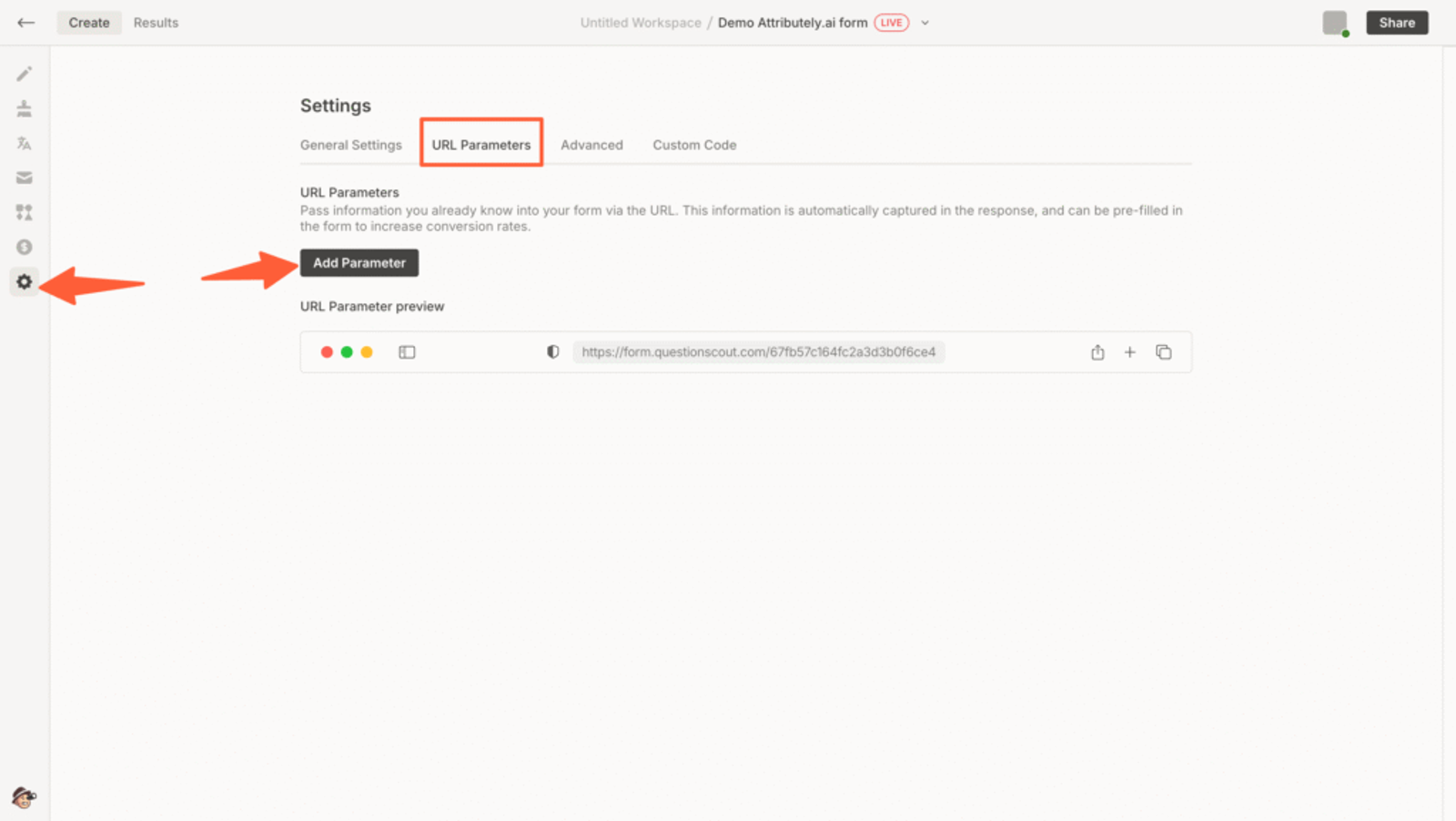
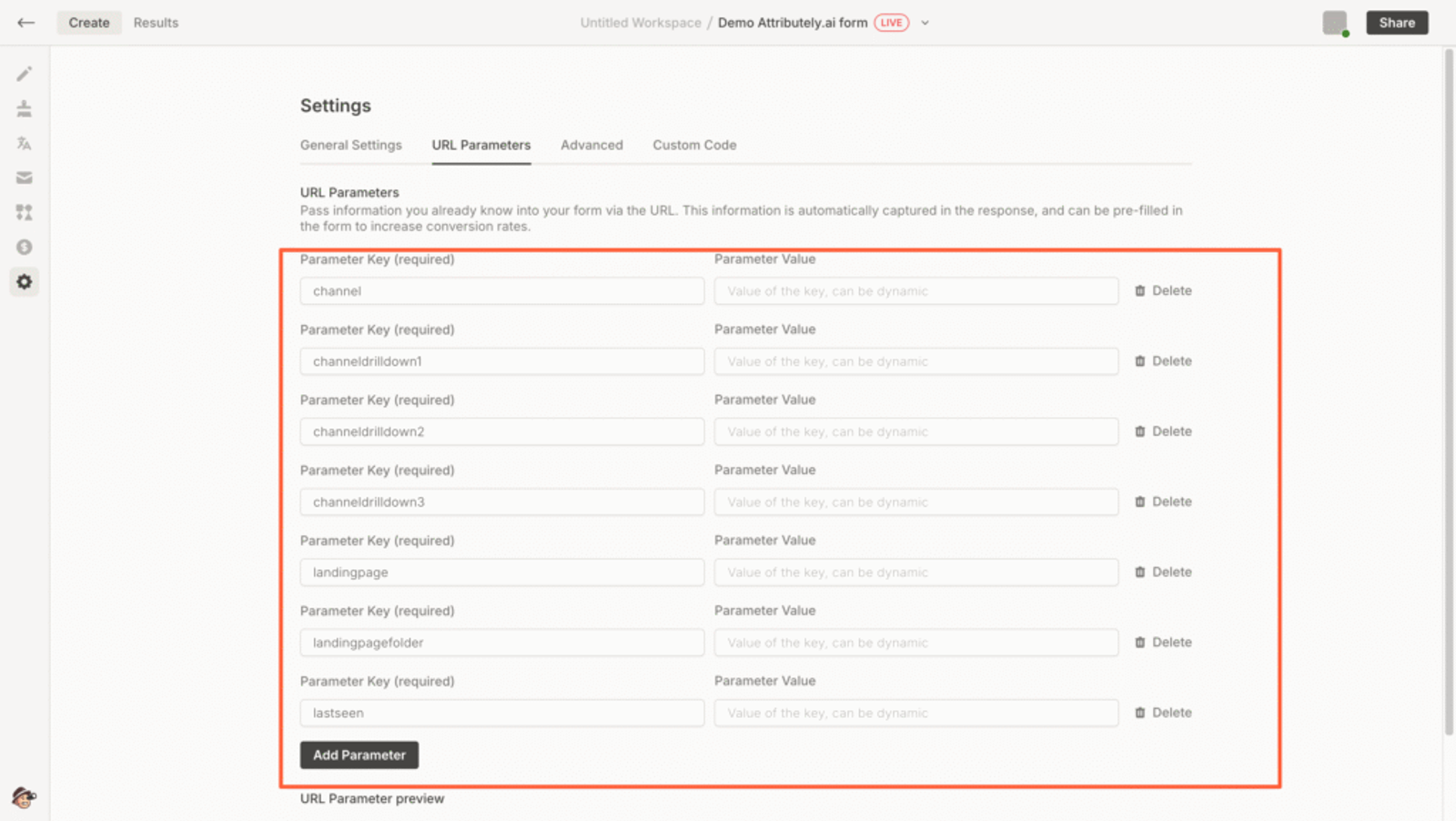
- Click Add Parameter and create 7 parameters with the exact names below
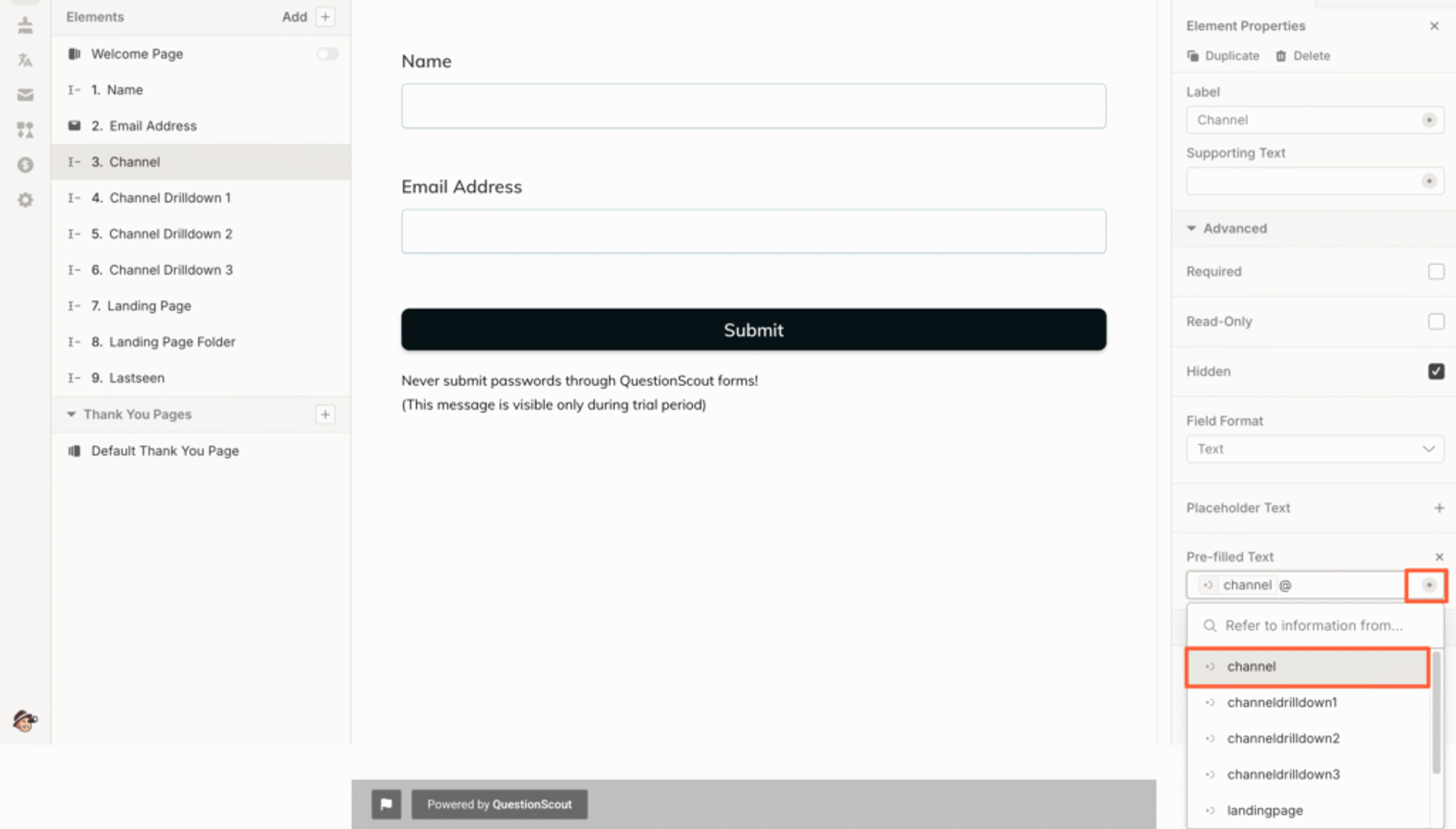
- Now, drag and drop 7 short text fields into your form and configure each of the 7 Short Answer fields to automatically pull data from the matching URL parameters.
- Click the field to open the settings panel on the right.
- Update the Label to match the parameter (e.g., “Channel”).
- Toggle Hidden option to ON.
- Under Pre-filled Text, click the “+” icon and select the corresponding URL parameter.
Here are the recommended url parameters:
- channel
- channeldrilldown1
- channeldrilldown2
- channeldrilldown3
- landingpage
- landingpagefolder
- lastseen
Optional: Track First-Touch Attribution (Highly Recommended for B2B)
If you sell B2B software, agency retainers, or any offer that requires multiple visits before a prospect fill a lead form or book meeting, then you may want to know how a lead first discovered your website.
Here are 7 additional hidden fields you can configure to get the attribution data of the user’s first visit to your website in the past 6 months.
- first_channel
- first_channeldrilldown1
- first_channeldrilldown2
- first_channeldrilldown3
- first_landingpage
- first_landingpagefolder
- firstseen
This allows you to keep track of which marketing channel create awareness and which ones close the deal.
4. UTM Parameters Are Automatically Collected in QuestionScout Submission
Once you’ve set up the form and a user submits it, SourceLoop auto-fills the hidden fields with attribution data.
To view it:
- Log in to QuestionScout and open your form/survey.
- Navigate to the Results section for your form
- Click any individual submission to see the UTM data and attribution details alongside the user’s responses
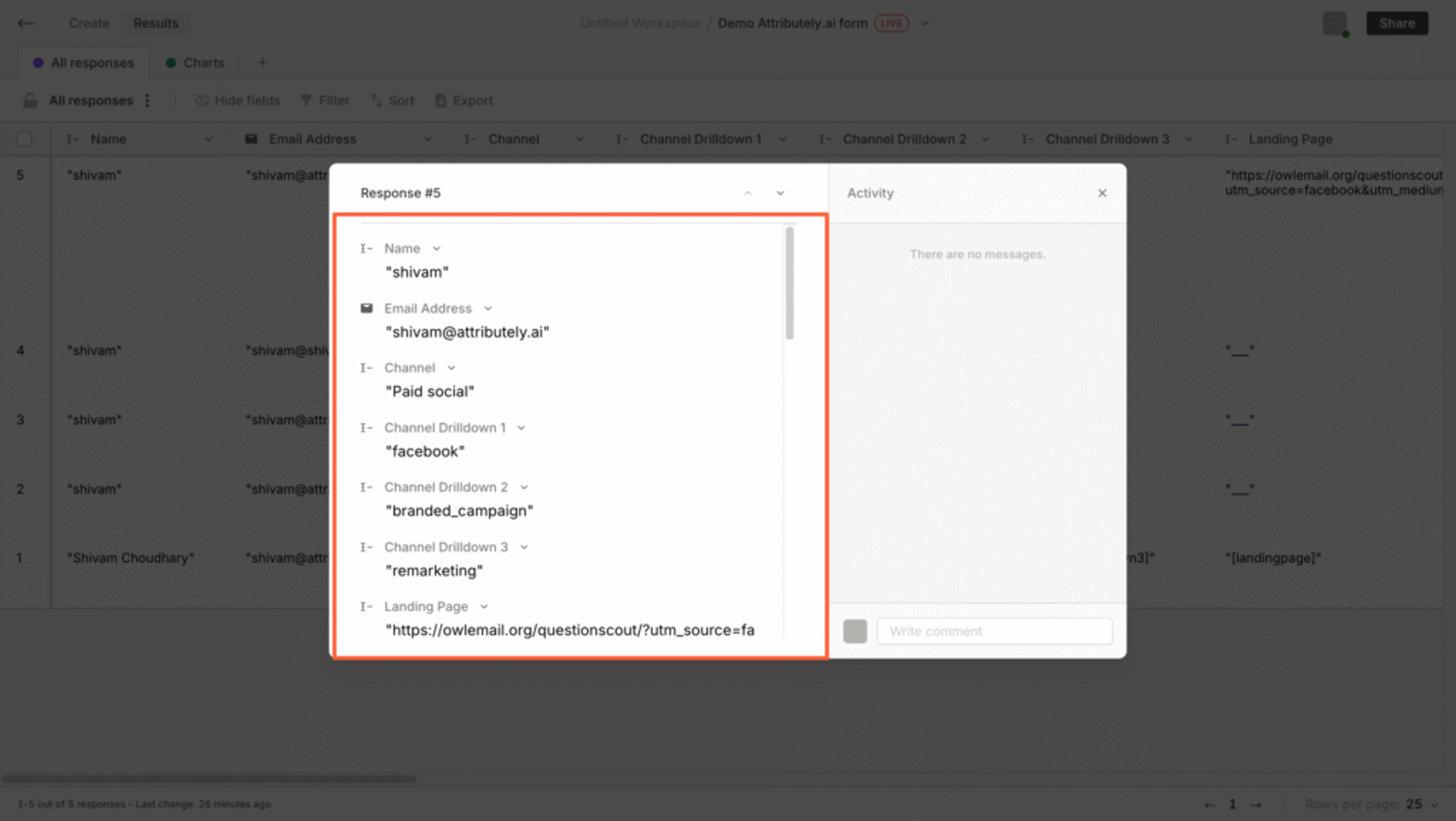
Once you have the lead attribution data of each lead, you can:
- Export it to Google Sheets for easier filtering and custom reporting
- Sync it with your CRM (like HubSpot or Salesforce) using tools like Zapier or Make
- Feed it into your lead scoring or marketing automation workflows
- Share insights with your sales or marketing team for better follow-ups
Instead of guessing where your leads are coming from, you’ll get a complete picture of which marketing campaigns are working, whether it Google Ads campaign, email newsletter, partner blog post, or anything else.
Which means you can:
- Double down on the campaigns driving quality leads
- Cut back or fix underperforming channels
- Give your team or clients clear reporting on ROI
- Confidently shift budget to what’s actually moving the needle



 Paid Social


