
How to Track UTM Parameters in Fillout Forms
Follow these 4 easy steps to capture UTM parameters in Fillout form submissions.
Table of contents
If you are driving traffic to your site from multiple channels and using UTM parameters to track performance, you would always want to capture the UTM parameters of users when they fill Fillout Forms.
Unfortunately, tracking UTM parameters in Fillout Forms is tricky, especially if UTM values do not exist in the URL of the page where the form is filled.
Luckily, there are plug-and-play tools like SourceLoop.ai which make it possible to seamlessly track UTM parameters in any form.
In this guide, we will discuss how to use SourceLoop.ai to track UTM parameters in Fillout Forms.
4 Easy Steps to Track UTM Parameters in Fillout Forms
Here are 4 simple steps to capture UTM parameters in Fillout Forms:
1. Add SourceLoop on Your Website

First of all, create your free trial account at SourceLoop.ai.
Once signed in, copy your unique tracking script and paste it into the <head> section of your website.
This tracking script will allow SourceLoop.ai to track each visitor’s UTM parameters (and more) and store that information in their browser cookies.
One of the most useful features of SourceLoop is that instead of storing raw UTM strings, it organizes that information into easy-to-understand marketing attributes.
Example:
Let’s say Airbnb is using SourceLoop.ai, and a user clicks on one of their Google Search ads while looking for vacation rentals in Italy.
SourceLoop.ai will capture and organize the user’s visit information like this:
- Channel = Paid Search
- Channel Drilldown 1 = Google
- Channel Drilldown 2 = Search Ad
- Channel Drilldown 3 = Italy Summer Rentals
- Landing Page = www.airbnb.com/s/italy
- Landing Page Folder = search
- Last Seen = Apr 14, 2025
2. Add UTM Parameters to Your Links

Once SourceLoop.ai starts tracking your website visitors’ sources, you need to ensure that every link you use to drive traffic to your website includes proper UTM tags.
Whether it is Google Ads, Meta Ads, TikTok Ads, or social media posts & email newsletters, you should add UTM tags to all of the marketing links.
Example of a link with UTM parameters:
https://yoursite.com/quiz?utm_source=facebook&utm_medium=paid&utm_campaign=summer_sale
Resources:
- How to add UTM parameters in Google Ads
- How to add URL parameters to Meta ads
- How to setup UTM Codes for LinkedIn Ads
- How to add UTMs to your TikTok ads
3. Add Hidden Fields to Your Form
Next, add a set of 7 hidden fields to your form to allow SourceLoop to pass attribution data into it.
These fields won’t be visible to your website visitors, but SourceLoop can see them and overwrite their placeholder data with real UTM data when a user submits a form.
Ti get started;
- Open the settings of your form and navigate to the URL parameters tab.
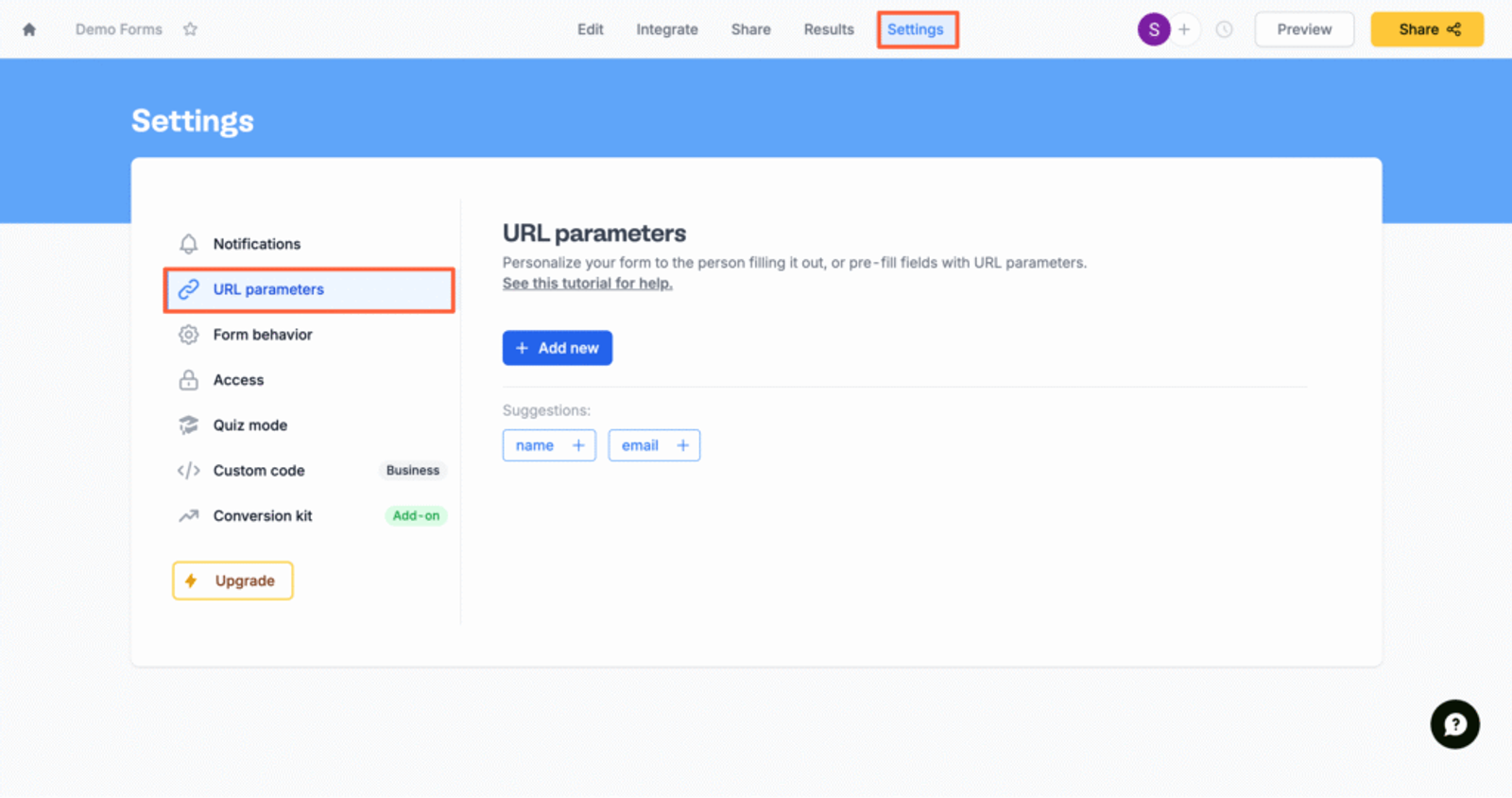
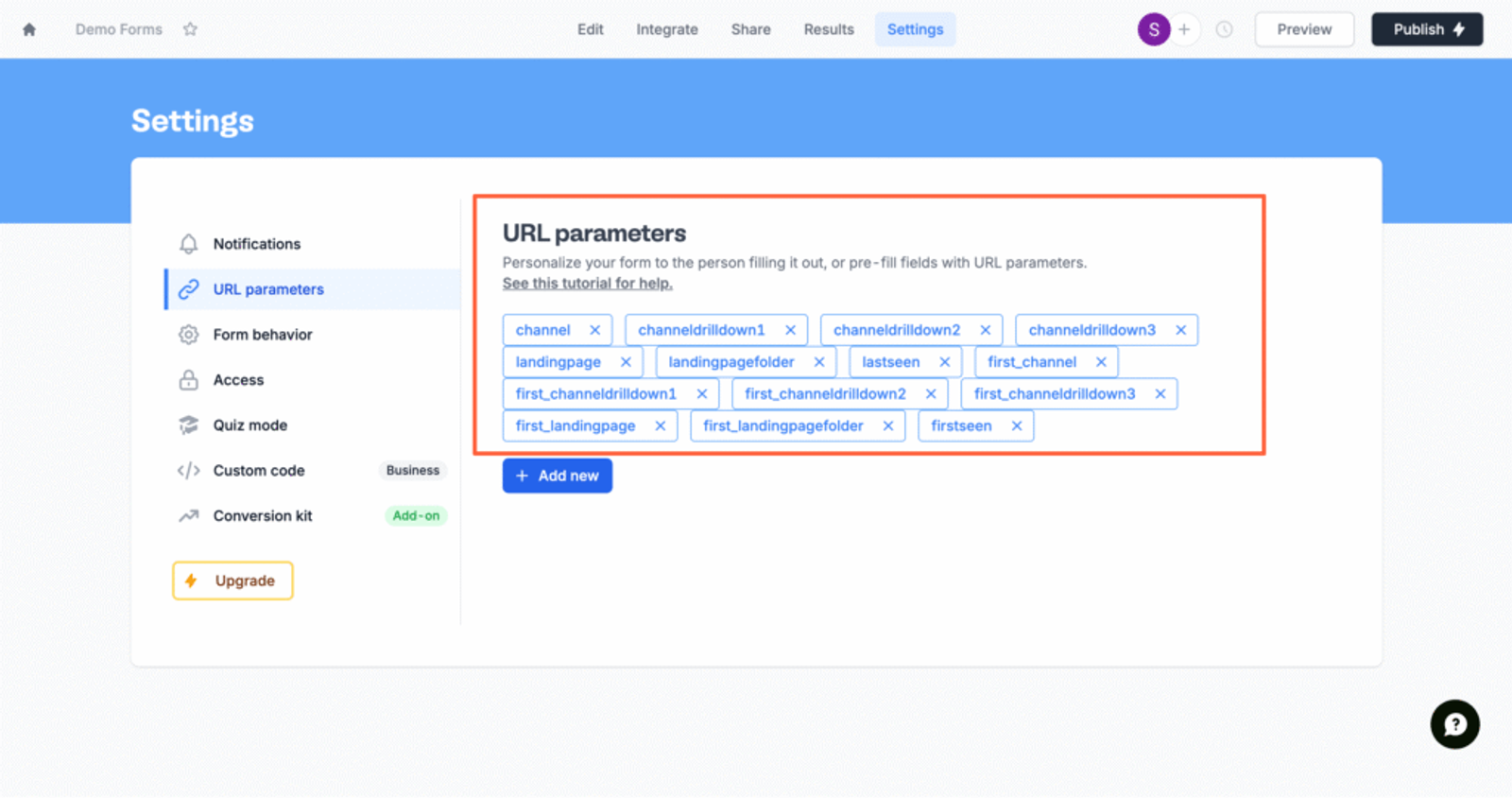
- Click “+Add New” and create 7 parameters with the exact names shown below.
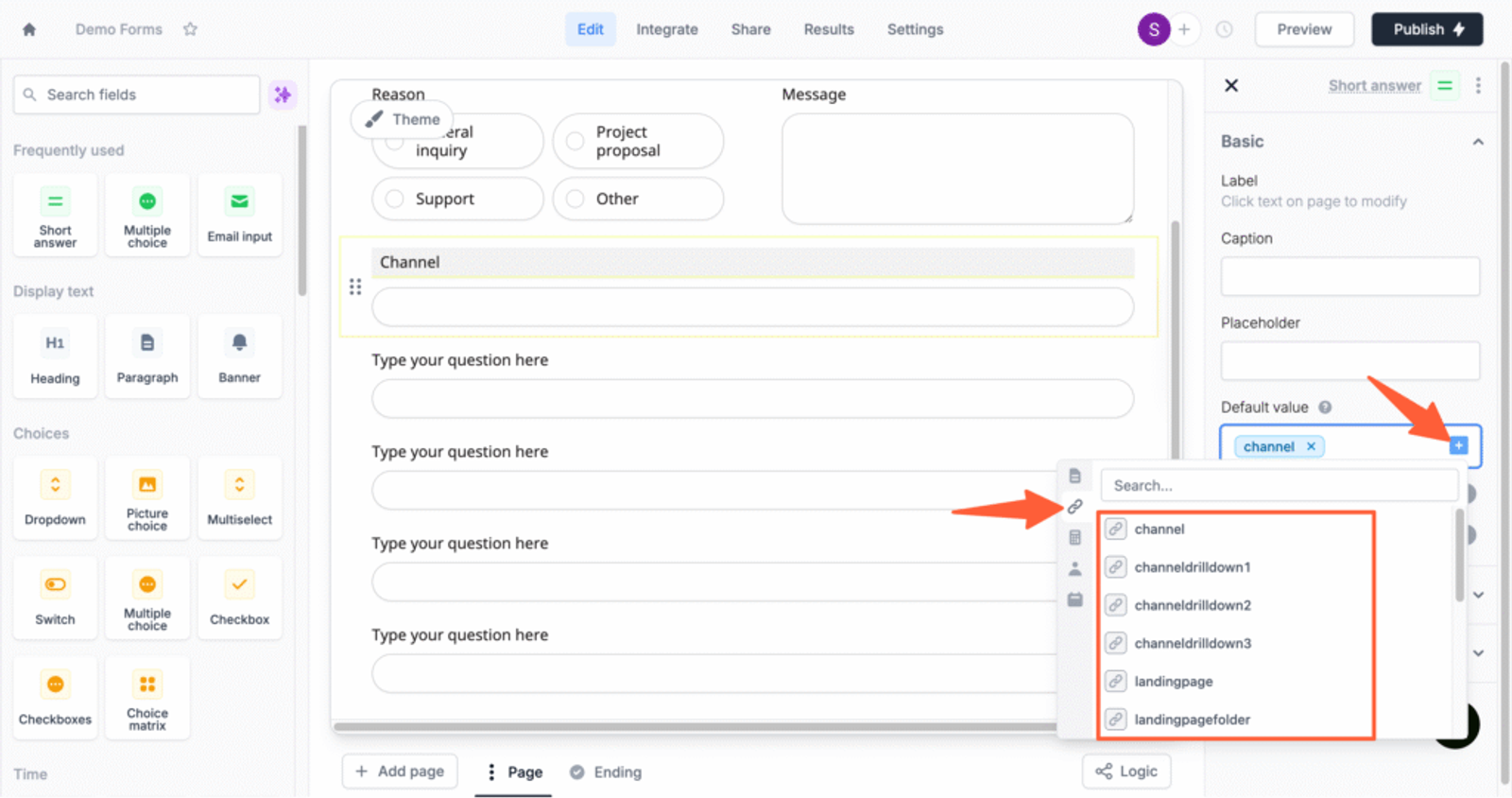
- Now, drag and drop 7 short text fields into your form and configure each of the 7 Short Answer fields to automatically pull data from the matching URL parameters.
- Click the field to open the settings panel on the right.
- Update the Label to match the parameter (e.g., “Channel”).
- Toggle Hide Always to ON
- Under Default Value, click the blue + icon and select the corresponding URL parameter.
- channel
- channeldrilldown1
- channeldrilldown2
- channeldrilldown3
- landingpage
- landingpagefolder
- lastseen
Optional: Track First-Touch Attribution (Highly Recommended for B2B)
If you sell B2B software, agency retainers, or any offer that requires multiple visits before a prospect fill a lead form or book meeting, then you may want to know how a lead first discovered your website.
Here are 7 additional hidden fields you can configure to get the attribution data of the user’s first visit to your website in the past 6 months.
- first_channel
- first_channeldrilldown1
- first_channeldrilldown2
- first_channeldrilldown3
- first_landingpage
- first_landingpagefolder
- firstseen
4. UTM Parameters Are Automatically Collected in Fillout Forms Submission
That’s it.
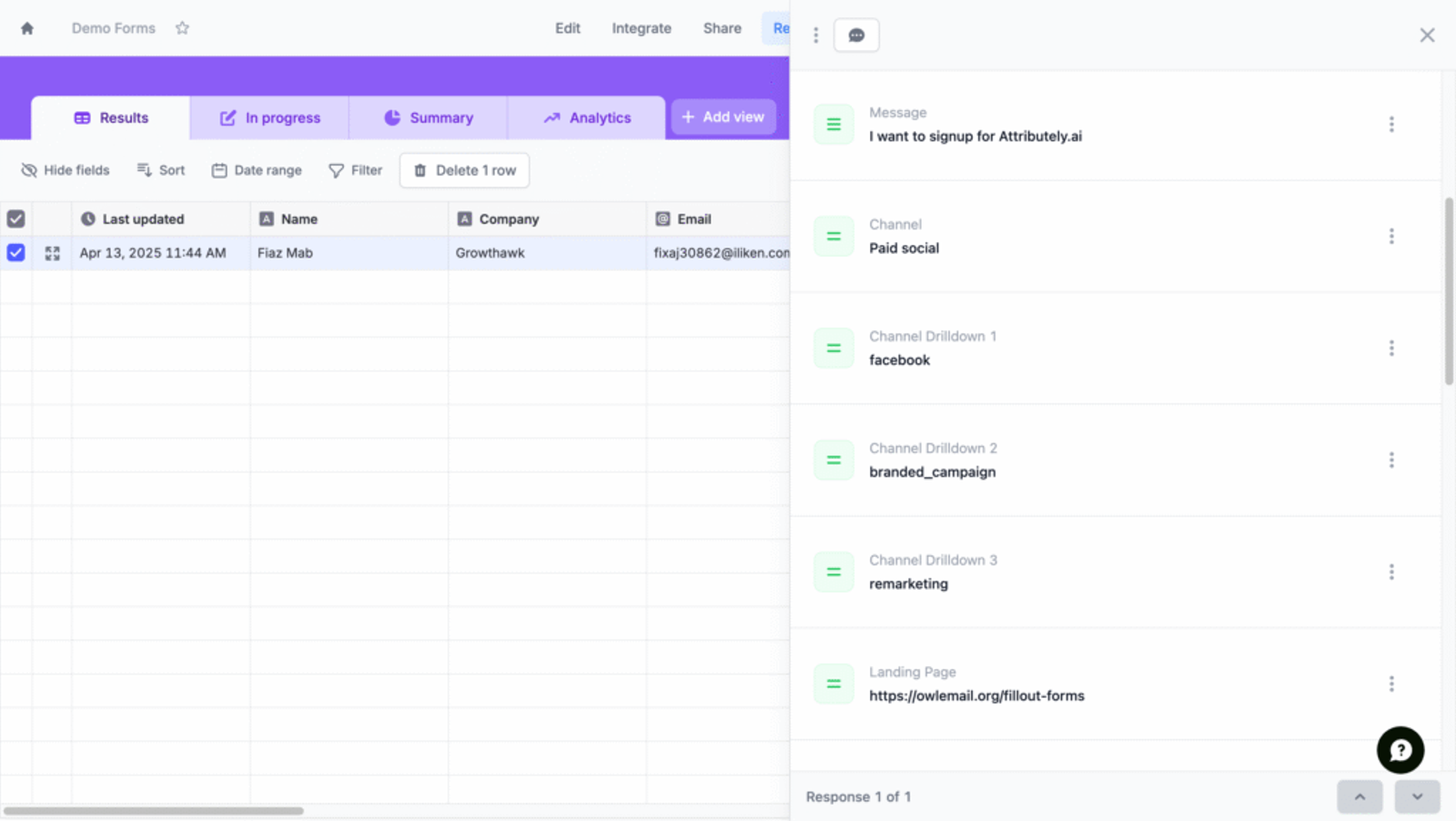
Now, whenever a user visits your site through any marketing channel and fills a Fillout form, SourceLoop.ai will auto-fill the hidden fields with attribution data such as traffic source, campaign, and landing page.
To view this data:
- Log in to Fillout and open your form.
- Navigate to the Results section for your form.
- Open any result to see the UTM data and attribution details alongside the user’s responses.
Once you have the source of each lead, you can:
- Export it to Google Sheets to create marketing campaign reports
- Sync it with your CRM (such as HubSpot & Salesforce) using tools like Zapier
- Feed it into your lead scoring or marketing automation workflows
- Share insights with your sales team for better follow-ups
This data will also help guide your marketing strategy.
When you know exactly which Google ad campaign, email campaign, or social media platform brings the high-quality leads, you can:
- Double down on the campaigns driving quality leads
- Cut back or fix underperforming channels
- Give your team or clients clear reporting on ROI
- Confidently shift budget to what’s actually moving the needle



 Paid Social


