
How to Track UTM Parameters in Cal.com
Follow 4 simple steps to capture UTM parameters in cal.com and and uncover the true source of every meeting
Table of contents
You are running marketing activities across different platforms to drive visitors to your website.
But when someone books a meeting via Cal.com, you have no idea what marketing activity brought them to your website in the first place.
That’s because Cal.com doesn’t capture UTM parameters by default.
In this guide, we’ll walk you through 4 simple steps to track UTM parameters in Cal.com using SourceLoop.ai.
Let’s dive in.
5 Easy Steps to Track UTM Parameters in Cal.com
Here are 4 simple steps to capture UTM parameters in Cal.com:
1. Add SourceLoop on Your Website

Head over to SourceLoop.ai and create a free account.
Once done, copy the unique JavaScript snippet provided and paste it into your website’s <head> section of your website.
You can add it globally through your CMS or plugins, or use Google Tag Manager.
Don’t have a full website?
You can still add this script to the landing pages where you embed your Cal.com booking form.
SourceLoop will then track how a visitor arrives on your site based on their UTM parameters — and store that info in the user’s browser until they book a meeting.
The best part? It doesn’t just capture raw UTM values. It uses its intelligence to organize that data into easy-to-understand marketing attributes.
Example:
Let’s say Nike is using SourceLoop.ai, and a user clicks on one of their Instagram Story ads promoting a new running shoe.
SourceLoop.ai will capture and organize the user’s visit information like this:
- Channel = Paid Social
- Channel Drilldown 1 = Instagram
- Channel Drilldown 2 = Story Ad
- Channel Drilldown 3 = Pegasus 42 Launch
- Landing Page = www.nike.com/running/pegasus-42
- Landing Page Folder = running
- Last Seen = Apr 14, 2025
2. Add UTM Parameters to Your Links

Next, open your performance marketing ad campaigns like Google Ads, TikTok Ads, Meta Ads, etc., and ensure that the links pointing to your website have UTM tags.
Not just performance ads — any link you share online, like in a social media post or email, should have UTM tags describing that marketing activity. That way, SourceLoop.ai can capture the detailed source of each visitor.
Example of a link with UTM parameters:
https://website.com?utm_source=paid_search&utm_medium=Bing&utm_campaign=prime_day
Resources:
- How to add UTM parameters in Google Ads
- How to add UTM parameters in Facebook Ads
- How to add UTM parameters in LinkedIn Ads
- How to add UTM parameters in TikTok Ads
3. SourceLoop Automatically Capture the full UTM journey
SourceLoop.ai records UTM tags and page visits every time someone comes to your site. We save that first-party visit data so a visitor’s path is preserved across sessions.
When a visitor fills a form or books a meeting, SourceLoop links those stored visits to their lead profile and shows the complete attribution record in the Lead Manager.
Open any lead to see a clear timeline: the first marketing touch and UTM details, each return visit with pages and timestamps, and the final conversion event.
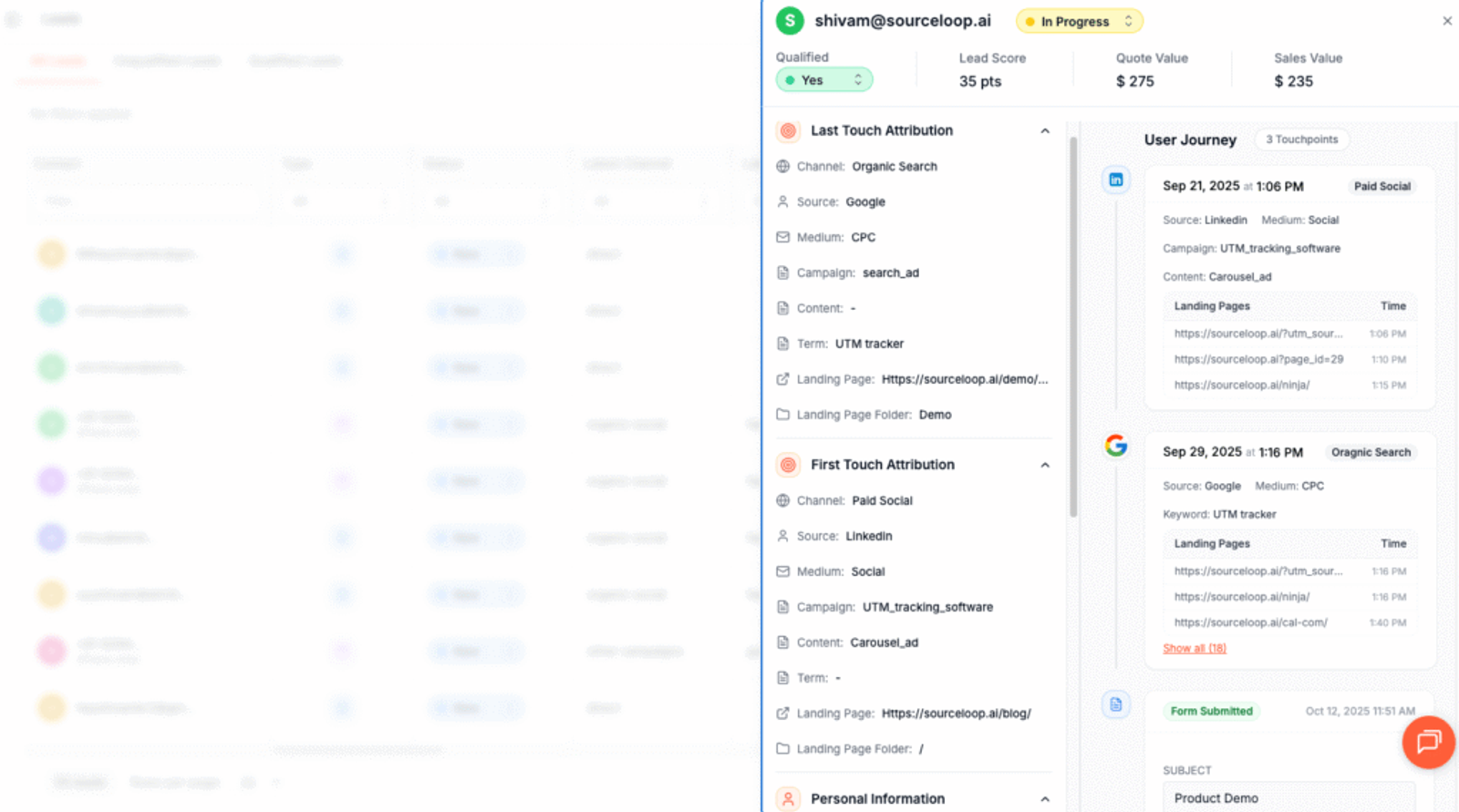
This makes it easy to understand which campaigns actually began the relationship and which ones influenced conversion.
Additional Tutorials:
- Track UTM Parameters in Involve.me Form
- Capture UTM Parameters in QuestionScout
- Set up UTM tracking in Typeform
4. Add Hidden Fields to Cal.com (Optional)
If you’d like to record a lead’s UTM parameters directly inside your meeting form, you can do this by adding hidden fields and mapping them to the recommended values.
These hidden fields won’t be visible to visitors, but SourceLoop.ai will use them to pass UTM values with each booked meeting.
To get started:
- Click Add a question at the bottom of the Booking Questions area.
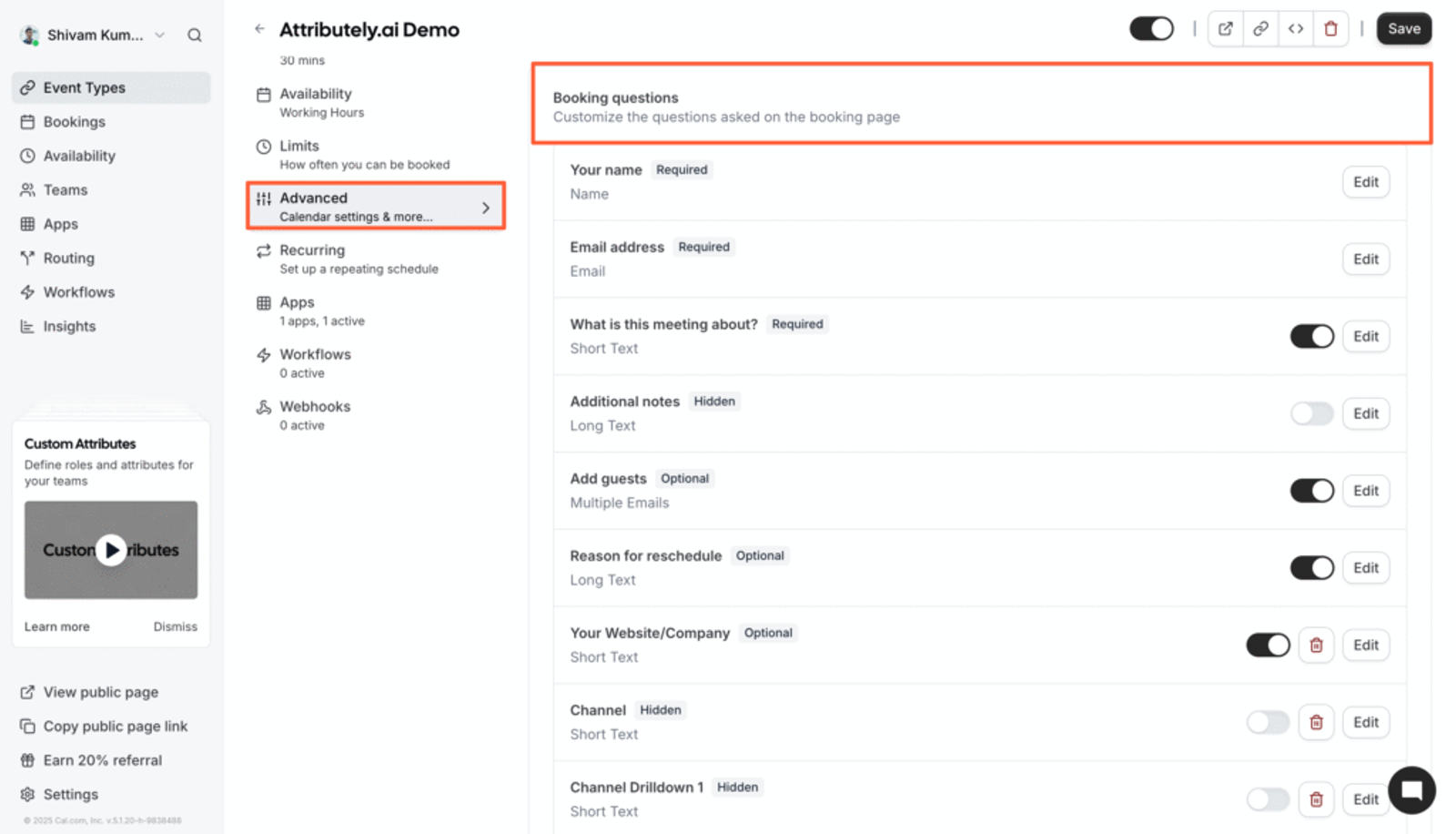
- In the popup:
- Input Type: Select Short Text
- Label: Use SourceLoop’s recommended labels (e.g., Channel, Channel Drilldown 1)
- Identifier: Use the exact internal name provided by SourceLoop (e.g.,
channel,channeldrilldown1) - Required: Set to No
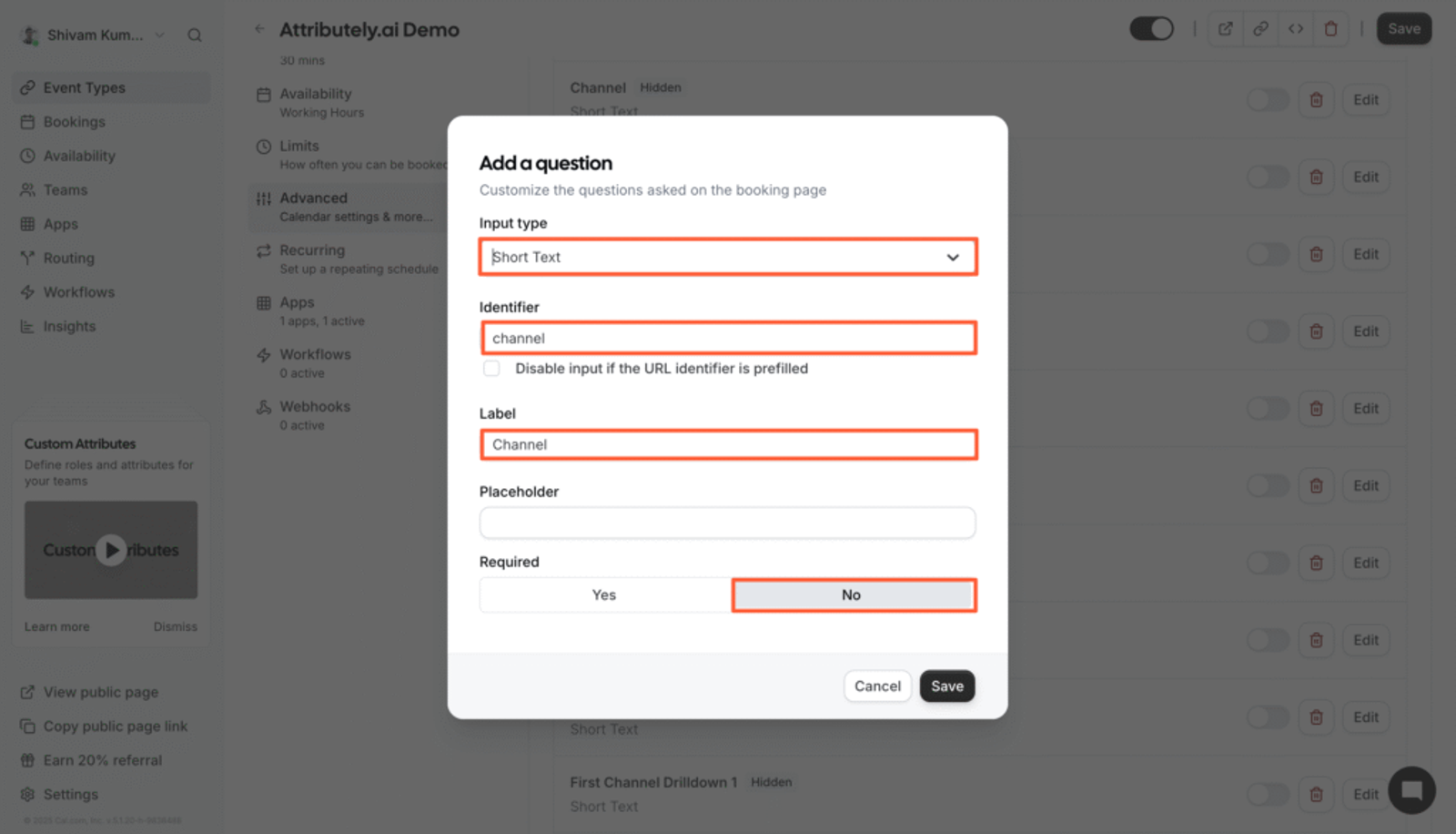
Next, make all the fields hidden so that it is not visible to users booking the meeting.
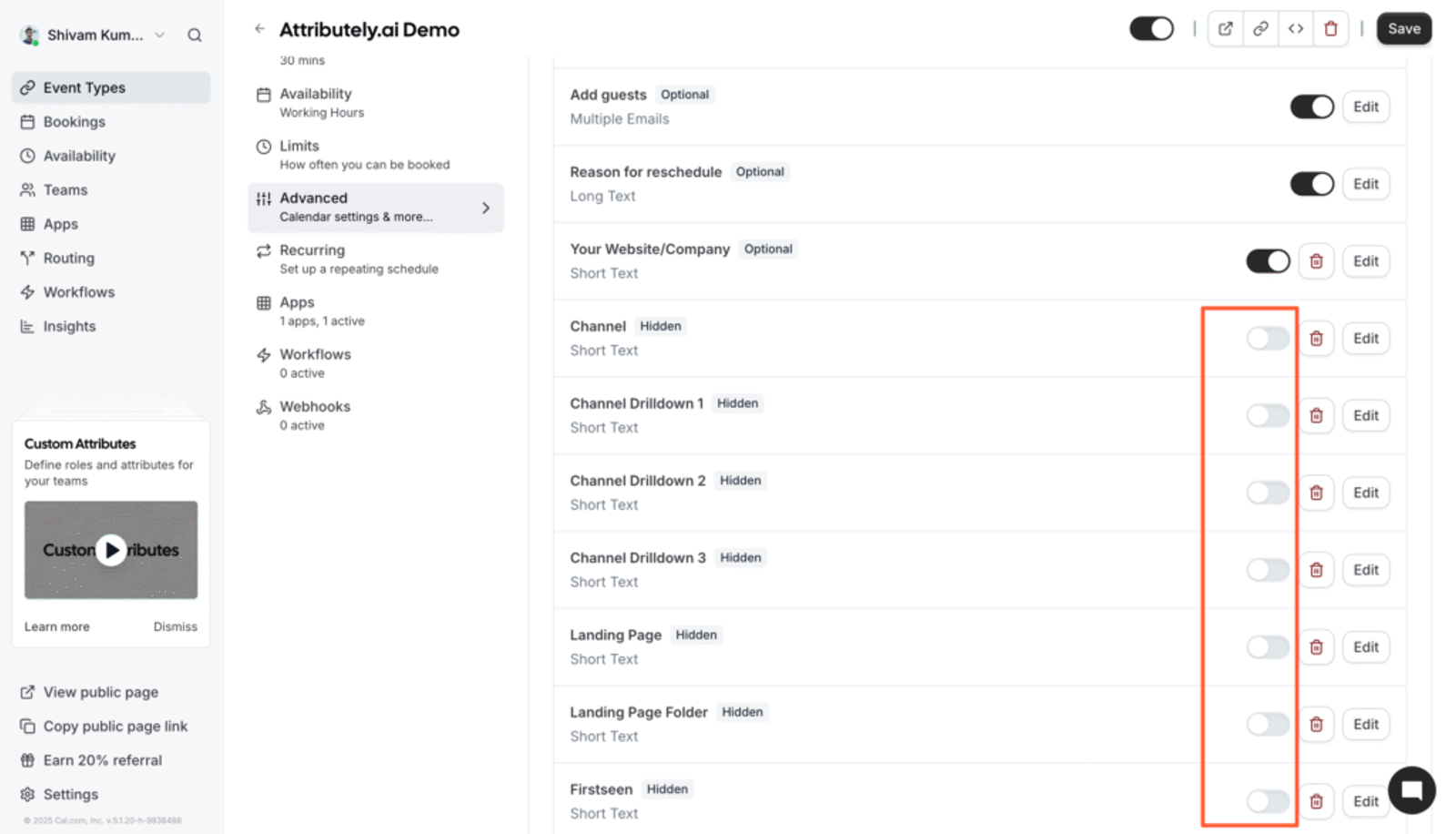
Here is the list of recommended identifier that you need to use for hidden fields to capture full set of attribution data.
- [channel]
- [attribution_source]
- [attribution_medium]
- [attribution_campaign]
- [attribution_term]
- [landingpage]
- [landingpagefolder]
- [lastseen]
If a user visits your site multiple times and you want to capture their first visit attribution as well, add these additional hidden fields:
- [first_channel]
- [first_source]
- [first_medium]
- [first_campaign]
- [first_term]
- [first_landingpage]
- [first_landingpagefolder]
- [first_seen]
Now, instead of sending people directly to your cal.com/username link, embed your Cal.com booking flow inside your own website page.
For example: Here’s how we have embeded our meeting form on https://sourceloop.ai/demo
5. UTM Parameters Are Passed for Each Cal.com Meeting
Once you’ve configured the hidden fields, let SourceLoop do the rest.
Whenever a user books a meeting, SourceLoop.ai automatically fills those hidden fields with the stored UTM values of that user.
So, just open the booking details for any user and you’ll be able to see their UTM information.
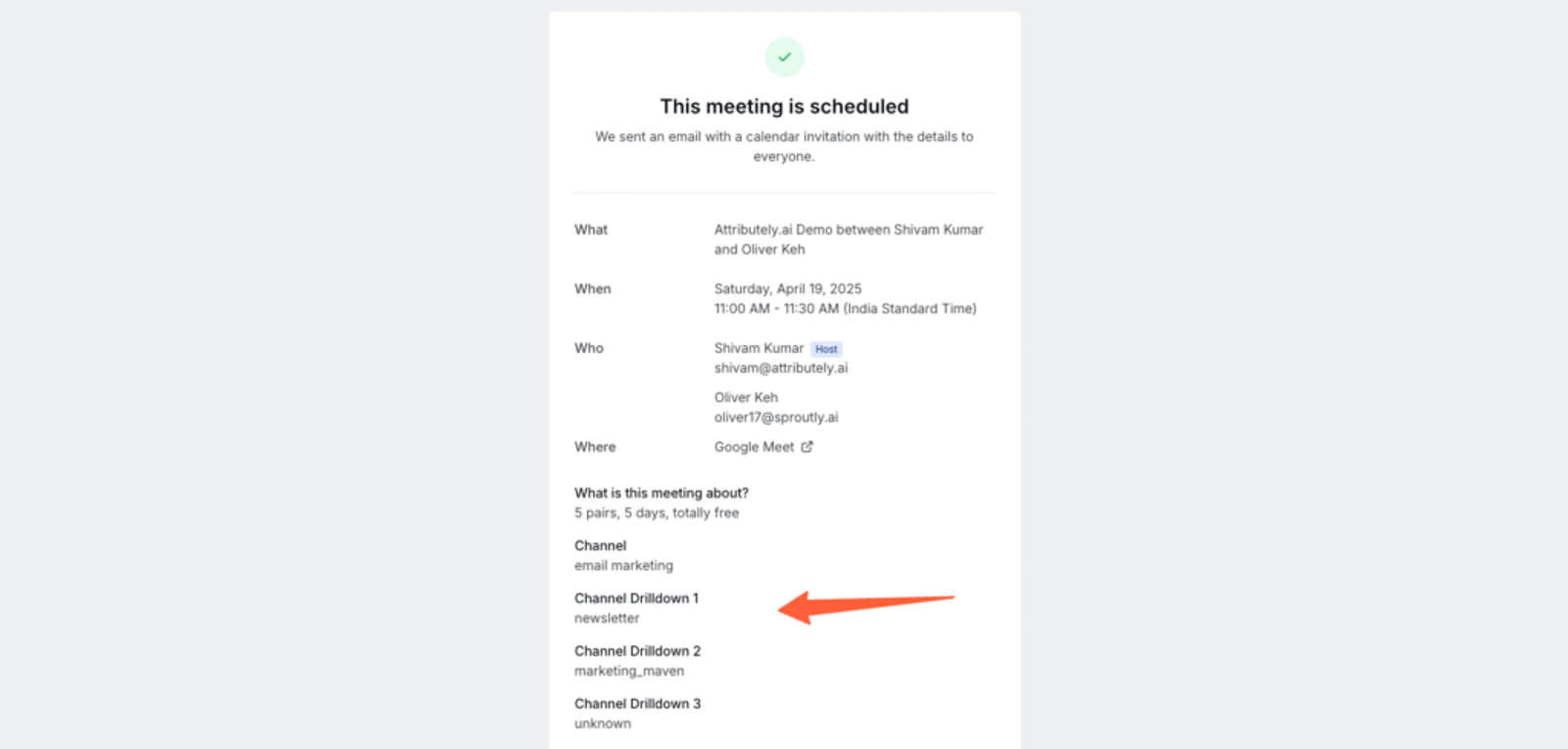
Now that you have the actual source of each meeting, you can:
Sync it with your Analytics platform:
Cal.com has free integrations with analytics tools like Fathom, Insights, Plausible, Umami, PostHog, etc. This means you can share attribution data and create detailed reports to see which marketing activities are actually driving meetings and demos for your brand.
Sync with your CRM:
Integrate your CRM like HubSpot, Pipedrive, Close.com, Salesforce, etc., and store the attribution data for each contact.
Create automations:
Cal.com integrates with automation tools like Make.com, Zapier, n8n, etc. This means you can use meeting attribution data to connect with third-party tools and build powerful workflows.
More Resources:



 Paid Social


